Best tools
Best AI Workflow Automation Tools in 2026
Compare six AI automation platforms by workflow control, hosting, approvals, recovery and real billing units. Choose Make, n8n, Activepieces or an enterprise fit.
Verdict
Choose Make when business operators need a managed visual workflow. Choose n8n when a technical owner needs code, API flexibility or self-hosting. Power Automate is the first candidate for Microsoft approval processes and Windows desktop work. Activepieces deserves a pilot when an open-source core matters; Workato fits a centrally governed integration program; Gumloop fits work where an agent must choose its next action.
The deciding question is who will recover a failed run, control a write and pay for repeated work. A platform can be excellent at drafting a summary yet wrong for a payroll change. This shortlist compares those operating boundaries, rather than ranking every product under a single “best AI” score. For the two general-purpose leaders, use n8n versus Make. For implementation, use the no-code workflow guide.
Shortlist by constraint
| Platform | Choose it for | Billing boundary checked October 13, 2026 | Decision-changing limit |
|---|---|---|---|
| Make | Managed visual branching and record transformation | Free: 1,000 credits/month; Core at 10,000 credits: $12/month equivalent billed annually | Most actions consume credits; model tokens and some AI features add usage |
| n8n | Developer-owned workflows or a self-hosted runtime | Cloud Starter €20/month billed annually, 2,500 executions/month | Starter has five concurrent executions; free Community lacks shared projects and workflow sharing |
| Activepieces | An extensible open-source automation core | Plus $20/month billed monthly, 10,000 credits; then $0.007/credit | Five users; governance and Agents/Chat are not all included in the free Community core |
| Power Automate | Microsoft approvals, cloud flows and desktop automation | US Premium $15/user/month paid yearly; Process $150/bot/month; Hosted Process $215/bot/month, both paid yearly | Premium is attended desktop automation; unattended bots and hosted machines are separate purchases |
| Workato | Enterprise integration and deployment governance | Pro starts at $75/month for 2,500 credits; Free has a one-time 50,000-credit grant | Enterprise entitlements depend on edition/contract; the free grant is not a monthly allowance |
| Gumloop | Model-led work across connected tools | Pro advertised from $37/month with 20,000 credits; standard orchestration fee 8% | BYOK still incurs tool/compute charges and changes the orchestration fee to 16% |
Make was rechecked October 16: two live browser sessions agreed on $12/$21/$38 annual monthly equivalents for Core/Pro/Teams at 10,000 credits. Month-to-month prices differed between sessions; confirm the live selector and checkout rather than applying one monthly quote.
Currencies and billing units are deliberately not normalized into a cost ranking. A credit on one platform does not buy an execution on another. Provider fees, taxes, implementation time and optional enterprise features can sit outside these prices. Verify the selected checkout and workload before purchase.
Make: managed visual control
Make's credit documentation distinguishes ordinary module operations from AI usage. A custom model connection on a paid plan moves token billing to your provider; Make still charges for operations. Loops and repeated actions therefore matter even when the business calls the work “one ticket.”
Choose it when an operator can understand the branches and mappings without maintaining a server. Before committing, turn on and test incomplete executions: they are disabled by default. Scenario settings determine whether failed work is retained, subsequent runs wait, or failed data is discarded when storage fills. Confidential payload logging trades debugging detail for reduced retention. These are configuration choices, not automatic guarantees of recovery or privacy.
n8n: runtime control with an operating owner
n8n Cloud meters workflow executions rather than every node. Self-hosting lets the team choose its infrastructure, while the Community edition omits collaboration and governance features such as projects, sharing, SSO and Git-based version control. Free software does not include an on-call operator, backups or external inference.
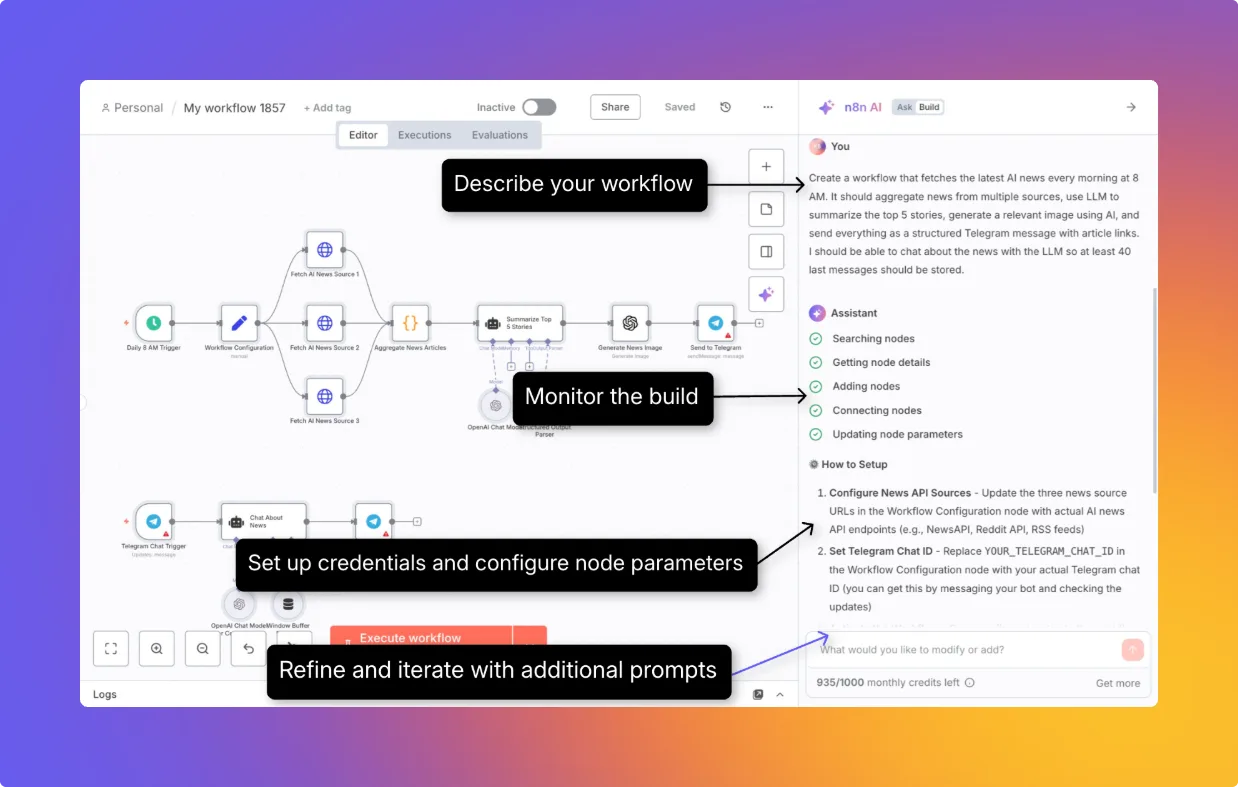
Its human-review tool connection can pause a selected AI tool before execution and show its proposed parameters. That is a useful reason to shortlist n8n when a model may write to business systems. Review applies to the tools you actually connect through that boundary; a prompt asking for permission is not an equivalent control. The n8n profile separates cloud plan limits, self-hosted editions and AI charges.
Activepieces: open core, separate commercial features
The repository distinguishes the MIT Community core from commercially licensed enterprise features. This fits a team that wants to inspect or extend integrations and retain a self-hosted path. It does not make every cloud capability free to self-host.
The current pricing page charges one credit for a normal run, with AI and agentic work adding usage. Plus includes BYOK; model charges then move to the provider while AI steps still consume platform credits. The Free card says 1,000 credits monthly, but the table and one FAQ describe daily reset while another FAQ says monthly. Treat the reset as unresolved; do not size an always-on workflow from that free allowance. Use Plus's stated monthly allocation for a paid pilot and confirm limits in the account.
Power Automate: approvals and desktop work in a Microsoft environment
The US price list separates a user's attended automation from unattended Process bots and Microsoft-hosted machines. One unattended bot runs one desktop flow at a time; parallel work needs additional capacity. AI/agent consumption and related Copilot Studio purchases require their own licensing check.
The strongest fit is a process whose reviewers already use Microsoft tools. Approval responses can come through email, the approvals center or the app. For approvals that may outlive 30 days, Microsoft documents storing the approval in Dataverse and using separate request/response flows. Validate that waiting period before choosing a single long-running flow for procurement or onboarding.
Workato: a governed integration program
Workato's self-service plans make a small pilot possible; it is no longer accurate to describe all access as quote-only. Its billing model combines edition, shared usage credits and optional add-ons. Workflow steps, document pages and API requests draw from that shared pool using different metrics. Older contracts can differ.
Shortlist Workato when deployment ownership is as important as building recipes. Environments support development, test and production, roles, deployment history and rollback, subject to plan eligibility. An on-premises connectivity agent is not the same thing as self-hosting the whole platform. Price the required environments, connectivity and concurrency with the actual contract instead of assuming Pro includes every enterprise control.
Gumloop: agents with explicit cost and ownership boundaries
Gumloop's current pricing foregrounds agents and labels workflows as legacy. That makes it a candidate for variable research and tool use, rather than the default choice for moving fixed fields between apps. Pro lists five concurrent workflow runs and 25 concurrent agent chats; organization-wide connector policies sit in Enterprise.
The spend guide separates reasoning, tools, compute and orchestration. BYOK removes the reasoning credit charge but leaves other charges and doubles the stated orchestration percentage to 16%. Also check trigger ownership: triggers cannot simply transfer to another person. Recreate them under a continuing owner before removing the original creator. A shared agent is not proof that its automation survives employee departure.
What community evidence adds
In a February 26, 2026 Make discussion, an author now shown as deleted reported extra operation spending across five clients and weighed migration against maintenance. Vendy_from_Make, identifying as a Make representative, suggested bulk actions, adjusted schedules and credit tracking. This is an attributed workload anecdote plus vendor advice, not an independent cost benchmark or a forecast for your bill.
An n8n community report by andreiradu2102 dated July 21, 2026 described an approval/tool-result regression in 2.27.5. The forum follow-up links 2.34.0, but post-merge review identifies PR #34271 in 2.32.0 as the actual fix. It supports testing approval behavior after upgrades; it does not establish a current failure or a general reliability ranking.
Run a pilot that can reject the wrong platform
Use a sanitized sample of the actual process, including a duplicate event, malformed model output, expired credential, API timeout after a write, rejected approval and exhausted usage balance. Before the pilot, define the expected destination record and the acceptable manual intervention. These are recommended checks; this site has not run that product benchmark.
Compare cost per accepted outcome, time to recover the failed item, retained sensitive payloads and who can change credentials or publish a workflow. Require a stable event ID before side effects, a visible failure queue, an approval tied to the exact proposed payload and a tested disable path. A successful run indicator alone does not prove that the right record changed once.
For existing Relay.app users, its official notice says it shut down in September 2026 and permanently deleted accounts, workflows and run history. It is excluded from this active shortlist. Existing exports and independent source-system records, if you have them, are the starting point for rebuilding; do not assume an in-product migration remains possible.
This selection is desk research from current vendor material and attributed community reports, reviewed October 13, 2026. Images are vendor examples, not evidence of our own authenticated use. Continue with n8n versus Make, the detailed Make profile, or building a no-code AI workflow.
For a runtime your team operates, use the self-hosted automation shortlist. Compare n8n versus Activepieces for business flows, or Dify for the AI application layer. Existing Flowise users should review its end-of-life and migration boundaries before extending a deployment.
For implementation, automate document intake and extraction, route and summarize support tickets, build human-approved automation flows.
Related comparisons
- Gumloop vs Lindy: configurable agents or delegated teammates
- Workato vs Power Automate: enterprise integration or Microsoft workflows
- Bardeen vs Zapier: browser collection or cloud orchestration
Related workflow guides
- Enrich and route inbound leads
- Summarize and triage a shared inbox
- Automate employee onboarding
- Monitor competitor and website changes
Platform research and service exits
Zapier covers managed cloud app orchestration, variable AI task charges and approval controls. Existing Pipedream Workflows users should plan migration before its March 31, 2027 shutdown; the separate Connect integration product continues. Former Relay.app users must rebuild from surviving records after its completed shutdown.
Specialized platform decisions
The core shortlist above covers broad automation choices. For narrower platform requirements, review Parabola/Prowork for finance and operations data flows, Tines 3B and Stories for governed security and IT workflows, Tray.ai for enterprise integration and governed agent access. Each profile separates current product editions, purchase limits and operating controls.
Sources & further reading
- n8n pricing and execution limits
- n8n self-hosted editions
- n8n human review for tools
- Make pricing
- Make credit rules
- Make incomplete executions
- Make scenario settings
- Activepieces pricing and limits
- Activepieces source and licensing
- Microsoft Power Automate pricing
- Microsoft approval workflow documentation
- Workato self-service billing
- Workato billing model
- Workato environments and plan eligibility
- Gumloop pricing
- Gumloop agent spend and BYOK
- Gumloop trigger ownership and employee departure
- n8n community human-review regression and release response
- Make operation-cost discussion, February 26 2026
- Relay.app shutdown notice
- n8n post-merge correction to the Human Review fix attribution
- n8n actual Human Review tool fix
- n8n 2.32.0 release with the Human Review fix





Ordered for comparison, not as a universal ranking. Inclusion requires a direct fit with this page's stated workflow.