
Tool
Parabola (Prowork)
Parabola Prowork review: assess 2026 credits, AI limits, data transformation, schedules, recovery, retention, governance, and operations fit.
Verdict
Choose Prowork by Parabola when finance, supply-chain, ecommerce, or operations teams repeatedly combine messy spreadsheets, emailed reports, PDFs, ERP exports, and API data; apply visible transformation rules; investigate exceptions; and publish a table, file, alert, or operational report. Its row-and-table model is more natural for reconciliation, inventory analysis, invoice auditing, and recurring report preparation than a trigger-action tool built around moving one record at a time. Do not choose it from the free allowance or “agent” language alone. The current public pricing page lists no paid dollar price, individual-run credit cost is not reported directly, some current plan documents conflict, AI steps have reliability limits well below the platform's general row ceiling, and configuration restore does not undo an external write.
Prowork's current introduction describes a finance-and-operations platform where AI helps build and edit the process while a visible, code-backed Flow executes it. The pricing page also calls deployed work “agents,” but the current Steps documentation keeps the operating model concrete: pull from a file, integration, API, or inbox; transform with filters, joins, calculations, extraction, or reshaping; then send to a system, file, email, or dashboard. Its clearest advantage is inspectable operations work over structured and unstructured business data.
Start with the AI workflow automation tools shortlist if the category is still open. Compare Make when event-driven SaaS orchestration and a broad visual integration catalog matter more, n8n when code steps or self-hosting are requirements, and Zapier when fast trigger-action coverage across cloud apps is the priority. The document intake and extraction guide covers controls for PDFs and attachments; the reliable no-code AI workflow guide covers test fixtures, approvals, and recovery.
Use operations-data criteria, not generic automation criteria
| Criterion | Prowork fits when | Validate before rollout |
|---|---|---|
| Data shape | Work starts with tables, files, reports, email attachments, documents, database results, or API responses | Replay production-shaped files with missing columns, duplicates, encoding differences, revised layouts, empty inputs, and late data |
| Transformation depth | Operators need joins, filters, calculations, grouping, standardization, extraction, exception flags, and reusable outputs in one visible flow | Compare the flow with a SQL/dbt/Python version for reviewability, testability, runtime, and ownership |
| Operating owner | Finance or operations should understand and change the process without waiting on data engineering | Have a second operator explain every source, rule, credential, exception, and destination from the canvas |
| AI boundary | AI handles document extraction, categorization, standardization, or builder assistance inside a controlled process | Sample by document type and exception class; measure field-level errors and route low-confidence or high-impact cases to review |
| Volume | A run stays comfortably inside file, row, cell, time, API-page, and AI-specific limits | Test the largest expected period plus backlog, not an average week |
| Cost | Value can be priced from actual flow frequency and observed credit use | Record the credit balance before and after isolated production-shaped runs; include reruns, AI steps, artifacts, and seasonal peaks |
| Recovery | Teams can diagnose failed runs and restore flow definitions inside the applicable history window | Test source outages, partial destination writes, credential expiry, deletion, manual rerun, and destination reconciliation |
| Governance | The signed plan includes the roles, SSO, integration controls, audit logs, SLA, retention, and support path required | Put each entitlement, credit rate, overage rule, and history window in the order form because public packaging is inconsistent |
Pricing is credit-based, but the current dollar price is not public
The pricing page was checked October 19, 2026. It publishes two routes rather than a complete rate card:
| Route | What is public | What remains unknown |
|---|---|---|
| Basic self-serve | $0 entry, 1 user, 1,000 credits per month, limited AI, prebuilt integrations, and community support | Which AI capabilities are limited, the current paid self-serve upgrade price, and the exact cost of additional credits |
| Business | Applied AI deployment help, production-data proof of concept, RBAC, version history and rollback, centralized integration governance, SSO, SOC 2 Type II controls, audit trail, SLA, and account management | Subscription price, included users, credit allotment, overage rate, storage, schedule frequency, and contractual support targets |
The page says Basic users have the “ability to add credits” and that pay-as-you-go usage is available. The billing documentation, updated September 22, says the opposite for Basic: it calls the plan a hard 1,000-credit cap, says Prowork stops until reset, and says there is no self-serve way to buy more credits. That page still names Explorer, Advanced, Team, and Enterprise plans absent from the current public pricing page. Treat checkout and the signed order as authoritative for the account; do not reuse historical $20 or $400 plan prices as current offers.
Credits are consumed when a Flow runs, including manual, scheduled, webhook, and inbound-email runs. Standard steps use flat credit amounts while AI use varies with work performed; steps that fail or have zero input and output rows do not count, according to the billing and usage docs. Editing a draft does not consume Flow credits, but running and rerunning it does. Steps, visualizations, and Artifacts share the account pool.
Cost attribution is the awkward part. Usage analytics reports total credits by day, user, and Flow, updates roughly daily, and can export PDF, CSV, Excel, or JSON. It does not show the credits used by one run. The documented workaround is to note the live Billing balance, run one Flow, then measure the difference. Before buying, isolate three cases: normal volume, worst expected volume, and a failure/rework case. Multiply each by actual schedule frequency and obtain the per-credit overage rate in writing.
The product is strongest between spreadsheets and data engineering
Prowork pulls from files, email, business systems, databases, REST or GraphQL APIs, and webhooks; transforms rows on a visual canvas; then sends results to another system, file, message, Artifact, or Parabola Table. API steps support reads, row-level enrichment, and writes with common authentication and pagination controls. That range suits work where the difficult part is not detecting an event but making inconsistent operational data usable.
Good pilot workloads have a concrete reconciliation target: match purchase orders to invoices, compare ERP inventory with a warehouse report, normalize carrier files, combine forecasts from several teams, or extract a fixed schema from vendor documents. Define expected output rows and exception queues before adding AI. Keep deterministic arithmetic, joins, thresholds, identifiers, and final writes explicit. AI should produce bounded fields that can be sampled and rejected, rather than silently decide the financial truth.
Published limits include 5 million rows, 150 million cells, 5,000 columns, 60 minutes for one step, and three hours for a Flow. Prowork also warns of performance problems around 400 steps; that is guidance, not a guaranteed capacity. Runs can fail below these limits, depending on the workload and connector. The documented AI ceiling is much lower: Categorize with AI, Extract with AI, and Experiment with AI top out at 100,000 rows, and Prowork says runs above roughly 70,000 rows often fail. Split and batch well before that range, then reconcile batch totals and duplicates.
Scheduling can be as frequent as every 10 minutes depending on plan. Webhook and inbound-email triggers can queue up to 1,000 runs. A single API step can fetch at most 1,000 pages. For high-frequency transactional traffic, long backlogs, streaming, or warehouse-scale incremental models, use an event bus or data pipeline and reserve Prowork for the operator-facing transformation layer.
AI helps build and transform, but it needs an explicit test boundary
Prowork's assistant can add and configure Flow steps from plain-language instructions. AI data steps can extract fields, categorize rows, standardize values, and generate custom transformation logic. Parabola says these features use third-party OpenAI and Anthropic models under DPAs that prohibit training on customer prompts.
Data scope differs by step. Extract, Categorize, and Standardize send selected columns; Experiment with AI can use the entire dataset unless configured to selected columns.
Treat generated Flow logic as code under review even though it appears visually. Freeze a representative fixture set, record expected columns and totals, test nulls and adversarial document text, and diff outputs after assistant edits. AI-generated documentation helps a reviewer orient, but it is not evidence that the transformation is correct.
Run history and version restore help; external effects still need reconciliation
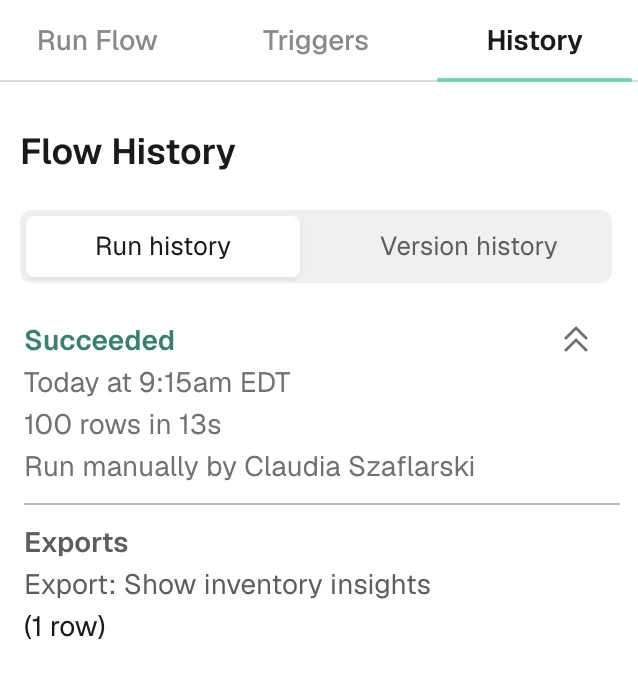
Flow monitoring emails editors on failed or partially failed runs by default and automatically pauses a scheduled Flow after 10 consecutive failures unless that guard is disabled. Run History shows success or failure, time, row count, duration, operator, and exports. The public recovery docs do not describe one-click replay of an individual failed step.
Version history records attributed live and draft edits in five-minute groups and can restore a version over live, into a draft, or as a new Flow. That restores configuration. It does not retract a file, message, API update, or duplicate row already sent downstream. Before manually rerunning a partially successful Flow, query each destination for a durable run ID or business key, separate safe recomputation from side effects, and make writes idempotent where the destination allows it.
History retention is another documentation conflict. The current version-history page lists 7 days for Basic, 30 for Explorer, 90 for Collaborator, 12 months for Team and Advanced, and 24 months for Enterprise. The data-retention page still says superseded versions are kept for up to 30 days. Custom and legacy contracts may differ. Confirm the workspace's actual window and export operating evidence elsewhere when audit duties exceed it.
The version-history FAQ says history for a deleted Flow is not directly accessible in the UI and directs customers to support to recover content. It does not publish a self-service restore workflow or recovery guarantee. Duplicate critical Flows before large changes and retain source mappings, fixtures, credentials inventory, and destination schemas outside the product.
Retention depends on data type, not one global number
The storage documentation says ordinary data pulled through a Flow is kept for at most 14 days or until the next run. That does not cover everything: uploaded data and Parabola Tables can remain until their Flow or organization is deleted, emailed data snapshots remain accessible for 90 days, server logs can remain for six months, and encrypted backups remain for up to 30 days.
Email attachments have a direct documentation conflict. The public security page says emailed files are subject to the same 14-day period. The security FAQ's opening exception explicitly includes files directly uploaded through a “pull from email attachment” step, without giving those emailed files a replacement duration. Confirm attachment retention in the DPA or order rather than extending either sentence into a blanket rule. Map each source, table, snapshot, log, version, backup, destination, and AI step separately.
The Terms prohibit categories including HIPAA-regulated data, payment-card data, government identifiers, and GDPR special-category data, and say Parabola is not a HIPAA Business Associate. Deleting a step or Flow removes access, while full deletion from Parabola and subprocessors requires a support request. Review the signed DPA and subprocessor list, and test deletion with the actual data paths used by the pilot.
Practitioner evidence matches the operations fit and exposes the maintenance cost
In a September 15, 2026 G2 review, Ofe S., a global supply-chain logistics specialist, described combining and standardizing provider reports, calculating KPIs, flagging exceptions, and producing repeatable shipment reporting. The same review said complex Flows take time to build, test, refine, and troubleshoot around exceptions. G2 labels it “Current User Validated Reviewer Source: Organic.”
In a May 29, 2026 G2 review, Michelle I., a sales project manager, reported that complex workflows created through the AI chatbot could be difficult to untangle when something broke. She also found credit estimation hard and reruns during debugging more expensive than expected, especially with AI steps. G2 labels this review “Current User Validated Reviewer Source: Organic.” These are self-reports from specific accounts, not controlled tests or platform-wide cost evidence.
We did not operate a Prowork account; this verdict uses public first-party pages and the attributed organic G2 reports checked October 19, 2026, while vendor screenshots document interfaces rather than successful execution.
Choose Prowork when an operations team owns a recurring data process and needs to see how messy inputs become an exception-ready output. Choose Make for broader managed app orchestration, Zapier for simple cloud trigger-action coverage, or n8n for code and deployment control.
Sources & further reading
- Current Prowork pricing and packaging
- Current Prowork product model
- Sources, transforms, and destinations in a Flow
- Billing and credit rules
- Usage analytics and per-run cost limitation
- Prowork infrastructure and AI limits
- Run and schedule documentation
- Monitoring and failure behavior
- Drafts, version restoration, and retention
- Parabola security and emailed-file retention
- Data storage and retention
- AI use and training commitments
- AI step providers and data scope
- API connection documentation
- Prowork terms of service
- G2 Parabola practitioner reviews