
Tool
Zapier
Zapier review: compare 2026 plans, task pricing, AI tool costs, app connections, approvals, privacy, retention, replay, and governance.
Verdict
Choose Zapier when a team needs a managed cloud automation layer across many SaaS apps and values fast setup, reusable connections, shared ownership, human approval, and searchable run history more than the lowest possible execution cost. Its strongest fit is event-driven business operations: lead routing, intake, notifications, document handoffs, CRM updates, and approval-backed writes. Do not buy from the headline monthly price alone. Price the complete workflow, because successful app steps, AI model tier, AI tool calls, MCP calls, long code execution, replays, and pay-per-task overages can all change the bill.
Zapier is a broad automation platform rather than just a two-step trigger-action builder. Current plans combine Zaps, Tables, Forms, AI by Zapier, MCP, and SDK access around a shared task pool, with more than 9,000 advertised app connections. The breadth is useful when cloud apps are the systems of record and the team does not want to maintain each integration itself.
Start with the AI workflow automation shortlist if the platform category is still open. Compare n8n for self-hosting and execution-based pricing, Make for a visual operations-first builder, and Microsoft Power Automate for Microsoft 365 plus desktop automation. The Bardeen vs Zapier comparison covers logged-in browser work versus cloud app orchestration.
Use these criteria before choosing Zapier
| Criterion | Zapier fits when | Validate before rollout |
|---|---|---|
| Execution model | An app event, form, schedule, webhook, table row, or API call should trigger cloud work | Confirm the exact trigger and action expose every field, attachment, object type, and permission required |
| Integration breadth | Supported connectors remove enough custom API work to justify the platform | Test pagination, rate limits, search semantics, bulk actions, deleted records, and vendor API-version changes |
| Workflow shape | Most paths are deterministic, with AI used for bounded classification, extraction, drafting, or tool choice | Keep identity, money, recipients, deletion, and deduplication in explicit steps and approval gates |
| Team operations | Shared folders, connections, SSO, ownership, and audit controls matter | Map owner departure, connection revocation, least-privilege service accounts, app restrictions, and emergency disablement |
| Cost | Successful work can be forecast in tasks and monitored against a shared pool | Replay production-shaped samples and count each paid step, loop item, AI tier multiplier, tool call, and overage |
| Recovery | Operators can investigate and replay failed runs inside the retention window | Test ambiguous timeouts, partial writes, duplicate delivery, expired credentials, replay after edits, and long-term evidence export |
| Human review | A paid Zap can pause before a consequential action | Confirm reviewer eligibility in the actual plan; Zapier's current reviewer documentation contains conflicting scope language |
Plans start low; task composition decides cost
The pricing page was checked October 18, 2026 in its default USD yearly-billing view.
| Plan | Public starting price | Included starting allowance | Decision-relevant boundaries |
|---|---|---|---|
| Free | $0 | 100 tasks/month | Unlimited Zaps, Tables, and Forms, but Zaps are limited to two steps |
| Professional | $19.99/month | 750 tasks/month | Multi-step Zaps, premium apps, webhooks, AI fields, and Human in the Loop access |
| Team | $69/month | 2,000 tasks/month | 25 users, shared Zaps and folders, shared app connections, SAML SSO, and priority support |
| Enterprise | Custom | Contract-specific | Unlimited users, advanced permissions and app controls, observability, custom retention, and annual task limits |
The task guide confirms the starting allowances above. The same pricing page has a Team seat-count conflict: its plan card says 25 users, while the FAQ says Team and Enterprise include unlimited users. Confirm the seat entitlement in checkout or the order form. Our separate monthly-billing check showed Professional starting at $29.99/month and Team at $103.50/month.
Those are entry cards, not quotes for a specific workload. Monthly billing, higher task tiers, taxes, premium add-ons, connected-service fees, and model-provider charges can differ.
Zapier's current rate card lists a standard connected-app step at one task, selected built-in tools such as Formatter, Paths, Filters, Delay, Looping, Storage, Tables, and Forms at zero tasks, Lead Router at five, and MCP tool calls at two. Code starts at one task, then adds one task per 30 seconds beyond the plan's included runtime.
AI by Zapier is deliberately variable. A Standard or bring-your-own-model step uses a 1× multiplier, Advanced uses 3×, and Premium uses 5×. Standard does not support tools; bring-your-own-key tool use requires an Advanced or Premium model. Each successful AI tool call uses the selected tier multiplier again. Zapier's formula is (one model run + successful tool calls) × tier multiplier; its own example prices one Premium run with two tool calls at 15 tasks. New paid AI steps default to Premium. Bring-your-own-model also creates a separate provider bill.
The rate card calls a standard “trigger and action” step one task, while the task-usage help page says triggers do not count and only successful actions consume tasks. That documentation conflict matters at volume. Build a representative workflow, run it with loop and branch distributions close to production, and reconcile Zap history with Billing and usage before approving capacity.
Paid accounts can continue through pay-per-task billing. The dollar rate is account-specific. Usage can reach three times the included task allowance before runs stop, and owners can disable overages so runs stop at the plan limit. A shared pool is convenient; it also lets one noisy workflow consume capacity expected by unrelated automations.
App connections are the platform's real operating boundary
Each app connection links one external account through OAuth, API key, basic, session, or digest authentication. The connected app and account determine what Zapier can read or write. Use a purpose-built service account where the source supports one, grant only required scopes, and inventory which workflows depend on each credential.
Team and Enterprise members can share connections without receiving the underlying login credential. That is not narrow access by itself: a member with the connection can build workflows that read or update data permitted by that connected account, and test data can be visible. When a Zap owner loses access to a required shared connection, the published Zap pauses. Transfer ownership, revoke access, and rotate credentials in a staging account before relying on the offboarding path.
Approval exists, but plan and reviewer boundaries need a live check
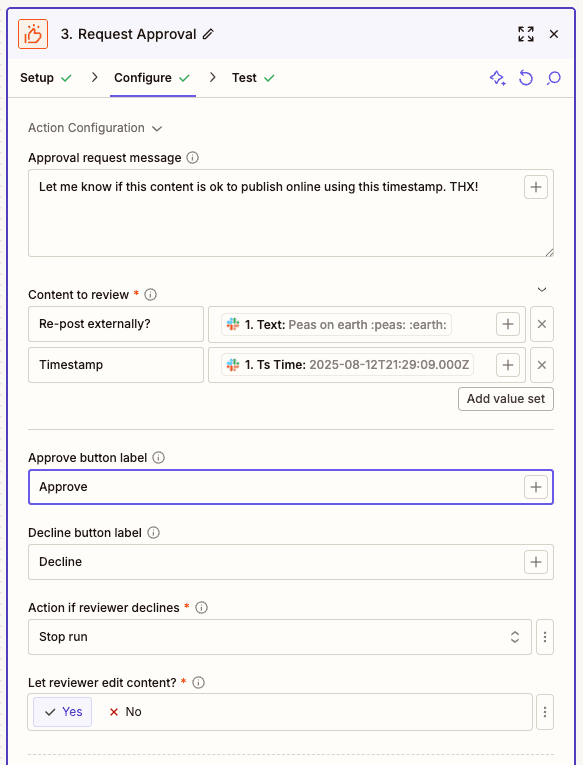
The paid Human in the Loop Request Approval action pauses a run, presents named fields, and lets a reviewer approve, decline, add notes, or edit allowed content. Builders choose whether decline or timeout stops or continues the run. Notifications can use email, Slack, or another Zap. Only successful Human in the Loop actions count toward tasks; previews and notifications sent by that action do not count separately. A second notification Zap can still consume tasks in its own downstream actions.
The same October 5 help page is internally inconsistent about reviewers. Its setup section offers “Anyone” outside the account, while its limitations say reviewers need Zapier accounts, Professional can send only to the owner, and Team or Enterprise reviewers must be logged in as selected Zapier users even when notification goes to any email. An April 10 product update also says outside-account reviewers are supported; outside the team account does not necessarily mean without any Zapier login. Treat reviewer scope as unverified until the target plan can send, authenticate, approve, decline, edit, and time out a real request. Human in the Loop also cannot sit within or after a Looping step.
AI by Zapier has a separate approval control for each tool. It is off by default. Turn it on for writes, sends, deletes, payments, record creation, and any read that exposes sensitive data. A per-run task guardrail pauses the AI step after 75 tasks by default and can be raised to 500; that is a cost checkpoint, not proof that each earlier action was safe.
For implementation patterns, use the human-approved automation guide. Put approval immediately before the consequential write, show the exact payload and target, revalidate mutable state after the decision, and attach an idempotency key.
Privacy depends on Zapier, every connection, and the contract
Zapier's data privacy overview says customer content is hosted on AWS in the United States and EU-only storage is unavailable. It describes customers as controllers and Zapier as processor for content moving through the service. Data sent onward to a connected app or model provider is then governed by that third party as well. Map each step's input, output, logs, attachments, credentials, and subprocessor; a cloud-automation label does not answer where all of that data goes.
Zapier says ordinary Zap content and history are retained for roughly 29–69 days under a monthly deletion cycle, while the history help page only guarantees a maximum of 60 days and displays up to 10,000 runs. Enterprise can shorten account-wide history retention to 7–30 days. Export evidence to a controlled system when audit or incident-response duties exceed those windows; shortening history also reduces native troubleshooting evidence.
AI-training language needs contract review. Zapier's security page says workflow contents are not used to train models on any plan and that it may learn from workflow structure, with Enterprise automatically opted out and other plans able to opt out. Its July 2026 AI legal page says Enterprise customer content is automatically excluded while other customers may opt out. The current Terms of Service are broader: they allow de-identified data derived from customer content to improve services, including through model training; the Terms also provide an opt-out and automatically exclude Company and Enterprise accounts from Derived Data sets. Do not turn marketing wording into a contractual guarantee. Review the agreement that governs the account, document the opt-out state, and obtain written terms for regulated or confidential workloads.
Replay helps operations; it does not provide exactly-once execution
Zap history records step status and data for investigation. Manual replay can rerun an errored action without rerunning earlier successful steps. Professional and higher plans can enable Autoreplay, which attempts errored steps up to five times. Entire-run replay is riskier: it starts a new run, repeats already-successful actions, and charges those tasks again. Replay is limited to 60 days, can be blocked by material workflow edits or expired connections, and is not guaranteed to succeed.
Assume any timeout after a remote request is ambiguous. Before replaying an email, payment, ticket, file upload, or record creation, query the destination for a durable receipt or idempotency key. Use a dead-letter path, alert on held and failed runs, export longer-lived audit evidence, and test restore of ownership plus credentials. Zapier can rerun steps; it cannot unsend a message or reverse a third-party side effect.
One practitioner's low-volume case shows the pricing tension
In a March 10, 2026 r/zapier post, u/Inner_Department3 reported that a two-step JobTread-to-Google-Drive file-copy Zap worked and used about 200 tasks per month, but felt that $29.99 monthly was too much for that single workflow. A reply suggested annual billing at $19.99 per month. This is one self-report without a billing export, account configuration, failure history, or independent test. It supports the need to price small workflows against their actual value; it does not establish current pricing or reliability for other accounts.
This profile is based on public documentation and the attributed community report checked October 18, 2026. We did not authenticate to Zapier, connect an app, create or run a Zap, invoke an AI model or tool, submit an approval, trigger an overage, replay a failure, export history, inspect network traffic, or test reliability, latency, permissions, migration, or deletion. Vendor screenshots document interfaces, not successful execution.
The separate Zapier Agents profile covers the historical standalone product and its activity meter. Zapier's October 1, 2026 migration guide says Agents is moving into AI by Zapier inside the Zap editor. Migrated agents use platform task billing; their prompt, reasoning, and tools remain inside one AI step; tool approval defaults off; full-Zap migration tests currently consume tasks; and Zapier has not announced a shutdown date. Treat that page as migration context, not as the current platform profile or price model.
Choose Zapier when connector coverage, managed cloud execution, shared operations, explicit approvals, and run evidence outweigh task-based cost and platform lock-in. Choose n8n when deployment control and execution-based economics dominate, Make when dense visual transformation is central, or Power Automate when Microsoft identity, approvals, and desktop RPA define the process.
Sources & further reading
- Zapier plans and pricing
- Zapier task usage rate card
- Task usage measurement
- Pay-per-task billing
- AI by Zapier model-tier pricing
- App connections
- Shared app connections
- Human in the Loop Request Approval
- Human in the Loop reviewer experience
- Replay behavior
- Zap history limits
- Data privacy overview
- Custom data retention
- AI platform legal and compliance information
- Zapier Terms of Service
- Agents migration into AI by Zapier
- Starting task allowances
- Human in the Loop outside-account reviewer update
- Security and AI training overview
- Practitioner task-cost report