Use case
How to Build Human-Approved AI Automation Flows
Design AI approval workflows that verify the reviewer, bind approval to an exact payload, expire safely, resume once, and leave an auditable record.
Verdict
A trustworthy approval flow authorizes one named actor to approve one exact action before a deadline. The approved payload must be the payload that executes. Rejection and expiry must end safely, and a retry must not repeat a completed side effect. Choose a platform only after proving those properties in its real delivery channel. A review button, an Enterprise plan, or a paused workflow does not establish reviewer identity by itself.
This guide starts where the broader no-code AI workflow guide stops: the boundary between an AI proposal and a consequential action. Use it for outbound messages, CRM changes, refunds, publishing, access changes, data disclosure, or any tool call where “a person looked at it” is too weak a control. If the platform decision is still open, start with the AI workflow automation shortlist.
Model approval as a state machine
Keep the AI's proposal separate from the authorization record and the external action. A useful minimum state model is:
proposed → pending
pending → approved → executing → succeeded | failed | unknown
pending → rejected | expired
approved → expired if its authorization deadline passes before dispatch.
Only approved can enter executing. rejected and expired are terminal unless a new proposal creates a new approval request. Do not reopen an old request after changing its recipient, amount, attachment, record ID, or generated text.
Store a distinct identifier for each object:
proposal_id: the model output plus its evidence;approval_id: reviewer, decision, deadline, and the exact payload version reviewed;action_id: the external side effect and its result;source_event_id: the business event that started the process.
That separation makes failures legible. “Approved” does not mean “sent,” and “timed out” does not mean “rejected by Maya.”
Put gates where consequences change
Approval belongs immediately before the side effect. Reviewing a summary upstream is insufficient if later nodes can select a different recipient, regenerate text, attach another file, or refetch a mutable record.
| Action category | Reviewer should see | Identity requirement | Safe expiry or rejection | Replay control |
|---|---|---|---|---|
| External email or chat | Recipient IDs, channel, subject, full body, links, attachments, source record | Named account allowed to speak for the team or account owner | Keep as draft; return revision reason | source_event_id + recipient_id + message_version |
| CRM update | Object ID, before/after values, source evidence, fields omitted from change | Record owner or scoped RevOps role | Leave record unchanged; queue correction | object_id + field_set + proposal_version |
| Refund or purchase | Account, currency, amount, reason, destination, policy evidence | Finance role with amount authority and step-up auth | Cancel; require a fresh request after deadline | Provider idempotency key plus internal action record |
| Publish or deploy | Exact revision, destination, visibility, diff, checks, rollback reference | Repository, CMS, or environment role | Preserve draft; never publish on timeout | Immutable revision or content hash plus destination |
| Grant access or disclose data | Subject, resource, permission, scope, duration, data classification | Resource owner or security-approved role | Deny closed; no partial grant | Subject-resource-scope tuple plus request version |
The keys above are design examples, not proof of exactly-once execution. The receiving API may accept a write and time out before returning. Your workflow still needs reconciliation.
1. Authenticate the reviewer, not the inbox
Delivery answers “where did the request go?” Authentication answers “who made the decision?” They are different questions.
n8n's Human Review can send review through n8n Chat, Slack, Discord, Telegram, Teams, Gmail, WhatsApp, Google Chat, or Outlook. It can show the tool name and AI-supplied parameters, then approve or deny the call. The documentation does not publish one identity, timeout, or audit guarantee shared by every channel. Test the chosen channel with a real user, forwarded message, shared mailbox, revoked account, and unauthorized responder.
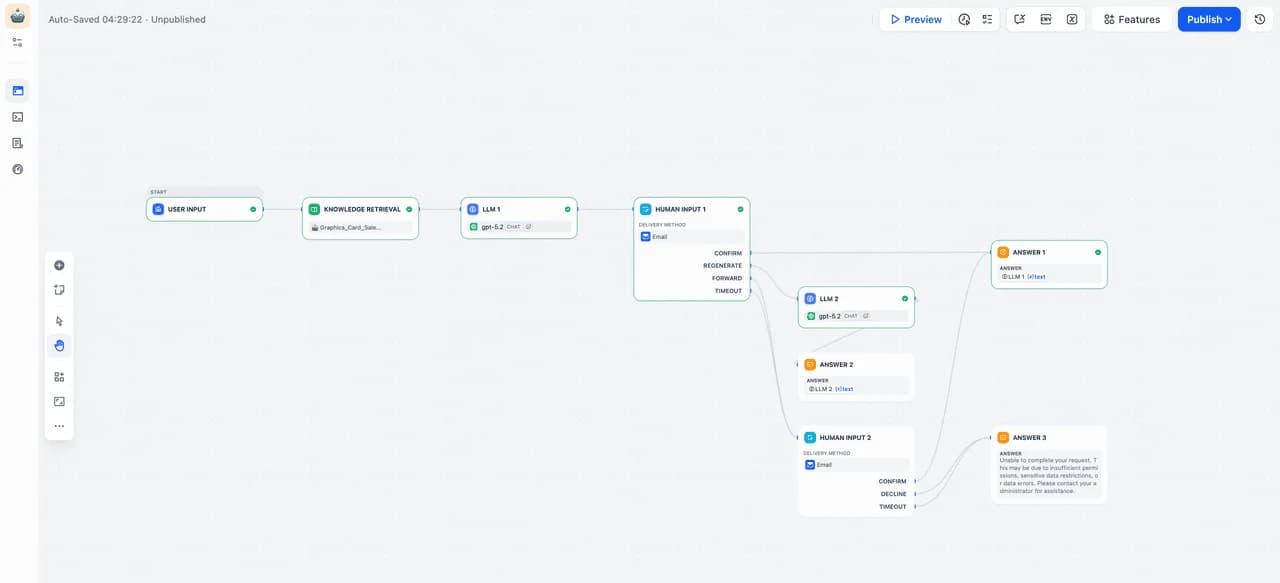
Dify's Human Input documentation is explicit about its email boundary: anyone with the link can respond without a Dify account, and the first response closes the request. Treat that URL like a bearer credential. Do not use the email-link path alone for refunds, access changes, regulated approvals, or secrets whose policy requires a named authenticated approver. Web-app delivery is unavailable when a Trigger starts the workflow, so a paid plan does not silently remove that identity constraint.
Make's native Human in the Loop app currently creates, lists, cancels, and watches review requests. The same documentation says it is Enterprise-only and in closed beta for invited customers. Public docs do not establish a universal approver-identity contract. Confirm invitation, authentication, role enforcement, audit fields, and retention in the actual workspace and order form.
For high-impact actions, route approval through an identity provider or business system that can return a stable user ID, role, authentication context, and decision timestamp. Avoid treating a display name, email From header, channel membership, or possession of a forwarded link as equivalent evidence.
2. Bind the decision to an immutable payload
Create the proposed payload once. Normalize it, store it, and calculate a digest such as SHA-256 over the canonical representation. The approval request should reference that immutable version and show the fields that matter to consequence.
{
  "approval_id": "apr_01K7...",
  "action_type": "send_customer_email",
  "target": { "account_id": "acct_248", "recipient": "buyer@example.com" },
  "payload_version": 7,
  "payload_sha256": "7f8d...",
  "expires_at": "2026-10-15T15:30:00Z",
  "required_role": "account_owner"
}
At execution time, load the stored payload by ID and recompute the digest. Never rebuild it from the latest prompt output. If the reviewer edits the body, adds an attachment, changes the amount, or selects another destination, save a new version and approve that version.
Mutable source state also matters. Before acting, reread the destination record and compare the version, ETag, balance, status, or other concurrency marker captured when review began. Use a conditional write with that version or ETag so a change between the check and the write also fails closed. If the API cannot enforce it, serialize per record and reconcile; a reread alone leaves a race. If the source changed, invalidate the approval or show a fresh diff. An hour-old approval to update an “open” ticket should not close a ticket another person already escalated.
3. Make approve, reject, revise, and expire explicit
Avoid a single “Continue” button. Use decisions with distinct operational meaning:
- Approve authorizes the displayed payload once.
- Reject terminates the proposal and records a reason code.
- Revise creates a new proposal version and a new approval requirement.
- Escalate changes the required reviewer without carrying over approval.
- Expire closes the request without a side effect.
Dify supports named action branches and uses a three-day default timeout. Its docs say an unhandled timeout ends the workflow; a connected timeout branch can notify, retry, or escalate. Three days is product behavior, not a good universal policy. Derive the deadline from the action policy, business SLA, source volatility, and how quickly authority can be revoked; require a fresh review after expiry.
On rejection, stop the protected tool call. n8n documents that denial cancels the action and returns the rejection to the agent. Instruct the agent to report the decision or request clarification; do not let it evade the gate by selecting an equivalent unprotected tool or repeatedly submitting the same proposal.
4. Resume from the approval record
When a decision arrives, validate the request ID, deadline, payload version, reviewer identity, and required role. Then atomically move pending to approved or rejected; a timeout worker atomically moves pending to expired. A second response should read the existing terminal decision and do nothing. This is essential for link-based systems where several recipients may receive the same request and for messaging systems that retry callbacks.
The resume worker should check, in order:
- request is
approved, the recorded decision precededexpires_at, and the authorization is still valid at dispatch; otherwise atomically expire it; - recorded reviewer identity and role still satisfy policy;
- decision references the expected approval and payload version;
- stored payload digest still matches;
- mutable source state has not invalidated the proposal;
- the action has not already succeeded or entered an unresolved
unknownstate; - workflow version is compatible with the paused request.
Then atomically move approved to executing, call the external system, and store the provider result. If the platform hides paused state inside its own runtime, keep a small external approval/action record for reconciliation. A native pause is useful; it is not a substitute for a business ledger.
5. Retry transport, not authorization
Retrying delivery of an approval request is usually safe when every copy points to the same pending request. Retrying the external action is the dangerous part.
Use a stable idempotency key when the destination API accepts one. Otherwise query by the internal action_id, source ID, or other stored marker before writing. After a timeout with an unknown outcome, reconcile first: search for the message, payment, ticket, or revision and compare its payload. Do not assume failure because the HTTP response never arrived.
n8n lets operators retry failed executions with the original or current saved workflow, according to its execution documentation. Make stores retryable state only when incomplete executions are enabled; they are disabled by default. Its Retry error handler can preserve the error, mappings, data, and remaining route for manual or automatic completion. None of those mechanisms establishes duplicate-free writes to an external system.
Test these failure points separately: before approval delivery, after the reviewer decides but before the callback is acknowledged, before the external write, after the write but before its response, and after success but before your internal record commits.
6. Keep an audit trail that answers the dispute
Execution logs answer whether nodes ran. An approval ledger should answer who authorized what, with which evidence, under which policy, and what actually happened.
| Audit field | Why retain it |
|---|---|
| Approval, proposal, action, and source-event IDs | Correlate the complete decision chain |
| Authenticated reviewer ID, role, and authentication context | Establish authority at decision time |
| Requested, decided, expired, and executed timestamps | Reconstruct waits and stale approvals |
| Payload version and digest | Prove which version was reviewed |
| Human-readable payload snapshot or secured reference | Make later review possible |
| Decision and structured reason | Distinguish approve, reject, revise, and timeout |
| Workflow, prompt, model, and policy versions | Explain behavior after configuration changes |
| External request ID, idempotency key, response, and reconciliation result | Connect authorization to actual consequence |
Redaction and evidence retention pull in opposite directions. Keep secrets and unnecessary personal data out of general logs, but retain enough protected evidence to resolve a dispute. A payload hash can show that two snapshots differ; it cannot tell an auditor what was sent. Set access and retention for the approval ledger separately from ordinary debug logs.
Current platform fit and limits
| Platform | Documented approval model | Current commercial context checked October 15, 2026 | Decision boundary |
|---|---|---|---|
| n8n | AI tool call pauses; reviewer sees tool and parameters; approve executes, deny cancels; several chat and email channels | Cloud Starter is €20/month billed annually for 2,500 executions and 5 concurrent executions; Community is self-hosted | Strong fit when a technical operator can add identity, payload, and action records around a flexible workflow. Verify channel-specific identity and timeout behavior. |
| Make | Native app creates/lists/cancels requests and watches completed reviews | Native Human in the Loop is Enterprise-only, custom-priced, and closed beta for invited customers; Free has 1,000 credits/month | Evaluate only with confirmed beta access. A home-built Slack/email/webhook route leaves identity, expiry, duplicate decision, audit, and resume logic to the builder. |
| Dify | Human Input form supports editable fields, named action branches, email/web-app delivery, and timeout | Sandbox is free; Professional is $59/month or $590/year with 20,000 trigger events/month; Team is $159/month or $1,590/year | Best fit when review sits inside an LLM application. Email approval is possession-of-link, first-response-wins, and defaults to a three-day timeout. |
Prices and entitlements change. Verify checkout, plan access, and the exact review channel before procurement. A higher tier may add retention, roles, or audit features; it does not automatically turn a bearer link or shared inbox into named authorization.
Acceptance tests before release
Run the approval flow against a sandbox destination and preserve the results:
- correct reviewer approves the exact payload;
- unauthorized account and forwarded-link holder attempt a decision;
- two valid recipients respond at nearly the same time;
- reviewer edits one consequential field;
- source record changes while approval is pending;
- request expires during a worker restart;
- rejection is followed by an agent retry attempt;
- external API accepts the action but drops the response;
- callback is delivered twice;
- workflow or prompt changes while the request waits;
- integration credentials are revoked before resume;
- audit export reconstructs proposal, decision, execution, and result.
Two recent, bounded regressions show why this path needs version acceptance. In July 2026, n8n Community user andreiradu2102 reported that v2.27.5 displayed approval but failed to execute the protected Calculator tool in manual chat; PR #34881 fixed that manual-chat resume path and shipped in v2.34.0. In September 2026, Dify user iamyz reported that v1.17.0 accepted Human Input in the design window but left the published web app unable to continue; the issue was assigned to v1.17.1 and closed through PR #42082. These are resolved, version-specific reports—not current defect rates. They support testing the actual published approval channel after every upgrade.
We did not create accounts, execute approval flows, measure reliability, or benchmark these products for this guide. Product behavior, prices, and limits come from current first-party pages; the two operational examples are attributed community reports with linked fixes.
Apply this pattern to document intake and extraction when a person must approve extracted values before a system write. For customer operations, use the separate support-ticket routing workflow and gate replies, priority changes, refunds, and account actions. For lighter internal commitments, see meeting action-item automation.
Sources & further reading
- n8n human review for AI tools
- n8n Cloud and self-hosted pricing
- n8n execution retry documentation
- Make Human in the Loop availability and modules
- Make pricing and credit limits
- Make incomplete executions
- Make Retry error handler
- Dify Human Input node behavior
- Dify Cloud pricing and limits
- Dify Human Input launch and media
- Dify v1.17.0 Human Input issue
- Dify Human Input fix
- Dify v1.17.1 release
- n8n v2.27.5 Human Review community report
- n8n manual-chat Human Review fix



Ordered for comparison, not as a universal ranking. Inclusion requires a direct fit with this page's stated workflow.