
Tool
Make
Choose Make for visual, branching automation with inspectable AI agents. Review October 2026 prices, credits, limits, retries, approvals, governance, and privacy.
Verdict
Choose Make when operators need to see branching logic, data mapping, AI decisions, and failure paths on one visual canvas. It is strongest for managed, multi-app workflows where a technical operator can own credit budgets, retries, and review gates. Skip it when self-hosting is mandatory, when the job is simple enough for a short script, or when nobody will maintain a growing scenario. Cost one ugly production-shaped workflow before buying: a business event can consume many credits, and Make-provided AI adds token-based credits on top of module operations.
Make is a managed workflow automation platform built around visual scenarios. Modules connect apps; routers and filters branch data; iterators and aggregators reshape batches; error handlers catch failures; and AI agents can choose among permitted tools inside the same canvas. That visibility is useful, but it does not make a complex automation simple. A large scenario still behaves like production software.
Start with the AI workflow automation shortlist if the platform decision is open. Read n8n vs Make and the n8n profile when source access, self-hosting, or code-level ownership matters. The reliable no-code AI workflow guide covers schemas, approval, idempotency, and monitoring regardless of platform.
Decide on operating fit, not connector count
| Criterion | Make is a fit when | What to validate |
|---|---|---|
| Workflow shape | The process has meaningful branches, transformations, loops, and several SaaS systems | Build the least tidy representative case, including duplicate input and a failed API call |
| Operator model | A technical operator can read bundles, mappings, filters, logs, and error routes | Name the owner for credential expiry, schema drift, replay, and monthly cost review |
| Billing | Module-level metering maps to acceptable cost per completed business event | Count polling, iterators, repeated lookups, retries, AI tokens, and approval branches |
| Failure recovery | Failed bundles can pause safely and resume without duplicating side effects | Test incomplete-execution storage, idempotency, rollback, retry limits, and a full queue |
| AI control | AI handles a bounded judgment step and deterministic modules enforce consequences | Restrict tool inputs/outputs, cap iterations, validate structured output, and review risky actions |
| Governance | Plan-gated roles, logs, identity controls, and data handling match procurement requirements | Confirm the exact plan, data region, AI provider, retention, and contract before rollout |
October 2026 pricing has two axes
The plan buys capabilities; the selected credit tier buys volume. The live pricing selector checked October 16, 2026 showed these rates at 10,000 credits:
| Plan | Month-to-month | Annual monthly equivalent | Relevant step-up |
|---|---|---|---|
| Free | $0 | $0 | Up to 1,000 credits/month; 15-minute minimum scheduled interval |
| Core | Confirm selector | $12/month, paid annually | Unlimited active scenarios, one-minute scheduling, Make API |
| Pro | Confirm selector | $21/month, paid annually | Priority execution, custom variables, full-text execution-log search |
| Teams | Confirm selector | $38/month, paid annually | Teams, team roles, shared scenario templates |
| Enterprise | Custom | Custom | Advanced security, enterprise apps, support, overage protection |
Two live browser sessions agreed on annual monthly equivalents of $12/$21/$38 for Core/Pro/Teams at 10,000 credits on October 16. Month-to-month values differed between sessions ($16/$28/$51 versus $15/$27/$49), so we do not publish one universal monthly quote. Confirm the selected billing term, credit tier and final checkout amount; earlier October observations are superseded.
Annual billing is not identical across paid plans. Make says annual subscriptions are paid upfront. Core still receives credits monthly, even on annual billing. Pro and Teams receive the annual credit package upfront, so the 10,000-per-month selection becomes 120,000 credits available across the term. Prices vary with credit tier, currency, tax, and account; confirm the checkout and order form.
Unused included credits expire at the end of the term. Paid users can buy extra credits; Make's extra-credit documentation says manual and automatic extras cost 25% more than the plan's per-credit rate. If a workflow is allowed to auto-purchase, treat that setting as a production budget control rather than a convenience toggle.
Credit volume also sets platform capacity. For each 10,000 licensed credits per month, Make currently lists 5 GB of data transfer, 10 MB of data storage, 10 MB of incomplete-execution storage, and a webhook queue of 667, subject to published maxima. A plan with enough run credits can still hit storage or queue limits.
Credits are simple until AI enters the scenario
For non-AI apps, one operation normally costs one credit. A module processing ten bundles normally performs ten operations; a loop can therefore multiply spend even when the user thinks of it as one task. Polling, retries, and downstream modules add their own operations.
AI introduces dynamic consumption:
- A third-party AI app connected with the team's own provider account normally costs one Make credit per operation, while the provider bills model tokens separately.
- Make's AI Provider is available on all plans. Agent runs, chat, and tools consume operation credits plus credits derived from AI tokens.
- Paid plans can use custom OpenAI or Anthropic connections for Make AI features. Make charges operation credits; the selected provider charges token usage.
- Agent chat adds credits for the chat operation and each called tool. Knowledge files can add embedding, file-description, and file-input tokens.
This makes the headline credit allowance an incomplete AI budget. Log operations, model tokens, tool calls, retries, and accepted outputs on the same fixture set. Make's own guidance recommends limiting agent input, tool output, conversation history, and unnecessary sub-agents to reduce both exposure and token use.
The canvas exposes the agent, but guardrails still need enforcement
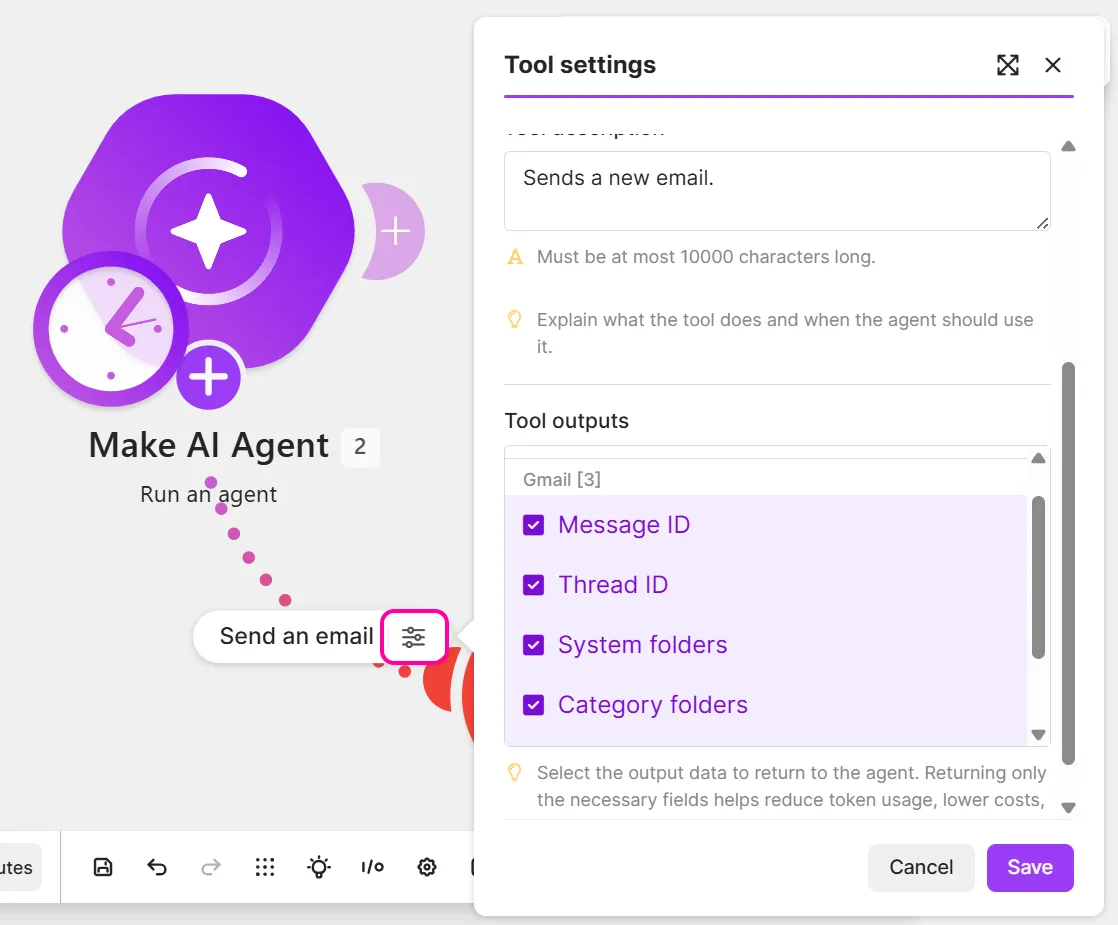
Make AI Agents live inside the Scenario Builder. An agent can use app modules, scenarios, MCP servers, and other agents as tools, while surrounding modules handle fixed rules. Tool settings can limit returned fields, which is materially safer than handing the agent an entire record or calendar.
Use AI only where the path must vary. Keep consent, recipient, amount, record identity, deduplication, and schema validation in deterministic modules. Make's agent best-practices page says explicit instructions can still be ignored or misinterpreted and advises builders to assume anyone could access information shared with an agent, including tool data and knowledge. A prompt is guidance; a filter, permission, or approval module is a control.
The current native Human in the Loop app creates, lists, cancels, and watches review requests, but its documentation says it is Enterprise-only and closed beta for invited customers. Do not assume a Core, Pro, or Teams workspace has a native approval gate because Make's blog shows one. Other plans can compose an approval route with Slack, email, a webhook, a data store, or a third-party approval app, but the builder owns authentication, timeout, duplicate decisions, audit history, and resume behavior.
Place review immediately before the consequential action. Show the source input, proposed payload, evidence, and editable fields. An approval after an email was sent or a CRM record was overwritten is merely documentation of the accident.
Retries are capable and easy to misconfigure
Store incomplete executions is disabled by default. When enabled, Make saves a failed run so an operator can fix and resume it or let supported errors retry automatically. A Retry error handler stores the error, scenario mappings, data, and remaining route as an incomplete execution. This is stronger than rerunning an entire multi-step scenario after a late failure.
There are two sharp edges. First, the separate discard data if storage is full setting determines whether Make throws away failed data and keeps running when the incomplete-execution folder is full. With that option disabled, Make stops the scenario instead. Leave it disabled when stopping is safer than losing the failed bundle; either way, monitor storage rather than only run status. Second, enabling keep data confidential stops payload retention. Logs still record that a run happened, but without the data needed for ordinary debugging; Make explicitly says error-resolution options become very limited.
Retries also do not create idempotency. Before a send, payment, ticket creation, or CRM write, persist a source event ID and action type. On replay, return or update the existing result. Test an API that times out after accepting a write—the failure mode that turns a convenient retry button into duplicate side effects.
Governance improves by plan
Teams adds team roles and shared templates. Enterprise adds the controls that matter in regulated or large deployments: custom organization and team roles, SSO, domain claim, audit logs, advanced security features, and enterprise support. Custom roles can separate scenario execution from billing or user administration. Audit logs record defined account actions with actor and timestamp.
These controls do not replace scenario-level ownership. Inventory each connection, record who can edit and activate the scenario, restrict agent tools, cap team credit spend, and define who can replay failed data. Make's execution history helps diagnose runs; Enterprise audit logs answer the separate question of who changed the platform configuration.
Privacy depends on the scenario and AI provider
The current plan table lists detailed execution logs for 7 days on Free, 30 days on Core, Pro, and Teams, and 60 days on Enterprise. Keep data confidential removes payloads from logs after processing, at the cost of debugging detail. Decide separately which business records must remain in source systems and which operational evidence belongs in Make.
AI requests cross another boundary. Make's provider-and-data-zone documentation says every AI feature sends a request to an AI provider. Selecting an EU Make data zone does not guarantee every model request stays in the EU: some Make-provided features and models route to the US, and a custom provider connection follows that provider rather than Make's EU guarantee. Verify the exact feature, model, provider, region, retention terms, and subprocessor path. Do not infer one platform-wide no-training or zero-retention promise from a single provider or beta feature.
For personal data, expose the minimum fields needed for the task. Filter tool outputs before they return to the agent, avoid uploading broad knowledge bases by default, and use a deterministic redaction step before model calls. Make's public privacy and security pages describe GDPR safeguards, encryption, certifications, and deletion processes; they are vendor commitments, not an independent audit of a buyer's scenario.
What one current operator reports
In a September 18, 2026 r/Make discussion, u/alexsirota1 wrote that the history log shows what broke, while complex scenarios still require patience, data-shaping knowledge, and correct error handlers. Their summary was blunt: “Any scenario or set of scenarios that do anything complex can be as challenging as code to develop.”
That is one attributed report, not a reliability benchmark. It matches the product mechanics: Make exposes execution detail, but an operator still has to understand the data and failure path. We did not create a Make account, connect apps, run a scenario, spend credits, measure uptime, or compare AI output quality for this profile. Product behavior, prices, and limits above come from current first-party pages and documentation.
Choose Make when the visual graph makes a genuinely complex managed workflow easier to own. Choose n8n when self-hosting and code control justify operating the runtime. Keep a script or simpler trigger-action tool when the visual system would add more state, metering, and maintenance than the process deserves.
For implementation, automate document intake and extraction, route and summarize support tickets, build human-approved automation flows.
Related workflow guides
- Enrich and route inbound leads
- Summarize and triage a shared inbox
- Monitor competitor and website changes
For the full platform decision, read Zapier platform pricing, approvals and recovery.
For migration planning, read Pipedream Workflows shutdown, exports and continuing Connect.
For migration planning, read Relay.app shutdown and reconstruction from surviving records.
For platform evaluation, review Parabola/Prowork for finance and operations data flows, Tines 3B and Stories for governed security and IT workflows.
Sources & further reading
- Make pricing and plan comparison
- Monthly and annual subscription behavior
- Extra-credit pricing and expiration
- Make credit rules and AI token conversion
- AI agent credit usage
- AI agent tools and test-run interface
- Scenario settings and confidential-data mode
- Incomplete executions and retries
- Retry error-handler behavior
- Make AI Agent best practices
- Human in the Loop availability and modules
- Enterprise custom roles
- Enterprise audit logs
- Enterprise single sign-on
- AI providers and data regions
- Make security controls and certifications
- Make privacy and GDPR commitments
- Reddit report on debugging complex scenarios



Appears in