
Tool
n8n
n8n review: compare 2026 Cloud and self-hosted pricing, execution limits, HITL approvals, governance, privacy, licensing, and production fit.
Verdict
Choose n8n when a technical team wants a visual orchestration layer without losing JavaScript, Python, HTTP requests, custom nodes, AI agents, or control over deployment. Its execution-based billing is attractive for long workflows because a production run costs one execution regardless of node count. The catch is ownership: Community Edition removes the software fee, not the database, upgrades, secrets, backups, scaling, observability, or incident response. Skip it for a simple SaaS-to-SaaS flow when non-technical maintainers and zero infrastructure work matter more than code and deployment control.
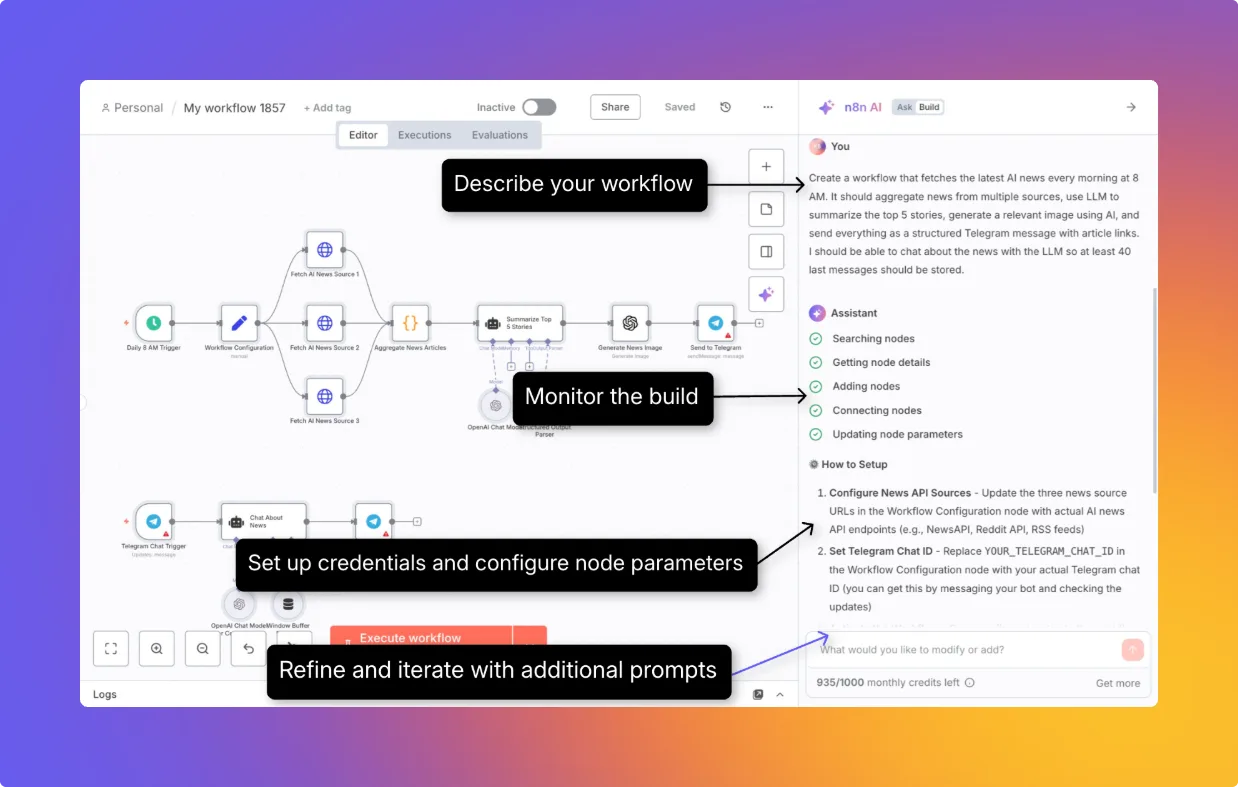
n8n is a fair-code workflow automation platform, not an OSI-open-source project. It combines a node canvas with code and API access, supports deterministic workflows and AI-agent tool use, and can run on n8n Cloud or infrastructure you manage.
Start with the best AI workflow automation tools for category-level selection. Read n8n vs Make for the direct deployment and pricing choice, or the full Make profile when a managed visual builder is the other finalist. The reliable no-code AI workflow guide covers evaluation, fallbacks, and approval gates that apply whichever platform wins.
Decision criteria
| Decision | n8n fits when | Validate before rollout |
|---|---|---|
| Workflow shape | Flows need branching, loops, APIs, code, custom nodes, AI tools, or sub-workflows | Rebuild one failure-prone production flow; measure debugging time and how much custom code remains |
| Cost model | Long workflows have many steps but a manageable number of top-level production triggers | Count schedules, successful and failed trigger runs, webhook calls, and chat messages; add model/API fees and infrastructure |
| Deployment | Internal-network access, data location, or custom runtime configuration justifies self-hosting | Test upgrades, backup restore, credential-key recovery, pruning, TLS, worker failure, and queue recovery |
| Governance | The selected paid tier includes the projects, roles, SSO, environments, secrets, and logs your team needs | Map every builder, approver, credential owner, deployment path, and audit consumer to an actual entitlement |
| AI safety | Sensitive agent tools can be separated and held for a named human reviewer | Test approve, deny, timeout, duplicate request, stale approval, malformed parameters, and channel outage |
| License | Use is internal business automation, personal, or non-commercial | Get a commercial agreement review before embedding n8n or offering its workflow UI to customers |
Current plans and meaningful limits
The pricing page was checked October 13, 2026. All paid plans advertise unlimited users, workflows, integrations, and workflow steps. That does not mean unlimited runs, parallelism, history, storage, or AI assistance.
| Plan | Public annual-billing price | Included production executions | Deployment and practical boundary |
|---|---|---|---|
| Starter | €20/month | 2,500/month | n8n Cloud; 1 shared project; 5 concurrent executions; 5-minute maximum execution; 1,600 Assistant credits/month |
| Pro | €50/month | 10,000/month | n8n Cloud; 3 shared projects; 20 or 50 concurrent executions depending on size; 40-minute maximum; admin roles and workflow history |
| Business | €667/month | 40,000/month | Self-hosted only; 6 shared projects; SSO/LDAP, multiple environments, Git version control, and queue mode |
| Enterprise | Custom | Custom | n8n Cloud or self-hosted; unlimited shared projects, 200+ concurrent executions, external secret store, log streaming, extended retention, and SLA support |
Starter and Pro are hosted convenience plans; Business is currently a paid self-hosted governance package. The free self-hosted Community Edition has no paid execution quota, but capacity is bounded by your machines, database, connected services, and configuration. Assistant credits are for n8n's builder assistant, not an all-inclusive allowance for model calls inside workflows. Budget the selected model provider, other metered APIs, storage, logs, and operations separately.
What counts as an execution
On paid Cloud and self-hosted plans, production triggers are the basis of the quota. The current execution docs say every schedule fire counts regardless of outcome, a polling trigger counts only when it finds new data, and every accepted webhook request that starts a workflow counts. The current Cloud support FAQ conflicts with that wording: it says failed executions do not count. The same FAQ says retries, error-handler workflows, and CLI-started executions are affected once the limit is reached, which describes what gets blocked at the cap rather than clearly saying each increments usage.
Both pages agree that paid-plan manual editor runs and sub-workflow executions are outside the production quota; the execution docs also exclude dedicated error-workflow runs. Because the vendor pages disagree on failed top-level runs, budget successful production starts as the lower bound, all production attempts as the upper bound, inspect the workspace's usage counter, and get failure/retry treatment confirmed for the purchased plan. A long workflow with 40 nodes remains one top-level execution, but a chatbot that starts a production execution per message can consume quota quickly. Model retries or API loops may also increase provider cost without changing n8n's execution count.
Cloud work above the plan's concurrency limit waits in a FIFO queue. Self-hosted regular mode has no production-concurrency cap by default; n8n explicitly warns this can thrash the event loop. Operators can set a limit or use queue mode, where the main instance handles triggers and webhooks, Redis brokers jobs, and workers execute them. Community Edition includes queue mode, but multi-main high availability is excluded.
Human approval for AI actions
n8n can place human review on all or selected tools connected to an AI Agent. When the agent requests a protected tool, the workflow pauses and sends the tool name and proposed parameters to Chat, Slack, Discord, Telegram, Teams, Gmail, WhatsApp, Google Chat, or Outlook. Approval runs the tool with those parameters; denial cancels it and returns the rejection to the agent. The approval channel can differ from the user's chat channel.
That is a useful execution gate, not a complete authorization system. Keep high-impact tools narrow, show the exact target and parameters, expire stale requests, make external writes idempotent, and recheck mutable state after approval. A reviewer approving “refund order 123” should not implicitly authorize a later retry against a changed order.
There is also version risk. In an n8n Community report, andreiradu2102 wrote on July 21, 2026 that in 2.27.5 “the approval step is displayed, but after clicking Approve, the actual tool is not executed correctly.” The official n8n account acknowledged internal ticket CV-21 on July 22; The forum later pointed to 2.34.0, but post-merge review identifies PR #34271 in 2.32.0 as the actual fix. This is a resolved, version-specific report, not evidence that current HITL is universally broken or reliable. Pin a stable version and acceptance-test the exact protected tool and channel before production.
Self-hosting, governance, and privacy
Community Edition includes most execution and building features, but it excludes custom variables, environments, external secrets, external binary storage, log streaming, multi-main mode, projects, SSO, workflow and credential sharing, and Git version control. Registered Community adds folders, debug-in-editor, and custom execution metadata. That split matters: a free instance can scale workers in queue mode, yet it lacks the collaboration and governance controls many teams expect before sharing production credentials.
Self-hosting keeps n8n's workflow storage and execution payloads on infrastructure you control, according to the vendor's privacy documentation. Connected SaaS and model APIs still receive the data that configured nodes send to them; self-hosting does not make external inference local. It also does not mean the default installation makes no outbound calls. Pseudonymous telemetry is enabled by default and can include instance configuration, truncated server IP, workflow shape and node types, product events, error text, and the registrable domains used by HTTP Request nodes and webhooks. n8n says it does not collect workflow payloads or credential contents through telemetry. Operators can disable diagnostics, version checks, and templates; paid self-hosted licenses still report the license identifier and usage counts.
Cloud data is stored in Frankfurt according to the pricing FAQ, and Cloud telemetry cannot be disabled. Cloud also records interface sessions with credential values excluded and deletes those recordings after 21 days. The Assistant can send workflow structure, node schemas and configuration, and code or expressions during a direct interaction; it does not send credential fields or workflow output data according to the vendor's current privacy page. Confirm the signed DPA, subprocessors, retention, region, and AI terms for your workspace rather than treating deployment labels as the whole privacy review.
Self-hosted teams own TLS, encryption at rest, the database, execution-data pruning, backups, recovery, upgrades, and the encryption key used for stored credentials. Preserve that key during migration; losing it makes the database's credentials unusable. Treat unverified community nodes as privileged code: n8n warns they can access the host and workflow data. Disable community packages, external Code-node modules, Execute Command, or SSH where the use case does not require them.
License boundary and limitations
n8n's Sustainable Use License permits using and modifying the software for internal business, personal, or non-commercial purposes. Redistribution must be free and non-commercial. The license is source-available and commercially restricted, so “open source” is inaccurate under the Open Source Initiative definition. Consulting and building internal workflows can be allowed; exposing n8n to customers as part of a hosted product can require a separate commercial agreement. Have counsel review the exact product model rather than inferring permission from self-host availability.
The product's flexibility is also its maintenance burden. Complex canvases can become harder to review than well-structured code, and generated workflows still need credential setup, data contracts, retry policy, observability, and tests. Plan limits and feature placement have changed recently, so recheck the pricing page at purchase time.
We did not run an n8n account, load test workers, execute an approval flow, audit source code, or compare workflow reliability hands-on for this profile. The verdict rests on current first-party pricing, documentation, license text, and the attributed version-specific community report above.
Choose n8n when the team values deployment control and code-level escape hatches enough to own the operational path. Choose Make when a managed visual experience and easier non-technical handoff matter more than self-hosting and custom runtime control.
For deployment selection, see the self-hosted automation shortlist and n8n versus Activepieces. Dify is a related option for knowledge-backed AI applications; the Flowise profile covers migration from its archived upstream.
For implementation, automate document intake and extraction, route and summarize support tickets, build human-approved automation flows.
Related workflow guides
- Enrich and route inbound leads
- Summarize and triage a shared inbox
- Automate employee onboarding
- Monitor competitor and website changes
For the full platform decision, read Zapier platform pricing, approvals and recovery.
For migration planning, read Pipedream Workflows shutdown, exports and continuing Connect.
For migration planning, read Relay.app shutdown and reconstruction from surviving records.
For platform evaluation, review Parabola/Prowork for finance and operations data flows, Tines 3B and Stories for governed security and IT workflows, Tray.ai for enterprise integration and governed agent access.
Sources & further reading
- n8n pricing, limits, storage, and data location
- How executions count toward paid quotas
- Cloud execution-limit and failed-run FAQ
- Cloud concurrency behavior
- Community Edition feature boundaries
- Self-hosted concurrency control
- Queue mode architecture
- Human approval for AI tool calls
- n8n privacy and telemetry documentation
- Self-hosted security responsibilities
- Self-hosted credential encryption key
- Community node security risks
- Telemetry controls
- Sustainable Use License
- n8n community license FAQ
- Community HITL regression and fix trail
- n8n post-merge correction to the Human Review fix attribution
- n8n actual Human Review tool fix
- n8n 2.32.0 release with the Human Review fix



Appears in