Use case
How to Automate Employee Onboarding Workflows (2026)
Automate employee onboarding from approved hire to verified access with HRIS source data, least-privilege roles, date changes, cancellation, retries, and reconciliation.
Verdict
Automate employee onboarding as a revision-aware lifecycle, not one long “new hire” flow. Let an approved HR record authorize the process, calculate access from maintained role bundles, track each destination independently, and reconcile the result before day one. A changed start date, role, location, manager, or hire status must replace stale work. Choose Workato for governed orchestration across a heterogeneous enterprise estate, Microsoft Power Automate for a Microsoft-centered environment, and n8n when a technical team wants API and deployment control.
This workflow begins after recruiting and document collection produce an approved hire. It ends when identity, access, hardware, calendar, and human tasks have verified states. Use the document-intake guide for parsing forms and IDs. Use the human-approved automation guide for approval identity, payload binding, expiry, and safe resume. This guide owns the employee lifecycle that connects those controls.
Choose the orchestrator around the operating estate
Prices and public limits below were checked October 17, 2026. They are entry points, not comparable totals: one platform meters credits, one sells user or process capacity, and one sells Cloud executions or self-hosted software.
| Platform | Best fit | Verified starting point | Boundary that matters for onboarding |
|---|---|---|---|
| Workato | Workday, Okta, ServiceNow, SaaS, APIs, and hybrid systems need one governed orchestration layer | Free grants 50,000 one-time credits; self-service Pro starts at $75/month for 2,500 recurring credits, with no rollover | Enterprise editions, on-prem agents, concurrency, connector entitlements, implementation, and downstream licenses can sit outside self-service pricing |
| Power Automate | Entra ID, Microsoft 365, Teams, SharePoint, Dataverse, and Windows already define the environment | Premium is $15/user/month paid yearly; Process is $150/bot/month paid yearly and can license a cloud flow independently | Flow ownership, connector class, capacity, service accounts, environments, action limits, and every target-system license affect the real architecture |
| n8n | Technical owners need HTTP, code, webhooks, custom nodes, or self-hosting across a mixed stack | Cloud Starter is €20/month billed annually for 2,500 executions, five concurrent executions, and a five-minute maximum run; Community Edition is free to self-host | Free self-hosting excludes projects, SSO, environments, external secrets, workflow/credential sharing, and Git version control; infrastructure and incident response remain yours |
Workato's public pages conflict. Self-service billing lists a $75/2,500-credit Pro option and says Free and Pro share capabilities; its live plan card leads with $100/3,500 credits and presents IDP, analytics, access controls, custom connectors, and three users as Pro additions. Treat $75 as a billing floor, not a confirmed enterprise entitlement. Get the plan matrix in writing; the Workato versus Power Automate comparison tracks the discrepancy in detail.
Workato publishes an example that detects new workers in Workday and creates Jira and Okta users. The page explicitly calls it an example that may require changed triggers, actions, or logic. Treat the connector path as verified capability, not evidence that a two-action recipe is a complete onboarding control.
Power Automate's standard Entra ID connector can create a user, assign a manager, add or remove group membership, update a user, and invalidate refresh tokens. It requires broad directory write permissions, does not return custom Entra attributes, and documents a limit of 200 API calls per connection per 60 seconds. Those facts make it a practical Microsoft path and a reason to isolate its connection, minimize its privileges, and test bursts.
n8n fits when the integration work is already engineering work. Cloud billing counts complete workflow executions rather than individual steps, while self-hosting exposes more runtime responsibility. Do not pick Community Edition for “free enterprise onboarding” if SSO, separate projects, external secrets, shared credentials, and deployment environments are requirements.
The AI workflow automation shortlist covers the wider category. The direct Workato versus Power Automate comparison is the useful next read when the choice is enterprise iPaaS versus Microsoft-native automation. Use the self-hosted automation shortlist when runtime ownership is a deliberate constraint.
1. Make the HR system the authority for hire state
Start from a stable worker_id or hire_id, not a person's name or email. The accepted event should contain the HR record revision, approved status, legal entity, location, employment type, role code, manager ID, and effective start date. The orchestrator may transform this data; it must not become a second HR database that silently overrides it.
Store the last processed HR revision and a hash of the fields that drive onboarding. Reprocessing the same revision should produce no new side effects. A later revision should calculate a delta against the currently desired state.
Do not trigger irrevocable work when a recruiter merely creates a candidate or draft worker. Define the exact HR state that means “approved for preboarding,” who owns it, and how cancellation appears. If the source cannot emit reliable events, poll by updated_at and reconcile by stable ID; do not infer a new hire from an unfamiliar email address.
Give AI a drafting role, not authority
AI can draft a role-specific checklist, welcome message, manager brief, or FAQ answer from the approved role bundle and policy sources. Store the proposed text with its source revision, evidence references, and model or prompt version; send it to a reviewer before external delivery until measured acceptance supports a narrower rule. Keep the proposal separate from the provisioning action. A model must never infer employment eligibility, hire approval, start date, role, manager, or access from a résumé, title, email, or chat. It must not override HR state, invent an entitlement, or turn a prose suggestion into a directory write. Deterministic rules and authorized humans own access.
2. Turn the hire into explicit work items
Create one onboarding case, then one work item per destination and consequence. Useful fields are:
| Field | Purpose |
|---|---|
onboarding_case_id | Stable case identity independent of a workflow run |
worker_id, source_revision | Tie every action to the approved HR version |
target_system, action | Name the exact account, group, license, ticket, device, or communication change |
desired_state | State that should exist after this revision |
actual_state | Last verified destination state, including unknown |
risk_class | Separate base access, elevated access, external communication, and physical delivery |
approval_ref | Bind exceptional access to its authorization record |
attempt_count, last_error, next_attempt_at | Make recovery visible and bounded |
state | planned, blocked, approved, running, succeeded, failed, cancelled, or unknown |
This prevents a successful mailbox from hiding a failed VPN account. It also allows safe repair of one target without replaying welcome emails, duplicate calendar events, or already completed account creation.
3. Grant least privilege from role bundles
Map maintained business roles to named entitlement bundles. A role bundle might include base directory groups, standard SaaS licenses, required training, and hardware policy. Keep privileged admin roles, production access, finance systems, customer-data access, and exceptions outside the base bundle.
Never clone another employee's access. Reference users accumulate temporary projects, historical exceptions, and privileges unrelated to the new hire's job. Generate a proposed access diff from the role code and location, show exceptional items to the accountable system owner, then bind approval to that exact diff.
Use a dedicated integration identity per boundary where the target permits it. Workato's Workday example recommends an Integration System User dedicated to the integration so employee lifecycle changes do not break the connection. Power Automate's Entra connector documents the directory write scopes its connection needs; that connection should not double as a builder's everyday account.
4. Make date changes and cancellation first-class events
Schedule work relative to the effective start date, but store the schedule as derived state. When the date changes, cancel pending jobs from the old revision and create replacements from the new one. Recheck the authoritative HR revision immediately before any scheduled external action.
Define cancellation behavior by outcome:
- Pending messages, meetings, orders, and access grants: cancel them.
- Accounts already created but not activated: disable or delete according to policy, then verify.
- Hardware already shipped: open a tracked recovery task rather than pretending cancellation reversed delivery.
- Access already granted: revoke it through the same identity control used for offboarding, then reconcile memberships and sessions.
- Ambiguous API result: mark
unknownand inspect the destination before retrying.
A manager or role change should recalculate the entitlement diff. It should not append a second role bundle and leave the original privileges behind.
5. Recover from partial provisioning
Retry only operations known to be idempotent, or inspect the target before retrying. Use the source revision plus target system and action as the idempotency key when the target API supports it. Cap automatic retries, add backoff, and route persistent or permission errors to a named queue.
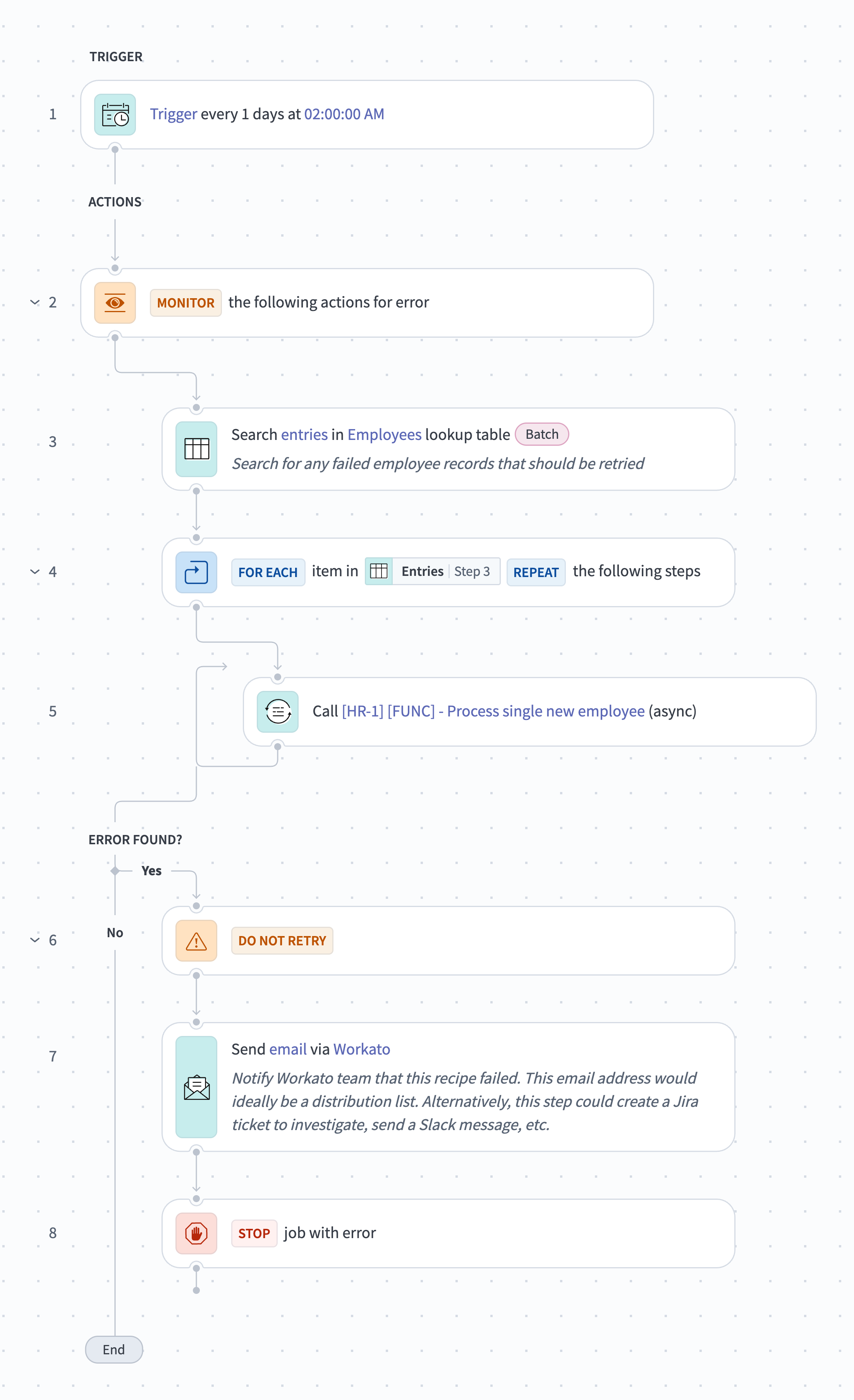
Workato's first-party failed-provisioning example searches an employee lookup table daily, retries a per-employee function, and alerts if the retry job itself fails. That is a useful separation between item failure and scheduler failure. It does not prove the retry is safe for every target; your function still needs destination lookup and duplicate protection.
Finish every case with reconciliation. Query actual account status, group memberships, licenses, ticket state, device assignment, and calendar artifacts. Compare them with the latest desired state and report missing, extra, failed, and unknown items. A completed workflow run is not completion evidence.
6. Prove behavior with measurable acceptance tests
Use sandbox tenants or reversible test targets. These are test specifications, not results from our lab.
| Test | Pass condition |
|---|---|
| Duplicate approved-hire event | Replaying the same worker_id and revision creates zero additional accounts, messages, meetings, licenses, or orders |
| Start date moved by 14 days | Every pending date-bound item references the new revision; zero old-date messages or meetings remain active |
| Hire cancelled after one account succeeds | Pending actions stop; the created account is disabled or removed per policy; reconciliation reports zero active unauthorized access |
| Role changes before day one | Old bundle entitlements are removed from desired state; only the new base bundle plus separately approved exceptions remain |
| One target returns timeout after write | Recovery checks actual target state before retry; final state contains one account and one tracked outcome |
| One destination is unavailable | Other independent work items retain their states; the case remains incomplete and has a named owner, error, and recovery deadline |
| Approval payload changes | Existing approval becomes invalid; no changed exceptional access is granted until a new approval exists |
| Connector burst or quota limit | Throttled items retry within the defined window without duplicate side effects; backlog age and count are visible |
| Day-one reconciliation | 100% of required targets return succeeded or an accepted exception; extra entitlements equal zero |
Track median and 95th-percentile time from approved hire to reconciled readiness, day-one missing-access rate, extra-entitlement count, manual touches per case, retry age, cancellation cleanup time, and unresolved unknown outcomes. Measure by role and target system so one reliable mailbox integration cannot conceal a consistently failing VPN or finance-system step.
What practitioner evidence changes
On October 1, 2026, Reddit user u/ScratchEvening3020 reported sending a product hire a stale sales schedule from copied templates. In the same thread, u/vladeta proposed one role-driven plan and manager preview; u/pushpendraagrawal said role, date, or template changes should invalidate the earlier approval. This is a self-reported, unverified incident and discussion—not proof of frequency, vendor quality, or a tested remedy. Its value is a directly testable failure case: one authoritative role, one versioned plan, and zero sends from superseded revisions.
The safe production target is therefore narrow: one approved employee revision produces one inspectable desired state; each destination proves its result; later HR revisions supersede earlier work; exceptions expire; and an owner can recover every partial case without replaying the whole onboarding.
We did not authenticate to Workato, Power Automate, n8n, an HRIS, or an identity tenant for this guide. Product capability, pricing, and limit statements come from the cited public sources; the acceptance tests are a buyer-run validation plan, not observed results.
Sources & further reading
- Workato new-employee provisioning example
- Workato failed employee provisioning retry example
- Workato self-service pricing and credits
- Workato Free and Pro plan cards
- Workato pricing model and add-ons
- Workato on-prem agent
- Microsoft Power Automate pricing
- Microsoft Power Automate license types
- Microsoft Entra ID connector actions and limits
- Microsoft Power Automate platform limits
- n8n Cloud pricing and limits
- n8n Community Edition boundaries
- Anecdotal employee onboarding template incident


Ordered for comparison, not as a universal ranking. Inclusion requires a direct fit with this page's stated workflow.