Tool
Dify
Dify review: compare 2026 Cloud pricing, Community self-hosting, license restrictions, privacy, human approval, recovery, and governance.
Verdict
Choose Dify when the thing being shipped is an LLM application: a chatbot, RAG service, agent, or API whose prompts, model calls, knowledge retrieval, tools, branches, and logs should live in one visual platform. It is a weaker default for ordinary SaaS-to-SaaS automation, where n8n has a broader integration-first operating model. Self-host Dify when model and application control justify owning a multi-service stack. Do not choose Community Edition on “open source” shorthand alone: its modified Apache 2.0 license restricts multi-tenant use and frontend-brand removal, while Enterprise holds the stronger multi-workspace, SSO, security, and support package.
Dify combines a workflow canvas, model-provider management, RAG pipelines, agents, monitoring, web apps, and service APIs. That makes it closer to an AI application runtime than a generic trigger-action connector.
Start with the best self-hosted AI automation tools when deployment control is the deciding factor, or the broader AI workflow automation shortlist when category fit is still open. Compare the n8n profile for integration-heavy business processes. If an existing stack includes Flowise, use the Flowise profile for its end-of-life and migration context. The reliable no-code AI workflow guide covers schemas, evaluation, approval, idempotency, and monitoring across platforms.
Decide whether Dify is the right kind of workflow system
| Criterion | Dify fits when | Validate before rollout |
|---|---|---|
| Product shape | The output is a model-backed app or API with prompts, retrieval, tools, or agent behavior | Build one real request path, including bad input, empty retrieval, provider timeout, and malformed model output |
| Integration depth | HTTP, plugins, MCP, and supported tools cover the required systems | Inventory every source and write target; compare gaps and credential ownership with n8n |
| Knowledge | Documents and retrieval are part of the application, not a separate data service | Test chunking, permissions, deletion, re-indexing, citation quality, and recovery with representative documents |
| Billing | Workspace, app, storage, trigger, request, and model costs remain predictable | Count model responses, trigger events, knowledge operations, external-provider charges, and retained data separately |
| Deployment | The team can operate the API, workers, database, Redis, file storage, vector store, plugin services, and upgrades | Restore a backup, rotate secrets, replay a failed run, and stage the exact vector-store upgrade path |
| Governance | One Community workspace is sufficient, or Enterprise controls are in the signed package | Map builders, publishers, model-key owners, reviewers, log readers, and workspace administrators to entitlements |
| Human review | Web-app or email approval can pause a workflow before a sensitive action | Test authentication, leaked links, first-response races, timeout, duplicate submission, upgrade, and resume behavior |
Cloud price is only one part of cost
The Dify Cloud pricing page was checked October 14, 2026. Monthly and annual options differ; the annual prices below are paid per workspace for the year.
| Plan | Public price | Included model allowance | Operational limits that change the decision |
|---|---|---|---|
| Sandbox | Free | 200 message credits | 1 member, 5 apps, 50 knowledge documents, 50 MB knowledge storage, 10 knowledge requests/minute, 3,000 trigger events, 2 triggers/workflow, 30-day logs, 5,000 API calls/month |
| Professional | $59/month or $590/year | 5,000 message credits/month | 3 members, 50 apps, 500 documents, 5 GB knowledge storage, 100 knowledge requests/minute, 20,000 trigger events/month, unlimited log history, no Dify API rate limit |
| Team | $159/month or $1,590/year | 10,000 message credits/month | 50 members, 200 apps, 1,000 documents, 20 GB knowledge storage, 1,000 knowledge requests/minute, unlimited trigger events, unlimited log history, no Dify API rate limit |
| Enterprise | Custom | Contract-specific | Self-hosted enterprise package with multiple workspaces, SSO, advanced controls, support, and commercial-license authorization |
Message credits are starter model access, not a fixed number of tokens or complete application runs. Dify says one model response consumes a model-dependent number of credits; a workflow with several model nodes can consume several responses. When credits run out, a workspace can use its own provider key. The provider then bills the account directly, and tool APIs, storage, vector infrastructure, observability, and self-host operations remain separate costs.
The Sandbox page publishes 200 credits and 3,000 trigger events without stating a reset period beside either item. Do not model them as monthly allowances unless the checkout or workspace meter confirms that. Professional and Team explicitly label their message credits per month; Professional explicitly labels trigger events per month.
Community is free to run, with license and governance boundaries
Dify Community Edition is free to self-host and exposes the core public-repository features in one workspace. Enterprise adds multiple workspaces and management, SSO, advanced security and controls, scalable deployment options, official maintenance, and support. Confirm every required control in the order form; “self-hosted” describes location, not role design, audit coverage, high availability, or vendor responsibility.
The repository is licensed under the Dify Open Source License, a modified Apache 2.0 license. Its text allows commercial use, including use as a backend or enterprise application-development platform, but requires a commercial license for an unauthorized multi-tenant environment. It also prohibits removing or modifying the Dify logo or copyright information when using Dify's frontend. The pricing page describes Community as suited to non-commercial projects, while the license text permits broader commercial use subject to those restrictions. Review the actual architecture and license text rather than treating either marketing copy or “Apache-based” as the whole answer.
Self-hosting also creates an upgrade and recovery job. Dify's Docker deployment includes application services plus database, Redis, storage, vector-store, sandbox, proxy, and plugin components. Back up the database, uploaded files/object storage, vector data, configuration, and secrets; then test a restore at the pinned application version. Read release-specific migration notes before changing images. The v1.17.1 release warned that bundled Weaviate users needed a manual staged upgrade across 12 minor versions and that a pull-and-restart path could silently and permanently break vector search. That warning is version-specific, but the operating lesson is durable.
Privacy depends on deployment and every connected provider
Dify's current privacy policy says Cloud collects prompts, uploaded files, knowledge-base content, outputs, application configurations, and workflows. LangGenius says it does not use AI interaction data to train models. When the customer supplies a model-provider key, interaction data goes directly to that provider and its agreement controls model training and retention. When LangGenius manages the provider, it says contracted subprocessors cannot use the data for training or their own purposes.
For on-premise deployments, Dify says it does not collect ordinary product-usage information through the product, though license verification and update services may send basic connection and version data. Self-hosting still does not imply zero egress: configured model providers, tools, plugins, email delivery, external knowledge sources, and observability services receive the data the workflow sends. Build a node-by-node data-flow inventory and test outbound network policy rather than relying on the deployment label.
Human Input is useful, but the approval link is a security boundary
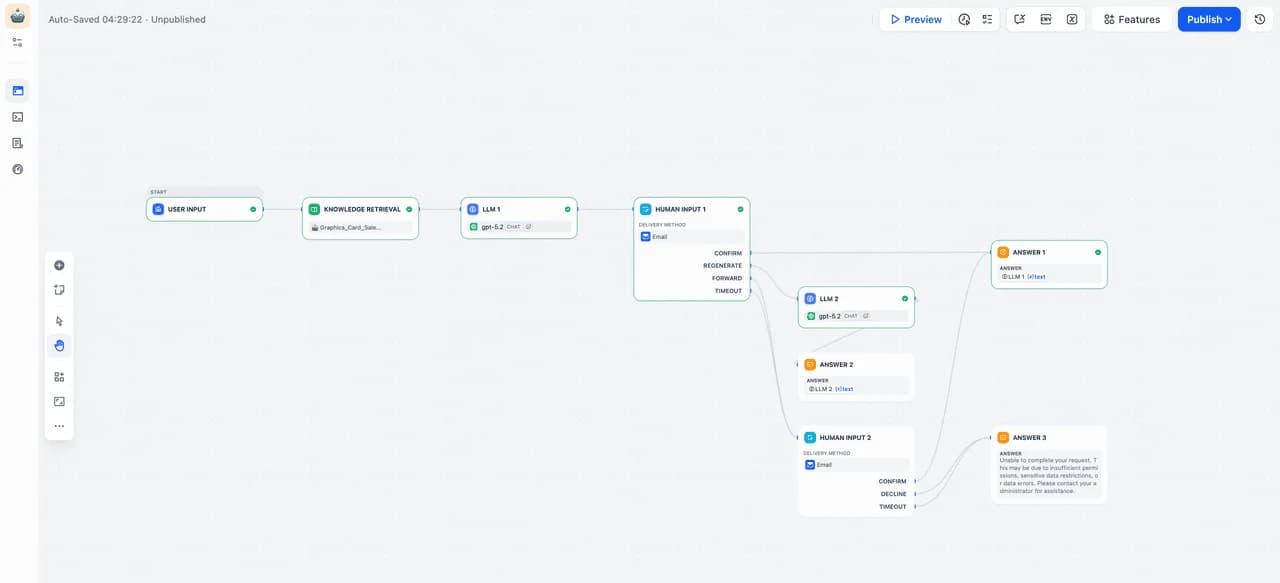
The Human Input node pauses a workflow, displays dynamic content and form fields, and routes the next step through named actions. It can deliver through the current web app or email. Web-app delivery is unavailable for workflows started by a Trigger; email can target workspace members or external addresses. Current documentation says anyone with the emailed link can respond and the request closes after the first response. Treat that URL as a credential, show the exact proposed action, and recheck mutable state after approval.
The default timeout is three days. Builders can connect a timeout branch to a reminder, escalation, or safe termination; without one, the workflow ends. Test approve, reject, edit, forward, timeout, duplicate response, first-response race, expired link, and worker restart. A review node does not make downstream writes idempotent.
Dify also offers node-level recovery for LLM, HTTP, Code, and Tool nodes: stop the workflow, substitute a typed default value, or follow a fail branch. Loop nodes stop on a child failure; Iteration nodes can terminate, continue with null, or remove failed outputs. Those controls are useful, but a default value can conceal a material failure and removing abnormal outputs changes result cardinality. Send error_type and error_message to observable failure handling, and keep external writes deduplicated.
One resolved HITL report shows why version acceptance matters
In a GitHub issue opened September 9, 2026, iamyz reported that Dify v1.17.0 on self-hosted Docker accepted Human Input in the design window but left the published web window unable to accept further input after the button click. The issue was assigned to the 1.17.1 milestone and closed through PR #42082. Dify's v1.17.1 release notes say the fix restored the completion events needed to clear the approval UI and unblock published Web App input.
That is one reproducible, resolved, version-specific report. It is not evidence that current HITL is generally broken or reliable. It does justify pinning a release and running the exact published-app approval path after every upgrade.
We did not create a Dify Cloud workspace, deploy Community Edition, run a workflow, submit an approval, restore a backup, inspect network traffic, audit source code, or benchmark latency and reliability for this profile. Pricing, limits, controls, and defects above come from current first-party pages and the attributed issue trail.
Choose Dify when one platform should own an LLM application's prompts, retrieval, model routing, tools, workflow, API, and runtime evidence. Choose n8n when broad application integration is the center of gravity. For an existing Flowise deployment, read the Flowise profile for end-of-life dates and migration planning before committing more work to that stack.
Sources & further reading
- Dify Cloud pricing, quotas, and message-credit rules
- Community and Enterprise self-hosted comparison
- Dify product capabilities and self-hosted quick start
- Dify Open Source License
- Model-provider credentials and billing
- Human Input node behavior and timeouts
- Workflow error handling and fail branches
- Dify privacy policy
- Docker deployment and configuration
- Dify 1.17.1 release and upgrade notes
- Community report of a Dify 1.17.0 Human Input regression



Appears in