Comparison
Gumloop vs Lindy (2026)
Choose Gumloop for configurable AI agents and workflow controls; choose Lindy for delegated inbox, meeting, and scheduled office work.
Verdict: Choose Gumloop when a builder needs configurable agents, per-tool approval rules, evaluations, and detailed task-cost visibility. Choose Lindy when the job is recurring inbox, meeting, research, or follow-up work that a team wants to delegate through chat, Slack, and scheduled routines.
The named choice is Gumloop for building and governing model-led automations; Lindy for operating a shared office teammate. Gumloop exposes more of the control plane. Lindy starts closer to the work itself.
We did not run authenticated reliability, cost, recovery, or usability tests. This comparison uses first-party pages reviewed October 16, 2026 and two attributed practitioner reports. The acceptance tests below are proposals, not results.
Gumloop vs Lindy decision matrix
| Decision | Gumloop | Lindy |
|---|---|---|
| Best fit | Teams designing reusable AI agents and model-heavy automations | Teams delegating inbox, meeting, research, and recurring office work |
| Operating model | Configure agents, connectors, skills, knowledge, triggers, and legacy workflows | Talk to one teammate; add personal or workspace routines around it |
| Current public entry | Pro starts at $37/month | Free start includes $50 in credits for seven days; Team starts at $29.99/month for 3,000 credits |
| Meter | Model tokens, tool calls, compute, and an 8% orchestration fee consume credits | Variable work consumes credits; current examples range from 2–250 for everyday asks to 1,000–2,500 for large builds |
| Collaboration | Unlimited Pro seats and teams on the current pricing page | Every active user is billed; seat allocations feed one shared workspace pool |
| Approval control | App-level, write/delete, per-tool, or conditional rules; default for a newly added connector is Always allow | Public pricing promises approval for outside impact, but technical docs limit integration guardrails to writes in shared Slack threads |
| Testing and visibility | Task history, credit and connector breakdowns, outcomes, evaluations, and reflections | Routine dry runs exercise real reads and judgment while suppressing delivery; Home shows activity and attention items |
| Capacity behavior | Pro: 25 concurrent agent interactions; excess Pro requests are rejected, and scheduled triggers are skipped | No public concurrency number found in the reviewed pages |
| Workflow ownership | Agents can move to a team, but triggers remain creator-owned and must be recreated during handoff | Admins manage workspace routines; workspace ownership can transfer to another member or admin |
| Enterprise controls | SSO/SCIM, custom roles, audit logs, model governance, connector policies, private networking options | SSO, SCIM, audit logs, HIPAA with a signed BAA, support, and custom billing are listed for Enterprise |
Pick Gumloop when the team is building an automation system
Gumloop makes the stronger case when someone must own the agent as a production asset. Its current model combines an agent, connected tools, company knowledge, skills, triggers, evaluations, and task history. Legacy visual workflows remain, but Gumloop labels them “Workflows (Legacy)” on its pricing page. Buyers should evaluate the agent product now rather than assume the old canvas is still the center of the platform.
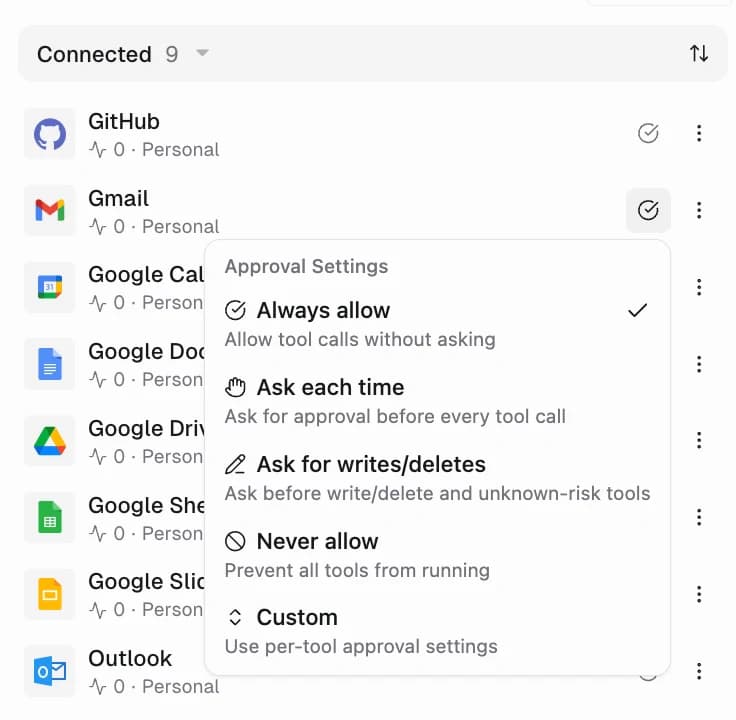
The control surface is the decisive advantage. A connector can run in Always allow, Ask each time, Ask for writes/deletes, Never allow, or Custom mode. Custom mode can gate individual tools, while conditional app rules can inspect call arguments, such as requiring review only for email outside a company domain. Approval pauses save state and resume after the reviewer decides.
That does not make Gumloop safe by default. Its documentation says Always allow is the default when a connector is added. Approval cards summarize key fields but may not display every argument. A rollout owner still needs to change the mode, test the displayed payload, and confirm who can approve.
Gumloop also gives an operator more evidence after launch. The Performance page reports credits, tasks, average credits per task, members, model and connector usage, outcomes, change markers, evaluations, and reflections. “Needed a human” and “Didn’t get done” are separate outcomes. This is useful for finding an expensive or regressing agent, though it is vendor-provided telemetry rather than proof of reliability.
Pick Lindy when the team wants to delegate office work
Lindy is the cleaner choice when the desired experience is “ask a teammate” rather than “open a builder.” Its current Home surface centers chat, meetings, email and Slack signals, files, routines, skills, and learned context. Built-in routines cover email drafting and labeling, urgent-email alerts, meeting recording and prep, scheduling, follow-up bumps, and daily briefs.
Personal routines can run for one user. Workspace routines run through the shared Slack teammate and only admins can create or manage them. A routine has a trigger, a plain-English prompt, and a destination. Event triggers include incoming or sent email, Slack messages, calendar events, and completed meetings. That packaging suits recurring knowledge work with a clear owner and review channel.
Lindy also documents a useful dry-run boundary. A dry run uses real data, reads, triggers, and model judgment while suppressing sends, posts, and writes. It can test selection and quiet-day behavior, but it cannot prove the delivery step. The vendor recommends sending to yourself or writing to a safe copy for that final check. That is more honest than treating a successful preview as an end-to-end test.
Pricing uses the same word for different work
Both products sell credits, but a credit is not a comparable unit.
Gumloop Pro currently starts at $37 per month with 20,000 credits, unlimited agents, seats, and teams, 25 concurrent agent chats, and five concurrent legacy workflow runs. Gumloop's credit documentation says those 20,000 credits comprise 7,400 credits at a $0.005 list price plus 12,600 bonus credits. Agent cost can include model tokens, paid tool calls, compute at five credits per active minute, and an 8% orchestration fee. Pro credits do not roll over. If overage is enabled, the documented price is $0.005 per credit with a configurable cap.
Bring-your-own-key does not remove Gumloop's platform meter. Eligible model usage becomes zero Gumloop model credits and moves to the provider bill, while tool calls and compute remain charged. The documented orchestration rate becomes 16% instead of 8%, calculated on the run’s value including the model usage that moved to your provider. Older organizations can have a different BYOK policy.
Lindy's live pricing page currently shows a free start with $50 in credits that expire after seven days, then Team from $29.99 per month for 3,000 credits. It says every active user is billed from $29.99, each seat's credits join the shared pool, and top-ups cost $10 per 1,000 credits. Monthly credits do not roll over; purchased top-ups do. When the pool runs out, credit-consuming work pauses.
Lindy publishes workload ranges rather than per-action prices: everyday asks can use 2–250 credits, deep work 250–1,000, and large builds 1,000–2,500. At the top of Lindy’s illustrated build range, one job would use 2,500 of a 3,000-credit allocation; that arithmetic is not a measured workload forecast. Measure a representative week; the headline pool alone is not a capacity forecast.
There is a live documentation conflict. Lindy's public pricing page now presents Free, Team, and Enterprise, while its pricing and team-setup docs still refer to Plus, Pro, and Max. The public page also mentions computer use “on Pro and Max” even though it does not show those plan cards. This comparison uses the live price cards and does not infer which unlisted tier owns a feature. The trial copy also conflicts: the Free card and trial FAQ offer seven days without a card, while the seat FAQ says direct signups bill immediately. Confirm signup billing and feature entitlements before purchase.
Approval scope is materially different
Gumloop exposes a builder-facing policy system. Approval can apply to every call, only writes and deletes, a specific connector tool, or a conditional rule. The setting belongs to the agent and applies to everyone interacting with it. Organization-wide app rules and broader governance sit in Enterprise.
Lindy's live pricing FAQ says anything with outside impact waits for approval. Its integration documentation is narrower: reads are never guarded, guardrails cover writes, and those guardrails apply only in shared Slack threads. The same page says web chat, Slack DMs, iMessage, and SMS are not guarded. A guardrail also covers every account under an integration; it cannot set different write rules for work and personal Gmail accounts.
Treat the narrower technical description as the implementation boundary until a test proves otherwise. Lindy can still be the better office teammate, but “approvals built in” is not enough for a process that requires one consistent gate across every channel.
Recovery and ownership decide who gets paged
Gumloop's task history and outcome reporting help an operator investigate what happened, but current public docs reviewed here do not promise a general automatic retry policy for failed tool calls. A separate capacity limit can cause loss: when Pro reaches 25 concurrent agent interactions, new work is rejected and scheduled or event-triggered interactions are skipped. Enterprise queues excess work. A four-hour cleanup releases a concurrency slot after a crashed or abandoned interaction; that is slot recovery, not business-operation recovery.
Ownership also needs a runbook. Gumloop agents can be moved into a team and given another owner, but triggers stay tied to their creator and that person's connectors. Triggers cannot transfer; the replacement owner must recreate them before the creator leaves. Claiming an ownerless agent later does not restore its triggers.
Lindy workspace routines are admin-managed, and overall workspace ownership can transfer. Its public routine docs do not specify a general retry count, backoff policy, or dead-letter queue. A personal routine converted to a script can wake Lindy to repair and test after a script crash, but that feature is unavailable for workspace routines and is not evidence that external writes are idempotent.
For either product, the platform recovering does not prove the destination is correct. An email or CRM write can succeed upstream and time out locally. Put an idempotency key or destination-side duplicate check around consequential writes.
What practitioners reported
In a January 31, 2026 r/automation thread, u/TheMuseCulture said Gumloop reduced setup through prompted creation but sometimes froze or failed while continuing to consume credits. They did not publish the flow, account tier, logs, or reproduction steps. Use the report to justify a forced-failure cost test, not as a measured failure rate.
In an April 7, 2025 r/AI_Agents review, u/woodss found Lindy useful for notes, meetings, Google tools, and research, while reporting weak loop debugging and a mismatch between requested and actual Google Drive placement. That review predates Lindy's current Teammate packaging and pricing. It identifies acceptance criteria; it does not establish current behavior.
Run these acceptance tests before choosing
These tests are proposed. We did not perform them.
- Same office task: ingest ten representative emails, classify them, draft replies, update a sandbox CRM, and send a summary to a private Slack channel. Compare accepted outputs, human corrections, elapsed time, and credits.
- Approval binding: change the email recipient after a draft is prepared. Confirm the approval shows the final recipient and payload, expires safely, and cannot authorize a revised action.
- Ambiguous write: make the destination accept a CRM update but delay its response until the run times out. Retry once and confirm only one record change exists.
- Credential failure: revoke one connector mid-run. Confirm the item becomes visible, alerts a named owner, and can resume without repeating completed external actions.
- Capacity: start more than 25 Gumloop agent interactions and the expected Lindy peak. Verify rejected, queued, skipped, and billed work from logs and credit balances.
- Ownership handoff: remove the original builder after transferring documented ownership. Confirm schedules, credentials, approvals, and alert delivery still work.
- Quiet-day behavior: run a routine against a period with no matches. Require no invented summary, no external write, and no unnecessary model spend.
- Security scope: repeat one write from web chat, Slack DM, shared Slack, and a scheduled trigger. Record which channel actually gates the action and who can approve it.
Choose Gumloop when the team needs to design the agent, inspect its costs and outcomes, and set different approval rules per tool. Choose Lindy when email, meetings, follow-ups, and scheduled briefs are the job and a shared teammate interface matters more than builder-level control.
See the wider AI workflow automation tools guide. The no-code AI workflow guide covers retries, ownership, and release gates, while the human-approved automation guide defines approval payloads and safe resumption. Read the detailed Gumloop profile or Lindy profile for each product's broader fit.
Sources & further reading
- Gumloop pricing
- Gumloop credits
- Gumloop human in the loop
- Gumloop agent performance
- Gumloop rate limits
- Gumloop ownership handoff
- Gumloop enterprise features
- Lindy pricing
- Lindy pricing documentation
- Lindy routines
- Lindy integrations and guardrails
- Lindy team setup
- Lindy security
- Gumloop practitioner discussion
- Lindy practitioner review


Ordered for comparison, not as a universal ranking. Inclusion requires a direct fit with this page's stated workflow.