
Tool
Clay
Decide whether Clay fits your GTM data workflow. Compare current pricing, Actions, Data Credits, provider waterfalls, Claygent, privacy, and limits.
Verdict
Clay is a strong choice when a GTM operator needs to combine several data providers, AI research, signals, scoring, and CRM or sequencer actions in a configurable workspace. It is a poor default for a team that only needs a contact list and email cadence: the $185 monthly Launch floor, two usage meters, and workflow ownership are hard to justify for that simpler job. Buy Clay for orchestration flexibility after a representative pilot proves provider coverage and per-record economics—not because its integration count is large.
Clay is a web-based GTM data and workflow platform. Tables remain its most recognizable interface, but the current product also includes provider waterfalls, Claygent agents, reusable functions, signals, Audiences, a sequencer, HTTP API actions, CRM and warehouse sync, and MCP access.
Start with the best AI sales tools if the category is still open. If the real choice is a configurable data layer versus a packaged database and engagement suite, read Clay vs Apollo and the separate Apollo review.
Decide on workflow shape, not feature count
| Buying criterion | What to test | Why it changes the decision |
|---|---|---|
| ICP and geography | Run the same representative contacts through candidate providers and record valid, current results | A long provider catalog does not guarantee that the useful providers cover your market |
| Steps per record | Count each enrichment, AI run, signal, export, and CRM write in the real workflow | These operations consume Actions even when you bring provider keys |
| Marketplace use | Measure Data Credits per successful record, including waterfall fallbacks and AI | Data Credit cost varies by data type, provider, model, and token use |
| System of record | Decide whether Clay should sync with CRM or only hand off qualified rows | CRM auto-sync, HTTP API, webhooks, and web intent start on Growth |
| Execution | Compare Clay Sequencer with the sending tool your reps already use | Clay can send, but it is primarily the enrichment and orchestration layer |
| Ownership | Name an operator for provider order, conditions, prompts, budgets, and QA | Flexible workflows become expensive or unreliable when nobody maintains them |
| Data boundary | Trace selected fields through Clay, providers, AI subprocessors, CRM, and exports | BYOK changes the bill, not the fact that data crosses connected services |
What Clay does well
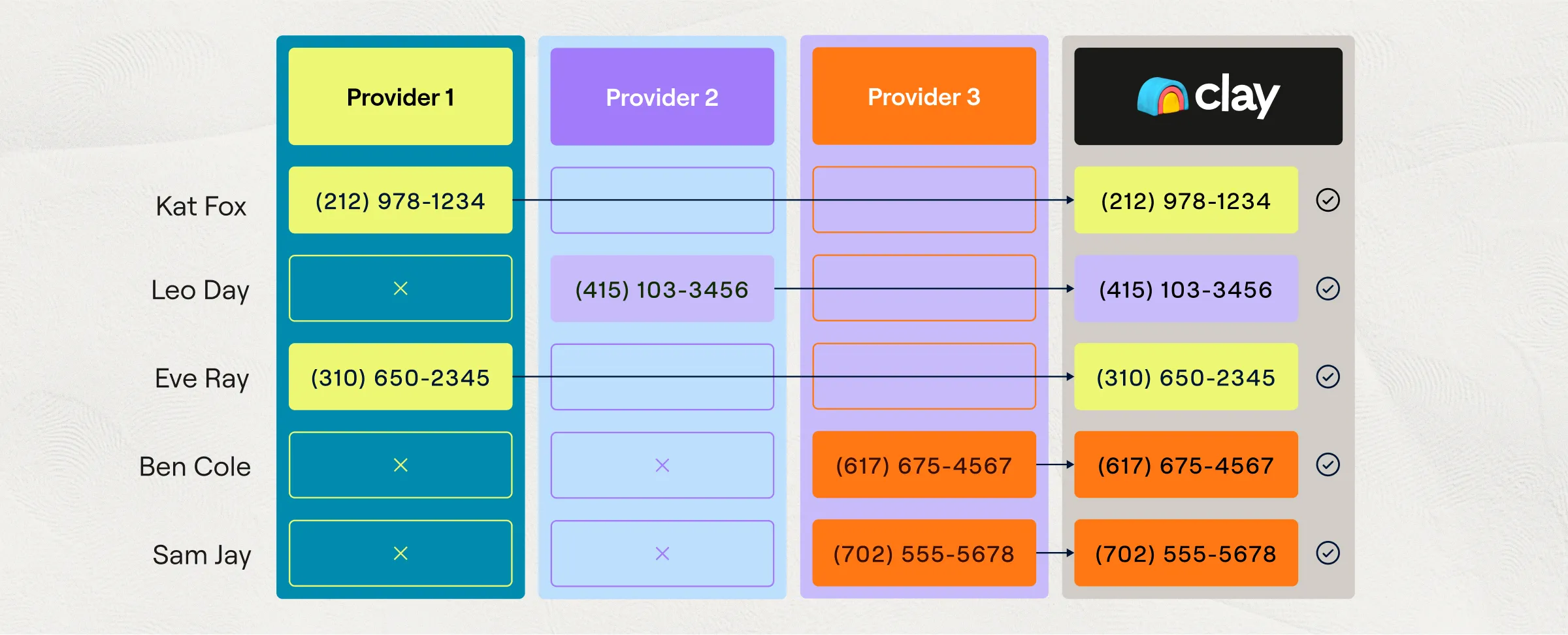
Waterfalls are the clearest reason to choose Clay. You can order providers for a field, stop when one returns a usable result, retain the successful source, and reuse the configuration as a template. This is more adaptable than committing every segment to one database, especially when coverage changes by country, industry, or seniority.
Clay also makes irregular research operational. Use AI can turn a plain-language task into a prompt, model choice, and structured outputs. Claygent Builder adds reusable agents, test cases, business context, documents, web search, skills, version history, and deployment across tables. That is useful for account briefs, qualification, persona classification, and extracting facts that a fixed database does not model.
The table is an inspectable workbench. Operators can filter before enrichment, add conditional runs, test one row, view provider results, and write only qualified data downstream. Growth adds CRM auto-sync and enrichment, arbitrary HTTP API calls, webhooks, web intent, ad audiences, and priority support. Clay's Audiences layer can maintain segments and write mapped fields back to Salesforce; its HTTP API can call endpoints directly and import up to 50,000 rows per source run.
Clay and Apollo can also be complementary. Clay's official Apollo integration can find and enrich contacts or add and update sequence records. In that setup, Apollo subscription and credit rules still apply, while Clay charges Actions for orchestration; BYOK does not make the combined workflow free.
Exact current pricing
Clay's live pricing page prices workspace capacity rather than seats. The self-serve plans inherit unlimited seats and tables from Free, then charge for two independent meters.
| Plan | Monthly billing | Annual billing shown as monthly equivalent | Included capacity |
|---|---|---|---|
| Free | $0 | $0 | 500 Actions and 100 Data Credits per month; 200 rows per table |
| Launch | $185/month | $167/month equivalent | 15,000 Actions + 2,500 Data Credits monthly, or 180,000 Actions + 30,000 Data Credits yearly; up to 50,000 rows per table |
| Growth | $495/month | $446/month equivalent | 40,000 Actions + 6,000 Data Credits monthly, or 480,000 Actions + 72,000 Data Credits yearly |
| Enterprise | Custom annual commitment | Custom | Negotiated capacity, governance, support, and infrastructure |
The annual prices are the live selector's 10%-discounted equivalents, not month-to-month prices. Clay's page says Enterprise starts at 200,000 Actions per month, while the Actions documentation says 100,000+, so Enterprise capacity belongs in the quote rather than a comparison spreadsheet copied from public pages.
An Action measures orchestration. Clay's meter documentation says a net-new enrichment, AI run, signal, HTTP call, CRM or warehouse sync, sequencer enrollment, or export generally consumes one Action per processed record. Sourcing a list, importing first-party data, formulas, filters, manual edits, and several table transformations do not. Actions expire at the end of the billing period and cannot be bought as one-time top-ups; increasing the Action tier is the remedy.
Data Credits buy marketplace data and AI. Clay says a fully enriched record commonly uses 6–20, but the real number depends on data types and waterfall depth. Data Credits can roll over within plan rules. One-time and automatic top-ups carry a 30% premium, and automatic top-ups can keep a run going until its threshold or daily spending limit stops them.
BYOK removes Clay's Data Credit charge for that provider or AI call. It still consumes an Action, and the external provider bills its own usage. This is the most important cost change for existing Clay operators: model both meters plus outside subscriptions.
Where Clay falls short
Clay is not a finished dataset with uniform accuracy. It orchestrates vendor data, public web research, and models. Provider results vary, AI can return unsupported claims, and a waterfall can increase cost without improving the fields that matter. Validate emails, preserve source fields, distinguish verified data from generated research, and test ten to fifty rows before scaling.
The operating surface is broad. Provider order, run conditions, model choice, prompt structure, CRM mappings, deduplication, and sending rules all need ownership. A stable two-provider enrichment can be cheaper to run directly; Clay earns its premium when teams keep changing segments or need many sources and research steps without rebuilding code.
Plan gates matter. Launch supports prospecting, signals, phone enrichment, and email integrations, but Growth is the practical entry point for CRM-centered automation, HTTP APIs, webhooks, and web intent. Teams comparing only Launch's headline price can therefore underprice the intended workflow.
Privacy and operating limits
Clay's AI and privacy documentation says customer data is not used to train its models or third-party AI models. It also says selected table data is sent to the chosen model when an AI action runs, names OpenAI, Anthropic, and Google among subprocessors, and says customer data is primarily processed in AWS US-East. Workspace deletion removes data after 30 days. These are vendor statements; review the current trust-center subprocessor list, DPA, region, retention, and model route for sensitive CRM or prospect data.
Connection allowlists restrict who can configure columns, waterfalls, signals, functions, and Claygent context with a credential. For ordinary existing columns, this is a configuration control rather than a runtime block: a user without connection access can still run the column and view its results. Claygent is the documented exception—when someone runs an existing Claygent, it uses only connections that person is allowlisted for, such as their own OpenAI connection. Admins can add themselves to connections. Treat table access, result visibility, credential ownership, configuration rights, and Claygent execution as separate controls.
HTTP API credentials should use Clay's encrypted workspace connection. Clay explicitly warns that credentials typed directly into a column's Headers field are visible in plain text to anyone with access to that column. SSO, RBAC, IP restrictions, audit and compliance material, and other enterprise controls should be confirmed in the purchased plan and tenant.
What users report
In a February 2026 r/revops discussion, u/opsjamonquemando said the useful work was learning which providers fit their ICP; they found Clay more effective than relying on one of several standalone databases, while declining to predict yield. In the same thread, u/ihatejackblack234 described flexibility alongside fast credit burn from expensive waterfall sources.
After the March pricing change, u/Not_Average78 described a different boundary: broad provider access remained useful while a team was testing segments, but direct APIs and n8n became more attractive once its workflow stabilized around two or three providers. The author also warned that maintenance and API changes move back to the team.
These are attributed anecdotes, not evidence of average accuracy, savings, or ROI. We did not run a hands-on coverage, deliverability, AI-quality, or cost benchmark for this review.
Who should choose Clay
Choose Clay when an operator needs to assemble and revise multi-provider enrichment, research, qualification, signals, and downstream actions faster than engineering can maintain a custom pipeline. Budget Growth if CRM automation or arbitrary APIs are core, then measure Actions, Data Credits, external provider fees, valid-field rate, and operator time on one real workflow.
Choose Apollo when the job is mainly searching a packaged B2B database and executing sequences in one approachable system. Keep Clay out of the stack when the workflow is stable, uses only a few known APIs, and the team is willing to own code, monitoring, retries, and schema changes directly.
For the next decision, use prospecting stack shortlist, controlled prospecting workflow, source-backed account research and evidence-grounded email personalization.
Related sales workflows
Related product evaluations: HubSpot Breeze for AI inside an existing HubSpot CRM; ZoomInfo Copilot and the GTM Workspace transition; Common Room for joining buyer signals to people and accounts.
Compare Amplemarket if you want contact data, signals and sequences under one vendor rather than maintaining custom provider logic. If you are moving an existing enrichment setup, the Persana shutdown review explains which workflow controls and downstream records to inventory.
Compare Unify when you want signal-triggered research, routing, and sequence enrollment in one outbound platform. Its self-serve plans and Business Plays have different control and CRM entitlements; Clay remains the comparison for a configurable enrichment workbench.
Sources & further reading
- Clay pricing
- Actions and Data Credits
- Pricing change rationale
- Waterfall documentation
- Claygent Builder documentation
- Use AI documentation
- Audiences documentation
- HTTP API documentation
- Connection access controls
- AI data and privacy documentation
- Enterprise security overview
- Clay and Apollo integration
- Community report on provider fit
- Community report on flexibility and credit burn
- Community report on stable workflow economics



Appears in