Use case
How to Enrich CRM Records with AI (2026)
Enrich CRM records with Clay or Apollo using identity checks, field previews, overwrite controls, source tracking, and reversible Salesforce or HubSpot updates.
Verdict
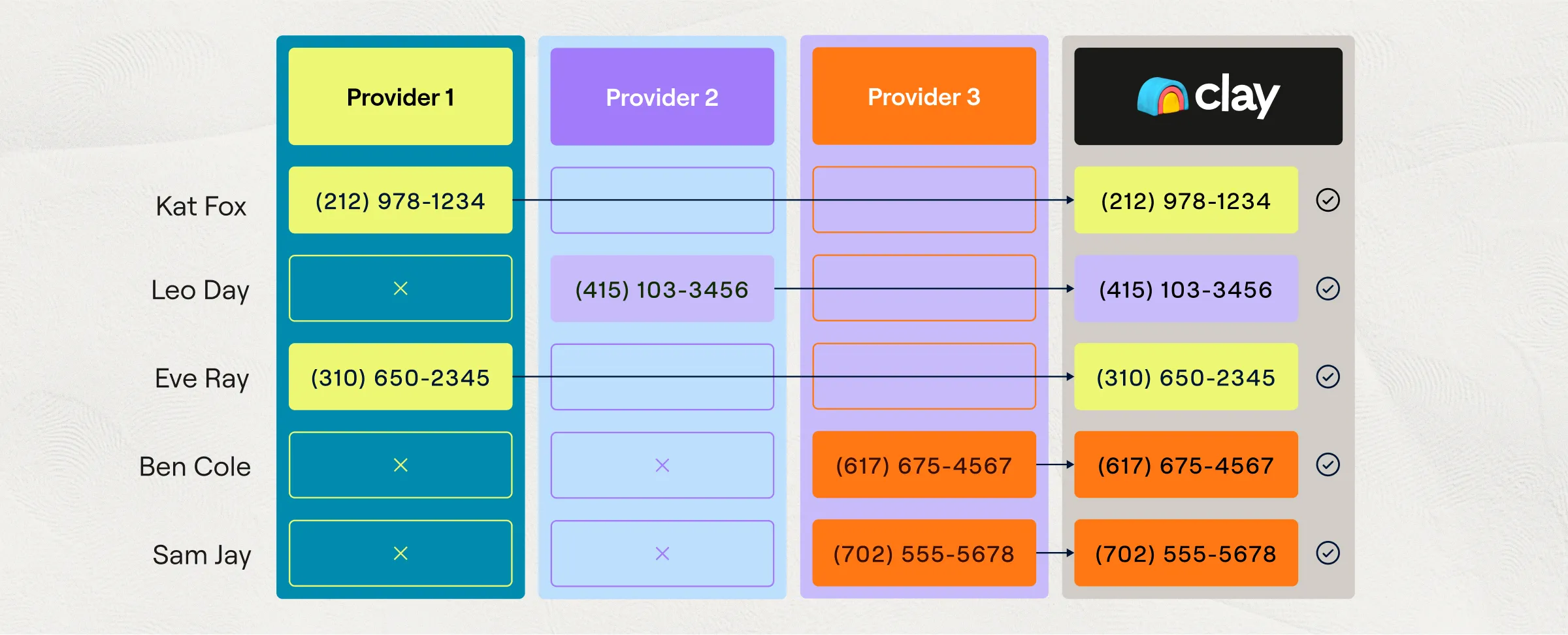
Use Apollo when Salesforce or HubSpot needs conventional contact and account fields from one provider and its coverage passes a representative data test. Use Clay when the accepted value may come from several providers, custom web research, or row-level rules. In either case, enrich into a proposed field patch first. Default to filling approved blanks, never treat a missing provider value as an instruction to clear the CRM, and require review before changing identity, ownership, hierarchy, lifecycle, source, opportunity, or suppression fields.
This workflow begins with records already in a CRM and ends with a verified, reversible write. It does not cover list sourcing or outreach; use automated sales prospecting for that pipeline. Use research target accounts with AI for evidence-backed account briefs, score and prioritize leads with AI after the underlying fields are trustworthy, and sync meeting notes to CRM for call-derived facts and tasks.
Choose the enrichment path by control surface
| Decision | Apollo is the cleaner fit | Clay is the cleaner fit |
|---|---|---|
| Source strategy | Apollo's person and company data is the intended source | Several providers or custom research may supply a field |
| Destination | Direct Salesforce or HubSpot enrichment | Salesforce Audiences writeback, a Clay table action, or a controlled API workflow |
| Field logic | Per-field fill-empty or overwrite rules are enough | Conditions, waterfalls, formulas, and source-specific precedence are needed |
| Review | Operators can select records and fields from Apollo's enrichment diff | Operators need a custom review table with candidate values and provenance |
| Identity complexity | CRM IDs and ordinary lead/contact/account matching are already clean | Cross-source aliases or a custom identity policy must be explicit |
| Operations | One admin can own mappings, sync settings, credits, and exceptions | RevOps can own provider order, actions, data credits, external fees, retries, and write rules |
Neither product is a master-data-management system. Clay's current Audiences documentation says it automatically deduplicates across sources, but Salesforce duplicates are preserved because Salesforce IDs remain distinct. Apollo likewise says Salesforce duplicates can appear in Apollo. Clean or quarantine source-system duplicates before paying to enrich both copies.
1. Define field authority before choosing values
Give each destination field one write policy. “Most recent” is not a policy when the latest value came from a weaker source.
| Field class | Examples | Default rule |
|---|---|---|
| Identity | CRM ID, work email, canonical domain, legal entity, professional profile URL | Match only; never overwrite automatically |
| Human or first-party | owner, lifecycle stage, lead source, opportunity stage, territory, customer status | CRM wins; external enrichment cannot replace it |
| Suppression and consent | email opt-out, do-not-call, legal hold, customer exclusion | CRM or suppression service wins; a blank provider result never clears it |
| Safe additive | industry, employee band, headquarters, technology, social URL | Fill an approved blank when identity is high confidence and provenance is stored |
| Time-sensitive | title, employer, phone, headcount, funding status | Add or replace only under a written freshness and source-precedence rule |
| AI-derived | business-model class, normalized segment, research summary | Write to a separate labeled field with prompt or rule version and evidence |
Keep provider output separate from the accepted CRM value. A practical schema uses candidate_value, candidate_source, source_record_id, retrieved_at, confidence, current_value, current_updated_at, decision, and reason_code. This preserves why a value was accepted without turning the main CRM field into an audit log.
2. Resolve identity before enrichment
Start with the immutable CRM record ID. For people, compare normalized work email and professional profile URL; for companies, compare canonical domain, legal name, and parent or subsidiary context. Redirects, shared domains, agencies, franchises, and acquired brands should route to review instead of falling back to fuzzy company-name matching.
Clay Audiences can match cross-source people by email or professional profile URL and companies by domain. Its configurable import record matching uses an exact alias. Clay also documents that an upsert from a table matches people on email, phone, and professional profile URL and companies on domain and professional profile URL. An unmatched row is created, so a low-confidence match is also a duplicate-creation risk.
Apollo's Salesforce integration generally mirrors the CRM and prefers a Salesforce contact when both a lead and contact represent the same person, but it does not remove broader CRM duplicates. Run duplicate detection first and keep create new record disabled during the pilot. Parent/child relationships need their own review: two companies sharing a brand or root domain are not automatically duplicates.
3. Stage candidates as a preview patch
Do not let an enrichment result flow directly into canonical fields. Build a patch that shows the exact target record, current value, proposed value, source, retrieval time, rule, and action.
{
  "crm_record_id": "001_example",
  "identity": {"status": "matched", "key": "domain:acme.example"},
  "patch": [
    {
      "field": "industry_enriched",
      "before": null,
      "after": "Industrial software",
      "source": "provider_name",
      "retrieved_at": "2026-10-08",
      "action": "fill_empty",
      "reason": "approved provider; destination is blank"
    },
    {
      "field": "employee_band",
      "before": "51-200",
      "after": "201-500",
      "action": "review",
      "reason": "conflicts with an existing human-verified value"
    }
  ],
  "blocked_fields": ["owner_id", "lead_source", "do_not_contact"]
}
This is a hypothetical contract, not a reported product result. In Apollo, manual CRM enrichment exposes current and proposed values for review, though new email and mobile values stay masked until enrichment. Operators can choose individual fields. Its documentation warns that confirming manual enrichment overrides auto-fill, auto-overwrite, and push settings, so the review screen is the final safety gate. In Clay, keep CRM export off while building the review table; Audiences defaults Salesforce scheduled export fields to Never write and offers a mapping preview before import.
4. Treat null, stale, and conflicting values differently
Use four states: value, confirmed absent, unknown, and error. Most enrichment systems return “no value found,” which means unknown. It does not mean the current CRM value is false or should be erased.
- Candidate is null or empty: no-op and record the attempt.
- CRM is blank and candidate is valid: fill only if the field is approved and identity confidence clears the threshold.
- Both values exist and agree after normalization: retain the CRM value and refresh provenance.
- Values conflict: apply the field's precedence and freshness rule or route to review.
- A value must be removed: use an explicit deletion event with reason, actor, and source; never infer deletion from provider silence.
Clay's table-to-Audiences upsert skips blank cells by default, so an empty table cell does not clear the existing Audience value. Apollo says its automatic fill and overwrite rules act only when relevant Apollo data is available. Those product behaviors help, but the workflow should still express null handling explicitly because API actions, manual runs, and future mapping changes can follow different paths.
5. Block conflicts, duplicates, and suppressed records
Recheck safety immediately before writeback, not only when the record entered the batch.
Route a row to review when the CRM record changed after the snapshot, several records match, the parent company is ambiguous, the candidate would change routing, or two sources disagree. Reject the patch when the record is deleted, merged, owned by another protected workflow, attached to an active opportunity under a different account, or globally suppressed.
Suppression fields are monotonic: automation may add a stricter suppression state, but it should not remove one without an authorized event. Apollo can sync a stored do-not-call status between Apollo and HubSpot when DNC screening is enabled, but its documentation says CRM sync does not perform a live DNC check. A synced DNC field is therefore not a substitute for checking the current suppression service before phone use.
6. Write in reversible batches
For every approved batch:
- Save a pre-write snapshot of target IDs, field values, versions, and timestamps.
- Assign a batch ID and idempotency key to every patch.
- Re-read the CRM record and reject patches whose protected fields or version changed after review.
- Write only the approved fields through a least-privilege integration user.
- Read the fields back from the CRM and compare them with the approved patch.
- Keep a compensation file that can restore each prior value; test it on the pilot before scheduling recurring runs.
“Undo” should not depend on rerunning the provider. Provider values change, mappings drift, and the original value may no longer exist outside the snapshot. A rollback is another controlled patch with its own actor, reason, and readback result.
For Clay, use Salesforce Lookup with the CRM ID before Create, Update, or Upsert; Clay's own lesson recommends the lookup to avoid duplicates and fetch current data. Audiences currently documents scheduled writeback to Salesforce. It can import HubSpot, but do not assume the same Audiences writeback path exists for HubSpot without checking the live workspace. Clay CRM exports and syncs consume one Action per record in addition to enrichment Actions and any marketplace Data Credits.
For Apollo, start with manual CRM enrichment, then move accepted fields to scheduled or real-time jobs. Apollo documents Salesforce and HubSpot support, pulls most records every 15–30 minutes, allows up to 1,000 records per manual enrichment selection, and supports weekly or monthly scheduled jobs with a maximum-record limit per run. Field-mapping changes are not retroactive until records change or an admin triggers a full push or pull.
Current price and limit check
Checked October 8, 2026. Recheck the live selector and order form before purchase.
| Product | Verified CRM-enrichment boundary | Pricing or limit caveat |
|---|---|---|
| Clay | CRM auto-sync and enrichment are listed on Growth. The public annual display shows $446/month equivalent, 480,000 Actions/year, and 72,000 Data Credits/year; CRM syncs and each net-new enrichment consume Actions. | Live billing selector: Growth is $495 month-to-month with 40,000 Actions and 6,000 Data Credits/month. Launch starts at $185 monthly with 15,000 Actions and 2,500 Data Credits; the annual starting equivalent is $167/month. Provider/BYOK fees remain separate. |
| Apollo | CRM enrichment works with Salesforce and HubSpot on paid plans. Free teams can enrich up to 100 contacts or accounts every 30 days; manual selection is capped at 1,000 records. Credits apply to real-time and scheduled enrichment. | Live cards show Basic $49/seat/month annually with 30,000 credits/year and Professional $79 with 48,000. Monthly prices are $65/2,500 credits and $99/4,000 credits respectively. CRM enrichment cost is shown before confirmation; do not equate one credit with one accepted CRM field. Cards say Organization while the FAQ says Custom; confirm enterprise terms. |
What practitioner reports add
In an r/salesforce discussion read October 8, 2026, u/Entire_Specialist829 reported losing a week after an enrichment tool silently overwrote lead source, then adding an allowlist, revert flow, and original-value log. Product, volume, and configuration were not disclosed. It is an incident report, not evidence that enrichment tools commonly fail at that rate.
Evaluate accepted fields, not completed rows
Build a stratified set of clean records, known duplicates, subsidiaries, shared domains, stale titles, protected owner and source values, suppressions, and deliberately empty fields. Run the same frozen batch through the preview and writeback path.
Track wrong-record writes, duplicate creation, protected-field changes, null-induced deletions, suppression removals, field-level acceptance, human correction rate, readback failures, rollback completion, accepted fields per 100 provider calls, and total platform plus provider cost per accepted field. Wrong-record writes, duplicate creation, protected-field changes, and suppression removals should remain zero.
We did not connect a production CRM, run a Clay or Apollo enrichment batch, or measure either product's match rate for this guide. The documented workflow is an operating design; the representative pilot supplies the evidence for your data.
Compare the broader category in best AI sales tools and the enrichment stack in best AI sales prospecting tools or the direct Clay vs Apollo comparison.
Sources & further reading
- Clay Audiences documentation
- Clay Salesforce enrichment actions
- Clay Actions and Data Credits
- Clay pricing
- Apollo CRM enrichment documentation
- Apollo HubSpot field mapping
- Apollo HubSpot integration
- Apollo Salesforce integration overview
- Apollo pricing
- Salesforce practitioner report on a silent enrichment overwrite


Ordered for comparison, not as a universal ranking. Inclusion requires a direct fit with this page's stated workflow.