
Tool
Common Room
Common Room review for signal-led GTM teams: 2026 pricing, Person360 identity resolution, workflow limits, privacy questions, and fit.
Verdict
Choose Common Room when a mid-market or enterprise GTM team already has meaningful product, website, CRM, community, and social signals but cannot join them to people and accounts or route the next action consistently. Its value is the connection between identity resolution, scoring, research, and activation. At a $30,000 annual entry price, it is an expensive way to discover that your signal volume is thin. Pilot with known accounts, measure correct person/account matches, and prove that reps act on qualified signals before expanding sources or automation.
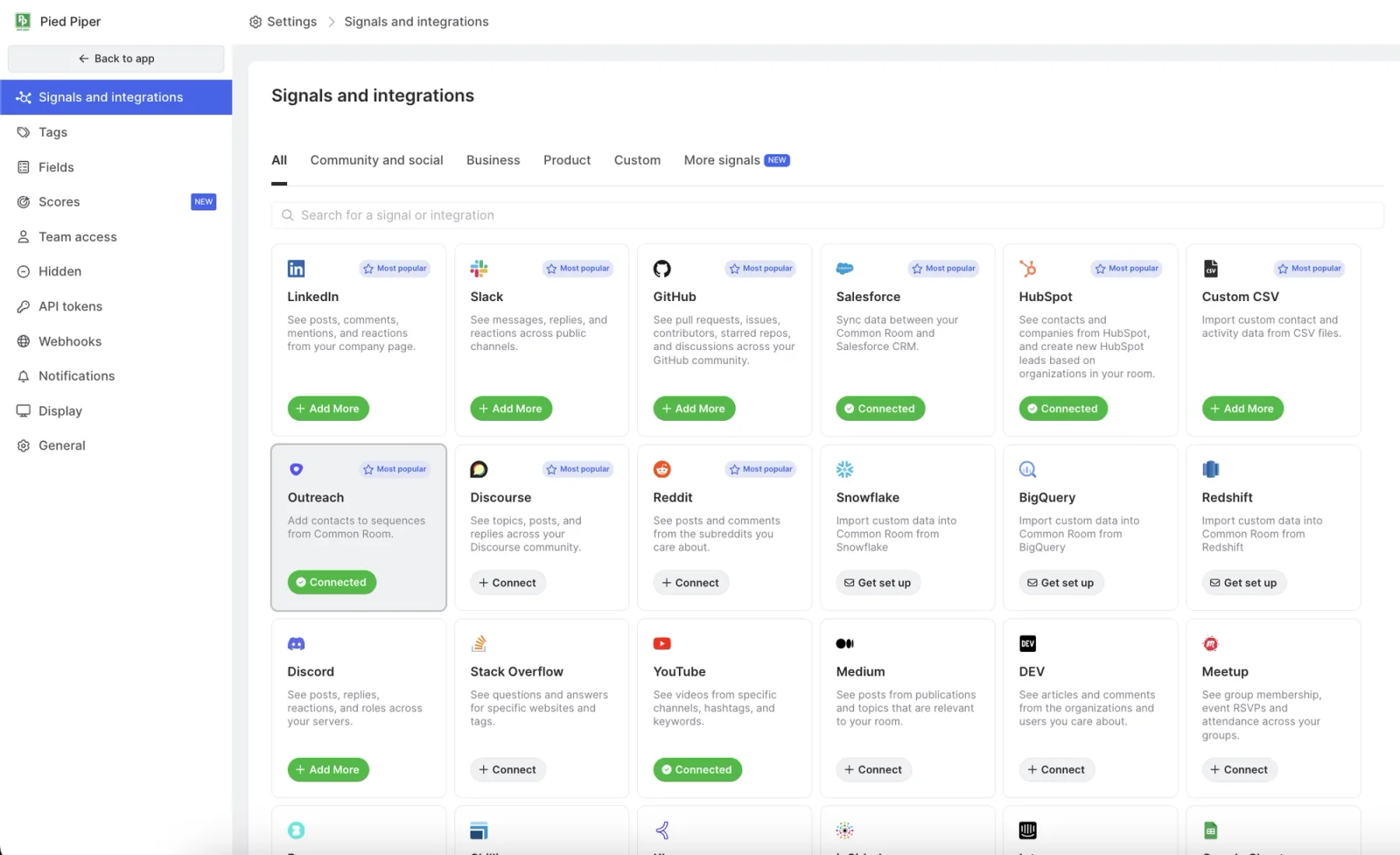
Common Room is a buyer-intelligence and GTM orchestration platform. It connects first-party and external activity, resolves that activity into contact and organization profiles, scores and segments those profiles, and routes work into alerts, CRM records, sales-engagement sequences, workflows, or AI clients. It now operates as Common Room by Zoom after Zoom Communications closed the acquisition on July 17, 2026. Do not confuse that parent company with ZoomInfo.
Start with the AI sales tools guide for the wider stack decision and the sales prospecting shortlist for pre-opportunity tools. Compare Clay when you want a configurable enrichment and research workbench. Compare Apollo when the priority is a packaged prospect database plus outbound execution at a much lower public entry price.
Buyer-intelligence decision criteria
| Decision | Common Room is a fit when | Validate in a pilot |
|---|---|---|
| Signal readiness | Your buyers leave useful traces across product, website, CRM, community, social, calls, or intent sources | Replay 20 known opportunities and 20 known false positives; check whether the connected sources reveal a timely, explainable reason to act |
| Identity resolution | Multiple identifiers and activities need to become one person and account view | Audit merges, proposed merges, current employer, account domain, duplicate rate, and unknown-person rate across each priority segment |
| Rep action | Scores and signals should create a review queue, alert, CRM update, or sequence step | Name an owner and response SLA; measure qualified actions, accepted contacts, and suppressed mistakes rather than alert volume |
| Stack position | CRM remains the system of record while Common Room becomes the decision and orchestration layer | Test field precedence, ownership, create/update rules, failed syncs, deletion, and whether activity needed by sellers actually writes back |
| Economics | A five-seat platform can replace enough signal, enrichment, research, and routing work to justify $30,000 a year | Model contact ceiling, research credits, Prospector actions, website events, phone enrichment, add-ons, implementation, and destination licenses |
| Governance | Legal and security teams can approve prospect data, website tracking, AI processing, and connected-system access | Review the signed service agreement and DPA, subprocessors, retention, deletion, opt-out handling, SSO entitlements, and AI data-use terms |
Current pricing and published limits
The pricing page was checked October 9, 2026. Essential is the only tier with a public dollar price: $2,500 per month billed annually, or $30,000 for the year. Advanced and Enterprise require quotes.
| Plan | Public price | Included scale | Published usage allowances |
|---|---|---|---|
| Essential | $2,500/month, billed annually | 5 seats; up to 100,000 contacts; shared customer-success manager | 5,000 RoomieAI research credits; 2,500 Prospector credits |
| Advanced | Custom | 15 seats; up to 250,000 contacts; dedicated customer-success manager | 7,500 RoomieAI research credits; 7,500 Prospector credits |
| Enterprise | Custom | 30 seats; up to 750,000 contacts; dedicated customer-success manager | 10,000 RoomieAI research credits; 15,000 Prospector credits |
All three plans list unlimited alerts, workflows, and segments. The comparison table presents product-signal integration, recurring exports, DataAgent actions, and some export capabilities as add-ons or higher-tier differences. It does not publish overage rates, credit reset or rollover rules, implementation fees, contract minimums beyond annual Essential billing, or a universal action-cost schedule.
There is also a first-party documentation conflict worth resolving in writing. The current pricing page includes Prospector credits at every tier, while the Prospector guide says search is included but adding, syncing, pushing, or enriching Prospector records requires the Prospector add-on. The same guide describes the underlying database as both more than 400 million and more than 200 million profiles. Database-size claims are therefore excluded from this verdict. Ask the order form to define which actions consume a credit, what the base package activates, and what happens at the limit.
Where Common Room earns its place
The platform is strongest when a team has fragmented evidence, not merely a need for more names. Person360 is designed to merge CRM data, product usage, website visits, community activity, social profiles, and other connected signals into unified contacts. Organizations aggregate the people and activity around an account. Teams can then create custom scores, tags, segments, alerts, and workflows from that combined context.
Prospector extends the workflow to people who are not yet in the workspace. Searches can start from account criteria such as industry, revenue, geography, technology, news, and hiring, then narrow to role, title, and seniority. A workflow can add matching contacts to an organization, and supported actions can send contacts to Apollo, Outreach, HubSpot, or Salesforce. Enrichment does not guarantee a verified email, and premium phone data has its own allowance.
Common Room's hosted MCP server exposes contact, account, activity, segment, research, and write operations to compatible AI clients. Writes use the connected user's OAuth permissions and workspace role controls. That is useful for account research and list building inside an AI client, but it expands the review surface: test upsert matching, write permissions, auditability, and downstream field ownership before letting prompts create production records.
Operational limits matter more than the signal count
Not every workflow is instant. Common Room's workflow documentation says recurring contact and organization checks run every four hours, while Prospector workflow additions run daily. Event triggers and alerts follow different paths. Map each important play to its actual trigger and latency instead of buying from a generic “real-time signals” promise.
CRM behavior also needs field-level testing. The current Salesforce guide documents bidirectional field sync and lead/contact creation, but distinguishes importing Salesforce activity from exporting Common Room activity: the latter cannot be synced out as Salesforce activity. Reps may still need the Common Room link, mapped summary fields, or a separate workflow to see the context they expect inside CRM.
Identity resolution is probabilistic. Common Room proposes uncertain profile merges for an administrator to review rather than treating every match as certain. That safeguard is useful, but it creates an operating queue. Measure false merges, missed merges, stale employment, and contacts with no usable email or phone. A score built on a wrong identity is still wrong, only tidier.
Use lead scoring and prioritization to define the review gates, account research to structure evidence, and CRM enrichment to plan safe field writes.
Privacy and data boundaries
Common Room's public privacy notice explicitly says it does not govern Customer Data processed for customers; that processing is controlled by customer contracts. The notice also says providing Prospector business-contact information may count as a sale under the CCPA. Review the signed subscription agreement and DPA rather than using the public website notice as a proxy for customer-data terms.
Website tracking uses first-party cookies. Common Room documents a user identifier that lasts one year and refreshes on visits, plus a 30-minute session identifier. Known-person identification can come from a form, login, or tracked email link; company identification can use an IP address. Common Room does not supply the consent banner, so the customer must integrate the script with its own consent and disclosure controls. The vendor says IP addresses are stored temporarily for matching, but buyers should still document the lawful basis, covered pages, identity calls, retention, suppression, and regional configuration.
The September 2026 subprocessor list names OpenAI and Anthropic for content analysis, categorization, summarization, and generative AI processing in the United States, plus several enrichment providers. Public pages reviewed here did not establish customer-specific AI retention or model-training terms. Ask for those commitments in the contract and AI documentation.
Common Room documents admin-controlled contact deletion with a recovery window before permanent removal. A deleted contact can be recreated as a new record when it remains in a connected source, so deletion also requires suppression or removal upstream. The vendor's security page states encryption in transit and at rest, SOC Type 2, role-based access, SSO, SAML, and SCIM support; confirm which controls are included in the purchased tier and request the underlying reports during diligence.
What users report
In a June 20, 2025 G2 review, Darren K., a business-development representative whose review is marked validated, current user, and organic, liked live website-visitor updates. He also reported cases where Common Room could not identify the person and where phone numbers or emails were missing. That is a useful pilot metric: count contacts that are both correctly resolved and reachable, not visitors surfaced.
We did not use a Common Room account, measure its identity-match rate, test its integrations, or attribute pipeline to its signals for this profile. Vendor case studies and outcome percentages were excluded from the verdict.
Choose Common Room after a replay test proves three things: it resolves your high-value activity to the right people, the resulting reason to act is specific enough for a seller to trust, and the team has an owned path from signal to reviewed action. If the first problem is simply finding contacts, start with Apollo. If the team wants to assemble and control its own provider and research logic, start with Clay.
Sources & further reading
- Common Room plans, prices, credits, and limits
- Common Room core concepts and Person360
- Common Room Prospector availability and limits
- Common Room workflows, triggers, conditions, and actions
- Common Room Salesforce integration behavior
- Common Room website tracking privacy FAQ
- Common Room contact deletion documentation
- Common Room MCP server documentation
- Common Room privacy notice
- Common Room security and trust
- Common Room subprocessors
- Common Room and Zoom product status
- Zoom acquisition announcement
- Zoom Form 10-Q confirming acquisition close
- Common Room user reviews on G2