Use case
Automate Sales Prospecting with AI (2026)
Build a controlled AI sales-prospecting workflow for sourcing, enrichment, qualification, approval, sequencing, CRM writeback, and cost control.
Verdict
Use Apollo alone when the job is a direct database-to-sequence motion and its data performs well on your actual segment. Add Clay when the prospect must pass multi-provider enrichment, custom web research, or qualification logic before a rep sees it. Keep humans responsible for the ICP, evidence policy, suppression rules, first production sends, and interested or ambiguous replies.
The useful automation is a controlled record pipeline: source → normalize → exclude → enrich → qualify → approve → enroll → route → measure. AI may research and classify inside that pipeline. It should not silently invent a reason to contact someone, override CRM ownership, or decide that an ambiguous reply is safe to continue.
This guide is about operating that pipeline. Use research target accounts with AI when the hard part is source-grounded account research, and personalize cold emails with AI when the account list is already qualified and message evidence is the bottleneck. For product selection, compare the focused AI sales prospecting tools, the broader AI sales tools guide, or Clay vs Apollo.
We did not run a contact-accuracy, deliverability, reply-rate, or cost benchmark. Product facts and public prices were checked October 6, 2026; community reports below are attributed anecdotes.
Pick one operating model
| Model | System job | Choose it when | Main control burden |
|---|---|---|---|
| Apollo only | Search people and companies, reveal data, qualify, and enroll in multichannel sequences | One database covers the ICP well enough and reps need a short path from search to action | Shared credits, segment-specific data quality, sequence rules, mailbox health, and suppression |
| Clay → CRM or existing sequencer | Combine owned data, providers, research, scoring, and routing | A custom signal or provider mix decides who deserves outreach | Provider order, conditional runs, prompts, two Clay meters, external provider charges, and writeback logic |
| Apollo → Clay → Apollo | Source broadly in Apollo, qualify or enrich selectively in Clay, execute in Apollo | Apollo is a useful source and rep surface, but a smaller subset needs waterfall or custom research | Duplicate prevention plus Apollo credits, Clay Actions, Clay Data Credits, and two-way status ownership |
Do not add Clay because the stack diagram looks sophisticated. If title, geography, industry, and company size are sufficient—and an Apollo sample passes—Apollo alone is simpler. Do not force Apollo to carry a differentiated research process that depends on several providers or facts absent from ordinary database filters.
1. Turn the ICP into record states
Define hard fields before generating a list. A compact schema is enough:
| Field | Required rule |
|---|---|
account_key | Normalized domain or CRM account ID |
contact_key | CRM contact ID, or normalized work email after verification |
fit_state | pass, fail, or review; never a hidden model score alone |
fit_reasons | Structured rules that passed or failed |
timing_signal | Event, source URL, observed date, and expiry date |
contact_status | unverified, verified, risky, or missing |
suppression_state | Global opt-out, customer, open opportunity, competitor, do-not-contact, or clear |
workflow_state | sourced, qualified, approved, enrolled, replied, stopped, or failed |
evidence | Source URL, excerpt or field, retrieved timestamp, and confidence |
Keep fit and timing separate. A company can match the ICP without a defensible reason to engage this week. Require review when evidence conflicts with the CRM, the source is stale, or the model cannot cite the decisive fact.
Apollo people search combines person and company filters and applies AND across filters and OR within a filter. Use that behavior deliberately: title plus geography plus company criteria should narrow the set; several acceptable titles inside one title filter should broaden it. In Clay, normalize and exclude before any paid research step.
2. Run cheap gates before expensive work
Use this order for every batch:
- Import or search account candidates; do not reveal every contact yet.
- Normalize domain, company name, geography, and CRM identifier.
- Reject customers, active opportunities, competitors, unsupported regions, personal domains, and global suppressions.
- Apply cheap firmographic rules.
- Find only the required personas, with a maximum number of contacts per account.
- Verify the chosen channel.
- Run AI or web research only for surviving records.
- Recheck suppression immediately before CRM writeback and sequence enrollment.
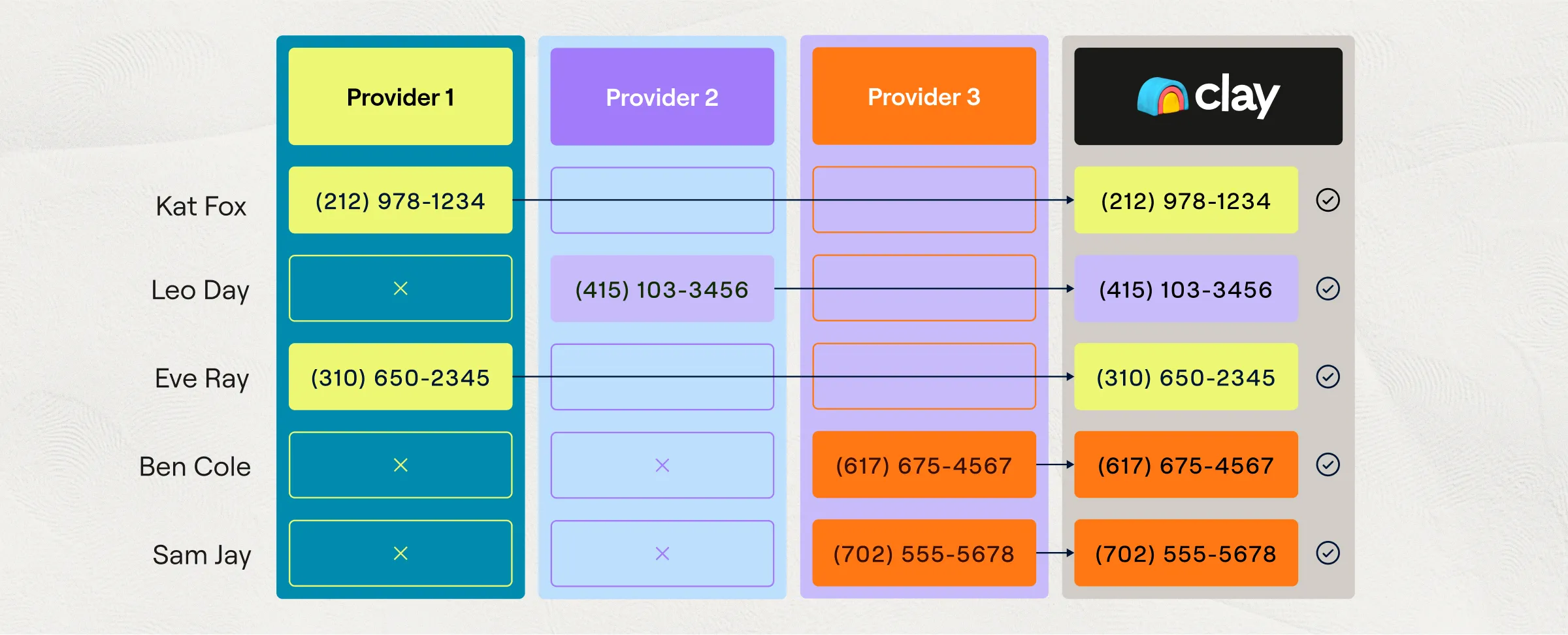
Clay documents three useful spend controls: keep Auto-run off while building, test a new enrichment on about 10 rows, and use Only run if conditions so disqualified rows never reach paid enrichments. A waterfall can order providers, skip a step, retain the successful provider, and stop duplicate work. The illustration above explains that mechanism; it does not prove better coverage in your market.
Apollo can cap contacts per company during bulk selection. Its data-request documentation says net-new verified email access and any net-new phone access consume credits. If an Apollo-verified email is requested and then bounces in an Apollo send within 30 days, Apollo says the credit is refunded in the next billing cycle; mobile-number credits are not refunded. Treat that policy as a billing rule, not an accuracy guarantee.
3. Keep research output auditable
Do not ask one prompt to decide fit, invent a pain point, and draft copy. Make research return structured fields first:
{
  "fit_state": "pass | fail | review",
  "fit_reasons": [{"rule": "...", "result": "..."}],
  "timing_signal": "...",
  "evidence_url": "https://...",
  "evidence_date": "YYYY-MM-DD",
  "confidence": "high | medium | low"
}
Block the row when the evidence URL is missing, the observed fact does not support the conclusion, or the source predates the signal's expiry policy. A model summary is not evidence; it is a transformation of evidence.
The Claygent composite above shows a vendor-designed account-research flow from prompt and row inputs to structured output. Use it as an interface example. For a full research protocol—source priority, conflict handling, freshness, and citations—follow the separate target-account research workflow.
4. Approve before production enrollment
Start with approval on every prospect. The reviewer should see the target account, contact, fit rules, timing evidence, source link, proposed angle, suppression result, owner, destination sequence, and estimated usage cost. Rejection reasons should be selectable: wrong account, wrong persona, stale evidence, unsupported claim, bad channel, duplicate, suppressed, or wrong owner.
Move to sampled review only after a representative pilot clears written thresholds. Keep mandatory approval for low-confidence evidence, new segments, new prompts, new providers, regulated audiences, executive contacts, and any record with a CRM conflict.
Apollo sequences support automatic email plus manual email, phone, LinkedIn, and custom-action tasks. Manual tasks must be completed or skipped before the contact advances. Review sequence messaging, sending schedule, and ruleset before activation. Apollo documents that deactivating a sequence clears pending scheduled emails and tasks; reactivation creates future work from each contact's current state rather than restoring the old queue. Record that behavior in the rollback runbook.
5. Make cost a preflight check
Current public self-serve pricing differs enough that “credits per lead” is misleading.
| Product and plan | Public price checked Oct. 6, 2026 | Prospecting-relevant allowance or limit |
|---|---|---|
| Clay Free | $0 | 500 Actions + 100 Data Credits/month; unlimited seats and tables; 200 rows/table |
| Clay Launch | $185 month-to-month; $167/month equivalent billed annually | 15,000 Actions + 2,500 Data Credits/month; 50,000 rows/table; phone enrichment, signals, and campaign integrations |
| Clay Growth | $495 month-to-month; $446/month equivalent billed annually | 40,000 Actions + 6,000 Data Credits/month; CRM sync, HTTP API, webhooks, web intent, and priority support |
| Apollo Free | $0 | 900 credits/seat/year, granted monthly; 2 sequences/team; 25-record selection limit |
| Apollo Basic | $49/seat/month billed annually | 30,000 credits/seat/year, granted upfront; unlimited sequences; 1,000-record selection limit |
| Apollo Professional | $79/seat/month billed annually | 48,000 credits/seat/year, granted upfront; unlimited sequences with A/Z testing; 2,500-record selection limit |
Clay has two meters. Actions cover platform work such as net-new enrichment, AI runs, signals, exports, and sequence enrollment; Data Credits buy marketplace data or AI. Actions do not roll over. Monthly Data Credits can accumulate up to twice the monthly limit. Bringing your own provider key removes Clay's Data Credit charge for that call, but the Action and external-provider bill remain. One-time Data Credit top-ups carry a 30% premium.
Apollo pools credits across the team and says unused credits do not roll over. Email, phone, enrichment, AI research, waterfall enrichment, some API activity, exports, and other features can draw from credits depending on the plan and configuration. Apollo's current AI Research documentation says each record × output column costs one credit: 100 contacts researched into three columns uses 300 credits. Preview and reduce the record or column count before scaling. For other actions, the public pricing table and authenticated account are the source of truth for the current rate. Track usage by feature, user, and surface; the credit dashboard pictured above is documentation example data.
Before each run, calculate:
maximum variable cost = candidate rows × sum(maximum cost of each permitted step) + separately billed provider costs
Price each step in the same currency and avoid counting a provider charge twice. Track included Action and credit capacity separately from that money estimate. Then set both a row ceiling and spend ceiling. Stop when either is reached. Do not let automatic top-ups substitute for a campaign budget.
6. Make writes idempotent and replies authoritative
Use an idempotency key such as campaign_id + crm_contact_id; if no CRM contact exists, use campaign_id + normalized_email. A retry updates the same activity instead of creating another contact or enrollment.
Define one owner for every field. The CRM should usually own account status, human owner, opportunity state, and global suppression. The prospecting layer can own research provenance, score version, provider result, and campaign state. Reject a write when the source version is older than the CRM value or when the record changed after approval.
Any reply should pause automated sending until classified. Positive, negative, referral, wrong-person, unsubscribe, out-of-office, and ambiguous are different states. Unsubscribe updates the global suppression list before any other action. An interested or ambiguous reply routes to a human with the original evidence and message history.
Controls to prove before launch
| Failure injected | Required behavior |
|---|---|
| Customer or active opportunity appears in source list | Removed before enrichment and again before enrollment |
| Evidence URL is blank or contradicts the model summary | review; no draft or enrollment |
| Same event arrives twice | One CRM activity and one sequence enrollment |
| CRM owner changes after approval | Write rejected or routed to new owner |
| Auto-run receives an accidental import | Paid columns remain stopped during build mode |
| Provider or CRM credential fails | Row moves to failed; alert includes stage and retry key |
| Credit or row ceiling is reached | Batch stops without auto-expanding scope |
| Contact unsubscribes through another campaign | Global suppression blocks every future enrollment |
| Sequence is deactivated mid-run | Pending work clears; operators know reactivation does not restore the previous queue |
What operators report
In a February 2026 r/revops thread, u/ihatejackblack234 described Clay as more adaptable than a fixed database for specific workflows, while warning that expensive waterfall sources can consume credits quickly. In the same discussion, u/opsjamonquemando said provider selection for the team's ICP was the real learning problem and declined to predict yield.
Product Hunt reviewer @rabnoor_s reported daily use and valued having data and sending in one place. The same review reported thinner coverage outside technology and smaller consumer brands, volume-oriented defaults, and reporting that showed outcomes without enough diagnostic guidance.
These reports explain why provider testing, spend controls, and segment-specific acceptance criteria belong in the workflow. They do not establish typical accuracy, cost, deliverability, reply rate, or return on investment.
Pilot acceptance criteria
Run one segment through 50–100 prospects before scaling. Define the threshold before seeing results:
- percentage of sourced accounts that pass the written ICP rules;
- percentage of selected contacts with current role and accepted channel status;
- percentage of research records with valid, current, supporting evidence;
- percentage of approved drafts needing factual correction;
- duplicate, suppression-leak, and wrong-owner counts—target zero;
- Actions, Data Credits, Apollo credits, external fees, and operator time per approved prospect;
- positive, negative, unsubscribe, bounce, and ambiguous reply rates by source and sequence.
If those numbers cannot be reproduced from record-level logs, the team has automated activity rather than built a prospecting system. Fix state transitions and evidence capture before adding volume.
Compare the next purchase
- 11x vs Artisan: managed autonomous outbound, copy approvals, human calling, and contract capacity.
- Regie.ai vs Lavender: prospecting execution versus draft coaching, with Ora evaluated separately.
Related sales workflows
Related product evaluations: HubSpot Breeze for AI inside an existing HubSpot CRM.
The Amplemarket evaluation covers a consolidated data-to-sequence implementation, including separate credit pools and conflicting documentation about MCP launch controls. Verify those controls before granting an AI client access to production audiences.
For call-heavy execution, evaluate Nooks against useful conversations, cancelled pickups, bridge delay, and rep time per outcome.
Related comparisons
Sources & further reading


Ordered for comparison, not as a universal ranking. Inclusion requires a direct fit with this page's stated workflow.