Use case
Sync AI Meeting Notes to Your CRM (2026)
A practical setup for turning sales calls into structured CRM notes, tasks, and deal fields without duplicates, bad associations, or unchecked AI updates.
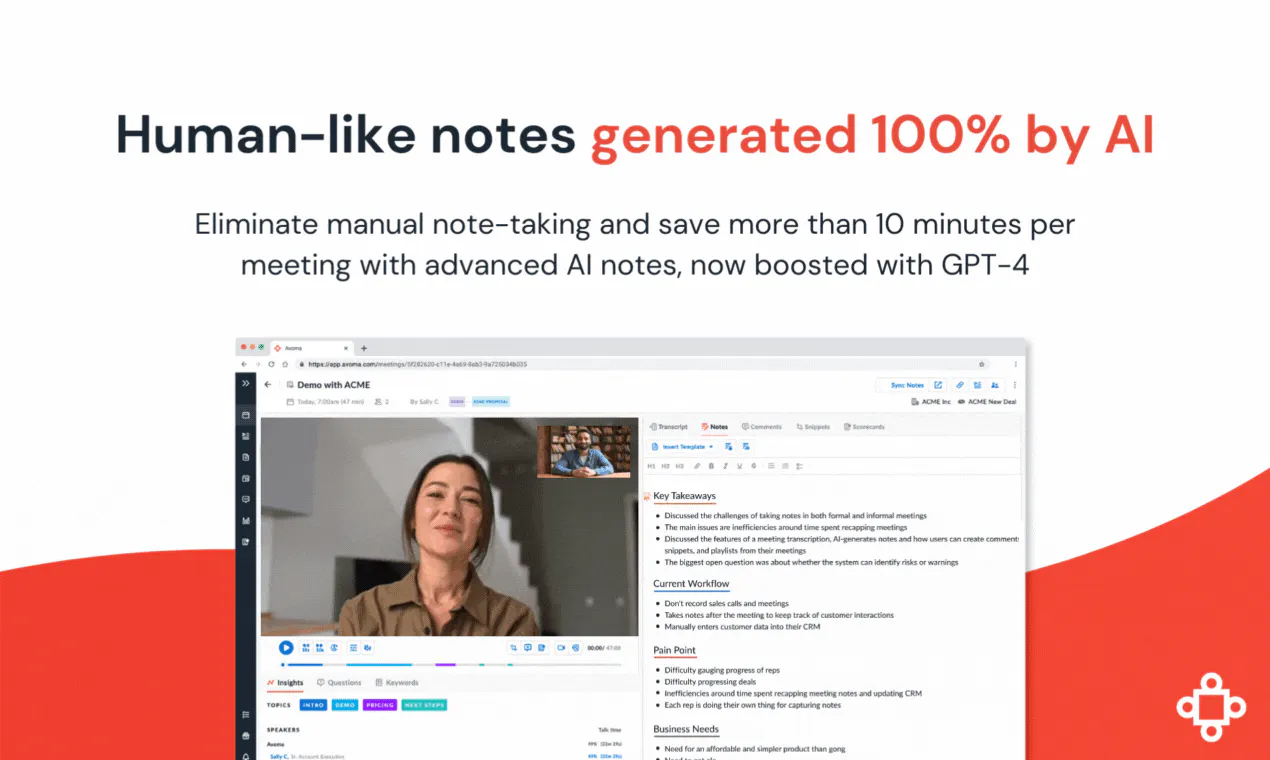
The dangerous version of meeting-note automation is “record everything and dump the summary into Salesforce.” It creates noisy timelines, mismatched deals, duplicate tasks, and confident updates that nobody reviewed.
A reliable workflow separates five jobs: capture the right meeting, extract a predictable schema, associate it with the right records, review risky changes, and verify the write. The recorder is only one component.
Use the 2026 meeting note-taker shortlist to compare capture products and the AI sales tools shortlist when conversation intelligence and pipeline inspection matter beyond note sync.
Choose the CRM result before choosing the tool
Define what should exist after a customer call:
| Output | Recommended CRM destination | Automation level |
|---|---|---|
| Recording + transcript link | Meeting activity or note | Automatic |
| Short factual recap | Note or event description | Automatic after pilot |
| Action item with owner/date | Task | Review if owner or date is uncertain |
| MEDDICC/SPICED fields | Deal properties | Human approval initially |
| Stage, amount, close date | Opportunity/deal fields | Always gated unless rules are deterministic |
Do not store a full transcript in a small CRM text field. Keep the source recording in the meeting system and write a durable link, compact summary, and structured facts to the CRM.
1. Control which meetings enter the workflow
Use calendar identity and external attendees to scope capture. Exclude internal stand-ups, recruiting calls, legal conversations, personal events, and sensitive accounts unless policy explicitly includes them. Give hosts a visible way to disable capture for one meeting.
The attendee list is also the primary association key. Calendar hygiene therefore affects CRM hygiene: an uninvited participant or manually launched recorder may not provide the email needed to match a contact. Read AI’s Salesforce documentation, for example, says auto-push depends on external participants from the connected calendar event. Grain similarly notes that a desktop recording must match a calendar event or have participants added manually.
Consent and retention rules vary by jurisdiction and company policy. Decide who gives notice, where recordings live, how long they remain available, and how deletion propagates before enabling organization-wide auto-join.
2. Standardize the note schema
A generic summary is readable but difficult to operate. Create separate templates for discovery, demo, onboarding, renewal, and support escalation. Keep the output fields stable:
- outcome and customer goal;
- current process and pain;
- decision criteria and named stakeholders;
- objections, risks, and competitors;
- commitments with owner and due date;
- exact evidence or timestamp for consequential claims;
- explicit
unknownwhen the call never established an answer.
Avoma is strong when different call types need structured Smart Categories and revenue workflows. Fathom offers direct CRM logging plus tasks, with deeper deal-field mapping on higher team plans. Fireflies exposes detailed rules for notes, transcripts, tasks, events, accounts, and opportunities. Grain combines recording, clips, custom summaries, and HubSpot property mapping. Read AI syncs reports to HubSpot and Salesforce and can use a chosen report template. Gong is the broader revenue-intelligence choice when conversation data must also support coaching, deal inspection, and forecasting.
3. Match the meeting to CRM records conservatively
Use the external attendee email to find an existing contact or lead, then derive account and open opportunity associations. If multiple opportunities match, do not let a model silently choose. Route the ambiguity to the host or RevOps queue.
Default new-contact creation to off during the pilot. Otherwise vendors, partners, candidates, and consultants can become sales leads. Fireflies and Read both expose settings that can create records when no match exists; that can be useful, but only after domain exclusions and ownership rules are proven.
Association logic is not identical across vendors. Gong documents configurable CRM association rules and recommends testing them before production. Fathom places HubSpot summaries under meeting events and links calls to deals. Grain’s HubSpot automation only syncs meetings shared to the workspace. These details determine whether a technically successful sync lands somewhere reps can find.
4. Add review at the point of consequence
Allow automatic writing of low-risk artifacts: meeting timestamp, participants, recording URL, and a clearly labeled AI recap. Gate anything that changes pipeline state, forecasts, customer commitments, or rep accountability.
The reviewer should see the proposed value beside the supporting transcript excerpt or timestamp. Approval should edit and publish in one step; a review queue that makes reps copy text manually defeats the automation.
Grain supports a “Require review” option for mapped HubSpot property updates. Avoma recommends piloting CRM mappings with a small group. Even where a vendor permits immediate writes, start with review and measure corrections by field. A 2% error rate may be acceptable for summaries and disastrous for close dates.
Reddit user u/spcakes93 described one dense product-meeting summary as “dense and unruly”. That is a reminder to test real, messy calls rather than clean demos. Summary quality changes with jargon, accents, interruptions, and meeting type.
5. Make writes idempotent and observable
Store a stable meeting ID on the CRM activity. A reprocessed transcript or edited summary should update that record, not create another note. Keep timestamps for capture completion, extraction, approval, and CRM sync.
Log these outcomes separately:
- captured but no CRM match;
- matched to multiple records;
- extraction missing required fields;
- waiting for approval;
- CRM write rejected by permissions;
- write succeeded and was read back;
- source meeting later deleted.
Use a dedicated integration user where the vendor recommends it. Gong explicitly advises this because deactivating the employee who authorized the connector can disconnect the integration. Dedicated identity also makes audit logs and permission boundaries clearer.
Failure modes worth seeding
Test an internal-only meeting, two contacts with the same domain, two open deals, an attendee absent from the invitation, an edited summary, an expired OAuth token, and a deleted recording. Confirm the workflow produces an alert or review task—not a silent gap.
Also test field length, rich-text formatting, timezone conversion, private-meeting behavior, and duplicate calendar events. Avoma warns that Salesforce Enhanced Notes must be enabled for its notes sync; configuration prerequisites like that are easy to miss in a happy-path demo.
Verification checklist
Run a 20-call pilot across at least three meeting types. For every call, verify the recording belongs to the correct account, the summary uses the intended template, tasks have real owners, and CRM edits match the source. Track association accuracy, fields corrected per call, time to availability, sync failures, and rep adoption.
The workflow is ready when a rep can open the account record and trust what happened, what was promised, and what happens next—without opening six duplicate notes or treating generated prose as ground truth.
Compare Outreach vs Salesloft: sequence governance, seller task prioritization, agent limits, and forecast integration.
Related sales workflows
- CRM enrichment with reviewed field changes.
- Sales-call risk analysis.
- Post-meeting sales follow-ups.
Sources & further reading


Ordered for comparison, not as a universal ranking. Inclusion requires a direct fit with this page's stated workflow.