
Tool
Cline
Choose Cline for an open-source coding-agent harness with model choice. Compare its IDE, CLI, Desktop, approvals, inference costs, and privacy boundary.
Verdict
Cline is a strong choice when you want one open-source agent harness while retaining model and billing choice. Its IDE extension keeps proposed file and command actions visible; its CLI, Desktop, SDK, and Kanban surfaces extend the same system into automation and parallel work. Choose it if you will actively configure providers and permissions. Skip it when you want one predictable bundled allowance, uniform controls across every surface, or a fully managed issue-to-PR service.
Cline can read repositories, edit files, run terminal commands, browse, and call MCP tools. The differentiator is the boundary around the agent: its open-source extension and CLI are free, while inference can come from Cline credits, a ClinePass subscription, your own cloud API key, or a local model.
Compare the wider market in the best AI coding agents guide. For narrower alternatives, see Aider, OpenCode, and Claude Code.
Choose the surface by job
| Surface | Best fit | Decision boundary |
|---|---|---|
| IDE extension | Interactive edits with visible approvals and editor diffs | VS Code-compatible builds are open source; JetBrains licensing needs separate checking |
| CLI | Terminal, scripts, JSON output, CI, and scheduled runs | Current CLI docs list global auto-approval as on by default; use command allow/deny rules and an isolated branch |
| Desktop | Parallel sessions and recurring tasks outside an editor | macOS and Windows only; Windows is beta; current positioning emphasizes open-weight models |
| SDK or Kanban | Embedded agents or several worktree-isolated tasks | You own integration, credentials, review, and operational controls |
Desktop is therefore an additional orchestration surface, not a replacement for the extension or CLI. ClinePass is a provider available across surfaces, not the price of the client.
Cost and provider boundary
Cline’s pricing page lists the open-source extension and CLI at $0. Model use is separate. Cline’s usage-billing option sells prepaid credits for supported models; BYOK sends requests under the selected provider’s billing; local runtimes shift cost to your hardware. ClinePass costs $9.99 per month for a changing set of open coding models and meters usage across rolling five-hour, weekly, and monthly limits. It is not unlimited.
Enterprise pricing is custom and adds centralized billing, SSO, provider restrictions, roles, audit logs, and support. JetBrains is awkwardly documented: the pricing page places it under Enterprise, installation docs present it as a normal IDE path, and the published evaluation license permits 30 days of internal non-commercial evaluation while prohibiting production use. Confirm entitlement with Cline before a production rollout; there is no public standalone JetBrains price.
Approval and recovery controls
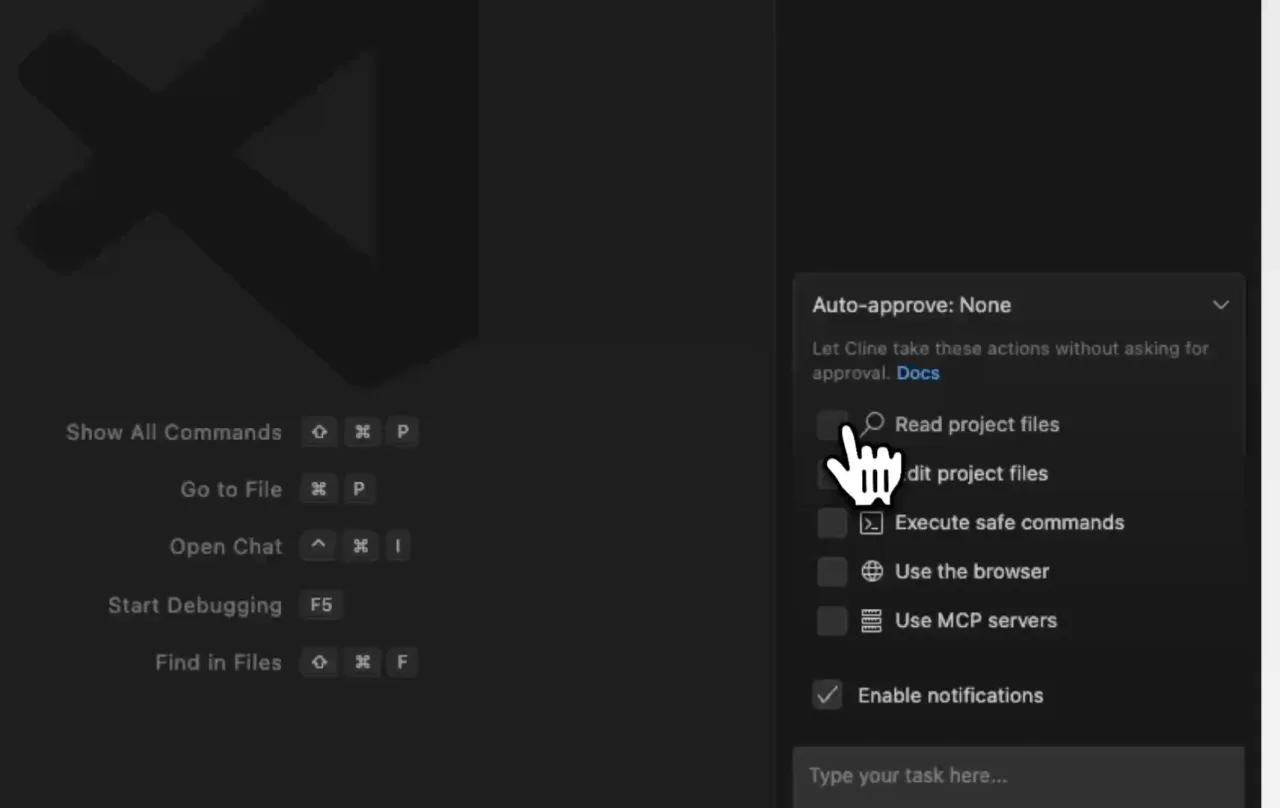
The IDE extension can require approval for each action or auto-approve selected categories: project or all-file reads and edits, “safe” or all terminal commands, browser use, and MCP servers. “Safe” is model-classified rather than a fixed command allowlist. YOLO mode approves everything, including commands and writes outside the workspace, so reserve it for disposable environments.
Plan mode can inspect and discuss without editing or running commands. Checkpoints are enabled by default and use a shadow Git repository to compare or restore files and conversation state. They are useful recovery, but not containment: external side effects, credentials, network calls, and pushed commits may not be reversible. Large repositories can also incur checkpoint storage and speed overhead.
For unattended CLI work, use a clean branch or container, explicit timeouts, narrow provider credentials, and CLINE_COMMAND_PERMISSIONS allow/deny patterns. Review the complete diff and rerun tests independently. The issue-to-PR workflow provides a stricter evidence path.
Privacy and data handling
With your own API keys and model calls routed through infrastructure you control, Cline says it does not receive or store prompts, outputs, or code. The chosen model provider still receives the request under its own terms. With Cline-provided keys or credits, Cline collects user content to route it to third-party model providers; its privacy notice warns those providers may train on content unless an available opt-out is used.
That makes “local client” an incomplete privacy claim. Check the provider route, training policy, retention, telemetry choice, MCP servers, browser access, and any account or website data separately. Enterprise VPC or self-hosted inference changes the transport boundary, but requires configuration and contract review.
Limitations and community signals
Provider freedom creates setup and cost complexity. Model capability, context behavior, caching, rate limits, and price all vary, so a Cline comparison is partly a provider comparison. Long agent loops can spend quickly even though the client costs nothing.
In an open GitHub discussion, viktor-ferenczi reported that routine ls, jq, parsing, linting, and test commands repeatedly blocked daily work and requested regex-based auto-approval. Current IDE docs still describe model-classified command safety, while the CLI documents explicit environment-based allow/deny patterns. In another open discussion, fastfret888 documented that external Hub clients lacked a supported public provider/model discovery API and had to use defaults, literal IDs, or private plumbing.
These are attributable integration reports, not evidence of typical reliability or code quality. We did not run a comparative coding benchmark or hands-on acceptance test for this profile.
Who should choose Cline
Choose Cline when open source, provider portability, local-model support, and multiple execution surfaces matter more than one bundled service. Start with approval-required IDE work, then automate only repeatable commands inside a clean worktree or container. Teams should resolve JetBrains licensing, provider contracts, retention, spend limits, and enterprise policy enforcement before standardizing it.
For terminal-only selection, compare the CLI coding-agent shortlist. Validate any generated change with the AI pull-request review workflow.
Sources & further reading
- Cline Plan and Act modes
- Cline enterprise deployment
- Cline pricing
- Installation paths
- Cline Desktop
- Cline CLI overview
- ClinePass pricing and limits
- Cline usage billing
- Auto Approve and YOLO Mode
- Checkpoints
- Cline privacy notice
- Cline terms and BYOK data boundary
- JetBrains evaluation license
- Community request for command approval rules
- Community request for public Hub provider discovery