
Tool
Devin Desktop
Choose Devin Desktop for a local IDE that coordinates Devin, cloud sessions, and third-party coding agents. Compare pricing, quotas, controls, and limits.
TL;DR
- Devin Desktop is the June 2026 successor to Windsurf, with the IDE preserved and agent management moved to the foreground.
- Choose it to run Devin Local, dispatch Devin Cloud work, and supervise compatible third-party agents from one desktop surface.
- Free has a light agent quota; Pro is $20/month, Max $200/month, and Teams pricing needs clarification between the public page and billing docs.
- Daily and weekly token-based quotas are not published as simple prompt counts; paid users can buy extra usage at API list prices.
- Treat local permissions, cloud access, and external ACP agents as separate trust and billing boundaries.
Verdict: Devin Desktop fits teams whose agent coordination has become a bigger bottleneck than code completion. It combines a local IDE with a status board for local and cloud sessions, shared Spaces, manual editing, and diff review. Developers who want one fast terminal agent may find the extra surface harder to justify.
Cognition announced Devin Desktop on June 2, 2026 as the next generation of Windsurf. Existing Windsurf plans, settings, extensions, keybindings, and in-progress work migrate through the update. This profile covers that local IDE and agent-management product. The separate Devin profile covers the autonomous cloud engineer and issue-to-PR workflow.
Agentic IDE decision table
| Job | What Devin Desktop provides | Limitation to price in |
|---|---|---|
| Hands-on coding | VS Code-style editor, autocomplete, terminal, debugging, local previews, and Devin Local | Moving editors still carries extension and workflow friction |
| Parallel local work | Sessions can run in git worktrees; the command center groups work by running, blocked, and ready states | Agents use your machine, files, tools, and credentials within configured permissions |
| Local plus cloud delegation | Start locally, send suitable work to Devin Cloud, and review PRs in the IDE | Cloud-agent access starts on Pro and uses the shared allowance |
| Multiple agent providers | ACP can host Codex, Claude Agent, OpenCode, Gemini CLI, Junie, and custom agents | ACP requires Pro, Max, or Teams; the external provider owns its billing and privacy terms |
| Project coordination | Spaces group sessions, PRs, files, worktrees, and inherited context | Shared context reduces repetition but increases the material exposed to each session |
| Review | Local diffs plus Quick Review for Devin Local changes | Review models can consume quota; generated findings still need human validation |
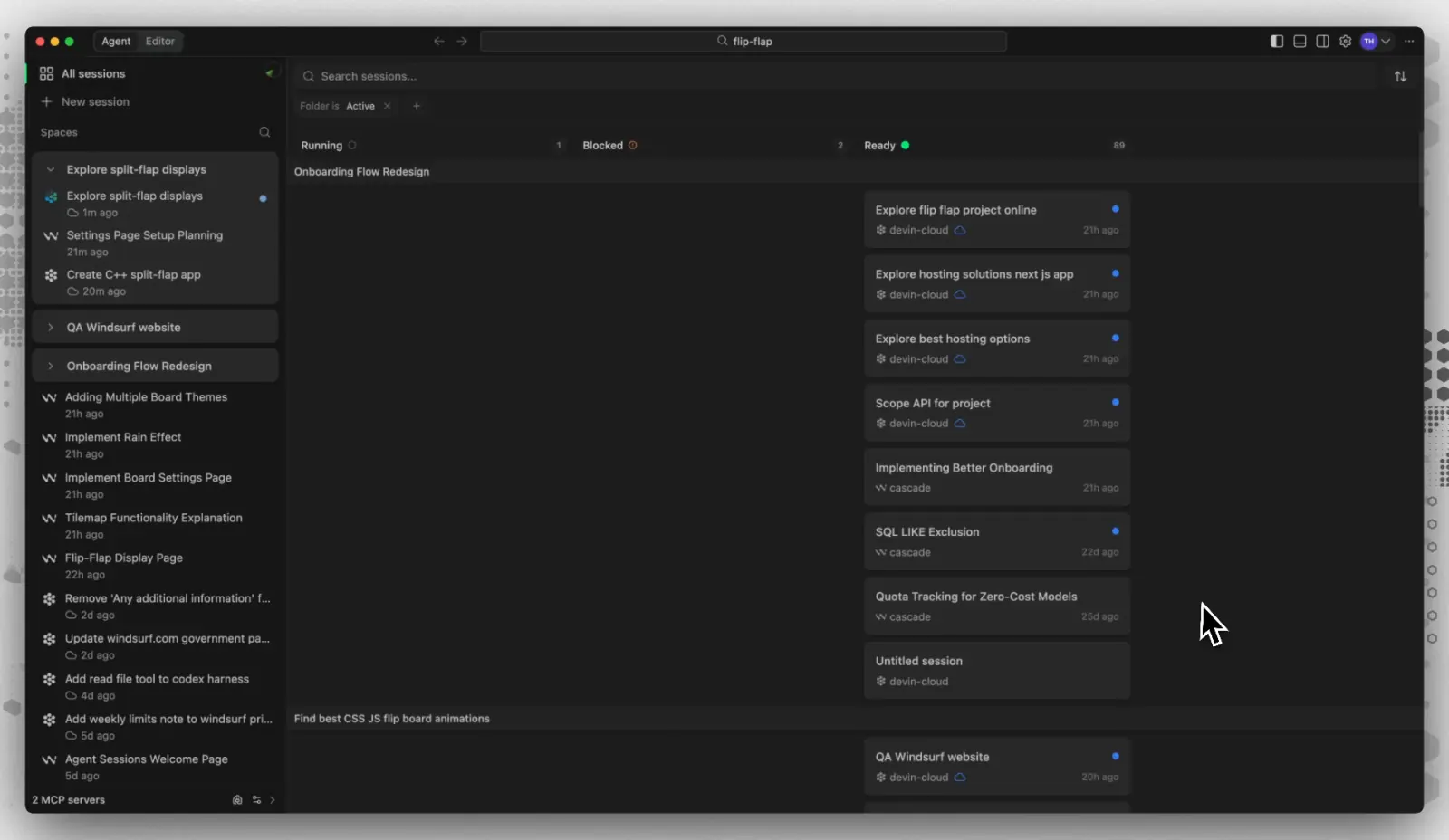
The clearest advantage over a conventional agentic editor is the command center. Local and cloud sessions appear in one Kanban-style view, while Spaces let related agents inherit project context. You can switch back to the editor for tracing, debugging, or last-mile edits.
Devin Local adds Plan and Ask modes, subagents, worktrees, rules, skills, hooks, MCP servers, and OS-level sandboxing. Permission rules can allow, ask, or deny file reads, writes, commands, HTTP fetches, and MCP tools. A .devinignore file excludes sensitive paths from indexing and agent access. Permissive rules can still give an agent broad access to a developer workstation.
For alternatives, Cursor remains the simpler editor-first comparison. OpenAI Codex is closer when local worktrees, desktop task management, and cloud delegation matter. Use the best AI coding agents guide to compare their execution boundaries and review paths.
Pricing and usage limits
Pricing checked October 4, 2026: Free is $0, Pro is $20/month, and Max is $200/month. The public pricing page lists Teams as $80/month plus $40/month per full developer seat, while the billing documentation describes an $80 minimum met by seats and credits. Confirm the actual quote before purchasing; do not assume those descriptions produce the same bill. Full seats include a Pro-equivalent quota plus Desktop access. Flex seats are free but use shared on-demand credits and do not include Desktop.
Free includes unlimited Tab completions and inline edits, limited models, and a light agent quota. Pro and Teams full seats receive daily and weekly allowances shared across Devin Desktop, CLI, and cloud sessions. Max has a larger weekly allowance without a daily cap. Cognition does not publish these allowances as fixed prompt counts: token use, model, context size, caching, and task length change consumption. After an included quota runs out, paid users can buy extra usage at the selected model’s API list price.
Privacy and operational limits
Cognition’s security documentation says customer data may be used for model training by default. Paid-plan users can opt out in Data Controls; on Teams, an administrator controls that setting. Enterprise data is not used for training without express prior written consent. When an external ACP agent runs inside Desktop, that provider’s privacy terms and billing apply instead of Devin Desktop’s.
The local/cloud distinction also matters operationally. Devin Local runs against local files and tools. Cloud sessions run separately and need repository and service access. Review both permission sets, keep secrets out of indexed paths, and use worktrees or recoverable branches for agent edits.
What users report
Community evidence is useful for workflow fit, not comparative code quality. Reddit user u/sultanmvp reported that ACP made Codex, Claude, OpenCode, and older sessions feel unified inside the Devin interface; commenters also described ACP as early and uneven across agents. In another thread, u/JoShMiQueL posted reproducible Windows renderer-crash details for Desktop 3.7.25 and said the CLI remained usable; one other commenter reported the same symptom. Two threads cannot establish prevalence, but they justify testing your target OS, extensions, repositories, and ACP agents before a team rollout.
Choose Devin Desktop when several coding agents already compete for your attention and you still want a real editor underneath the control plane. Choose a narrower IDE or CLI when one agent, predictable capacity, or minimal local overhead matters more than cross-agent coordination.
Sources & further reading
- Devin Desktop installation
- Devin ignore rules
- Cognition announcement of Devin Desktop
- Devin Desktop product page
- Devin plans and pricing
- Devin self-serve plan documentation
- Devin Desktop quota documentation
- Devin Local documentation
- Agent Command Center documentation
- Spaces documentation
- Agent Client Protocol documentation
- Cognition security and data-use documentation
- Reddit user report on ACP workflows
- Reddit user report on Windows crashes