
Tool
Litmaps
Evaluate Litmaps for citation mapping and literature monitoring by search controls, corpus gaps, Zotero workflow, plan limits, and institutional privacy.
Verdict
Choose Litmaps when you already know several relevant papers and want to steer citation discovery from that set, see the network, retain selected papers, and keep the same search alive through alerts. Its clearest paid case is not the graph alone. It is the combination of unlimited multi-paper inputs, advanced filters, configurable Monitor searches, and Zotero Sync.
Do not use it as the only search of record for a systematic review. Litmaps itself says its open-metadata catalogue has absences, delayed or missing citation links, and occasional duplicates. It discovers candidates; it does not screen studies, extract results, appraise bias, or prove coverage.
For a broader shortlist, start with Best AI Research Tools. Compare ResearchRabbit for an alternative visual discovery workflow, Semantic Scholar for direct paper search, and SciSpace when reading and interrogating full papers is the main job.
What matters for a citation-mapping tool
| Criterion | Litmaps evidence | Buying implication |
|---|---|---|
| Starting set | Free search accepts up to 20 inputs; Pro says unlimited | Useful when one seed would distort a multidisciplinary topic |
| Graph meaning | Suggestions can use citations, references, saved inputs, filters, and selectable algorithms | Inspect why a paper appeared; a visually central node is not automatically the best study |
| Corpus boundary | 270M+ records from Crossref, Semantic Scholar, and OpenAlex, using available open metadata | Missing metadata or citation links can hide eligible work |
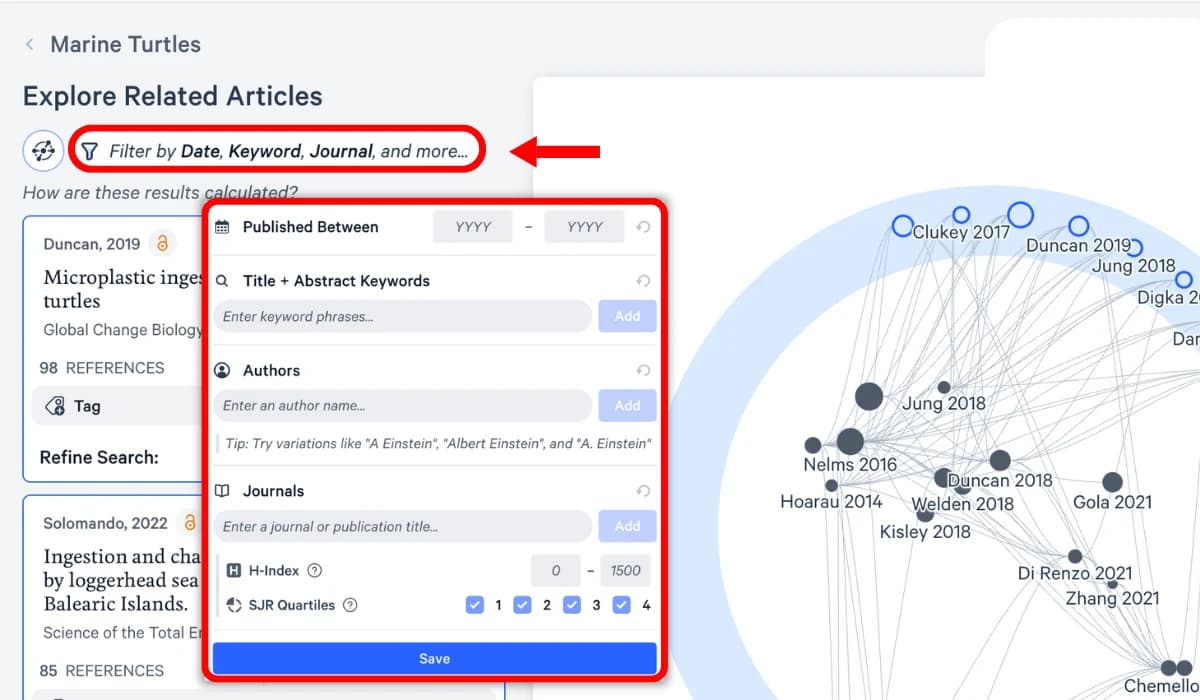
| Search control | Pro adds date, keyword, author, journal, H-index, and SJR filters | Helpful for exploration; preserve a separate reproducible database strategy for formal reviews |
| Current-awareness | All users get Monitor; Pro can change frequency, algorithm, and filters | Strong fit for a thesis, grant, or living topic that changes after the initial search |
| Handoff | BibTeX, RIS, and CSV export; Pro adds two-way Zotero collection/tag sync | Test identifiers, duplicates, tags, and deletions before moving a large library |
Discovery starts from papers, then becomes iterative
Litmaps can start from a topic search, one known paper, or an imported library. You select relevant inputs, run Explore Related Articles, save useful suggestions, and use More Like This to feed those choices into another search. That feedback loop is the product's main value: the map changes as the researcher supplies better evidence, rather than remaining a one-paper snapshot.
Pro filters include publication date, title and abstract keywords, author, journal, journal H-index, and SJR quartile. Those fields can reduce noise, but journal-level metrics are weak proxies for study quality. Evaluate the paper's methods and results separately. Litmaps also warns that citation search can inherit citation hacking, predatory publishing, and unreliable research.
The database page, checked October 26, 2026, describes 270M+ articles sourced mainly from Crossref, Semantic Scholar, and OpenAlex and updated weekly. It also states that records can be absent when open metadata is unavailable, new citation data can lag, and duplicates can survive deduplication. A large headline corpus does not establish recall for your field.
For a publishable review, run named bibliographic databases with preserved queries and dates, then use Litmaps for backward/forward chaining and gap-finding. The controlled literature-review workflow shows where mapping fits. Use the citation-verification workflow before turning any discovered paper into support for a claim.
Monitor is the strongest reason to keep a map
Monitor reruns the search behind a Litmap and emails newly added results. Free users can enable it with the default search settings; Pro users can configure frequency, algorithm, and advanced filters. This makes a map useful after initial discovery: a lab can retain a bounded topic watch instead of recreating seed selection every month.
Treat the alert as a candidate queue, not proof that every new paper was found or is relevant. The official pricing cards also conflict on cadence: one current card says weekly/configurable, another says daily/configurable, while the Help Center documents weekly or monthly settings. Verify the schedule inside the account you will buy.
Pricing: researcher rates are public; institutions need a quote
Checked October 26, 2026 in the live pricing page billing and audience selectors and Pro documentation:
| Plan | Published price | Current boundary |
|---|---|---|
| Free | $0 | Basic search, up to 20 inputs, 100 articles per map, no collaboration; the same page conflicts between one and two Litmaps |
| Pro Educational | $12.50 month-to-month or $10/month billed annually ($120/year) | Academic affiliation/email required; advanced search, unlimited inputs/articles/Litmaps, configurable alerts, Zotero Sync |
| Pro Commercial | $50 month-to-month or $40/month billed annually ($480/year) | Same published individual Pro feature set; country-based discounts may change checkout price |
| Team / institution | No public price | Team members receive Pro inside Team Workspaces; that entitlement does not extend to personal workspaces |
The Pro documentation describes Educational pricing as 75% below Commercial. Government, publicly funded research, nonprofits, multi-year buyers, and institutions are directed to sales. Ask for seat minimums, guest access, SSO, usage reporting, library-linking, renewal terms, support, and ownership/export of shared maps. Because the free-card count conflicts within the vendor's own page, use the lower one-map figure for planning until a signed-in account confirms otherwise.
Zotero is useful, but keep an export path
Pro's Zotero Sync maps Zotero collections to Litmaps tags and synchronizes added/removed articles plus edited metadata. It does not sync notes or PDFs, and renaming a tag or collection is not synchronized. Deleting the Zotero collection removes its articles from the Litmaps tag; deleting the Litmaps tag does not delete the Zotero collection.
Manual import accepts BibTeX, RIS, PubMed files, or identifiers. Export supports BibTeX, RIS, and CSV. In a 2024 r/academia post, u/Affectionate-Ad3666 said they had organized thousands of papers in Litmaps but needed duplicate handling across three searches and could not get Zotero Sync working despite support contact. In a 2024 r/PhD post, u/LilyRose878 reported repeated bulk-import errors from PubMed/RefWorks. These are dated, self-reported failures rather than current reliability measurements. They justify a pilot with a copy of a real collection plus a successful export/restore before committing the only working library.
Privacy needs an institutional addendum, not assumptions
Litmaps' privacy policy, last modified June 23, 2026, says Litmap Limited collects saved papers, maps, collections, annotations, notes, account and usage data, approximate IP-derived location, and sampled session recordings with text fields masked. It says data may be shared with subprocessors, is not sold, and may be retained as reasonably necessary; anonymized data may be used indefinitely. The public policy does not give a fixed deletion schedule or a blanket promise that research content is excluded from every model-training workflow.
ResearchRabbit now shares the Litmap Limited legal operator: its DPA names Litmap Limited as the processor, and its product documentation describes a Litmaps partnership. A Litmaps press release announced the ResearchRabbit acquisition in May 2025. That supports common ownership and some shared technology; it does not establish identical ranking behavior, account boundaries, data flows, prices, or roadmaps. Evaluate both products separately and ask an institution-wide buyer to document which service, workspace, subprocessors, retention terms, and export rights the contract covers.
Run the final decision on a real topic: import 20–50 known papers, include deliberately missing and duplicate records, compare discovery against a database gold set, inspect why recommendations appeared, test Monitor for one cycle, and round-trip the library through Zotero or BibTeX. This profile is source-based research; no independent recall, precision, sync, or alert-latency benchmark was run.
Sources & further reading
- Litmaps pricing and plan limits
- Litmaps Pro eligibility
- Database coverage
- Search workflow
- Monitor availability and configuration
- Zotero Sync behavior and boundaries
- Import formats
- Export formats
- Litmaps Teams scope
- Litmaps privacy policy
- ResearchRabbit product update describing the Litmaps partnership
- ResearchRabbit data processing addendum naming Litmap Limited
- Litmaps press release announcing the ResearchRabbit acquisition
- Community report about large-library export and Zotero Sync
- Community report about bulk import failure


