Comparison
Cursor vs Claude Code (2026)
Choose Cursor for editor-native coding, autocomplete, and model choice; choose Claude Code for Claude-native terminal, desktop, and automation workflows.
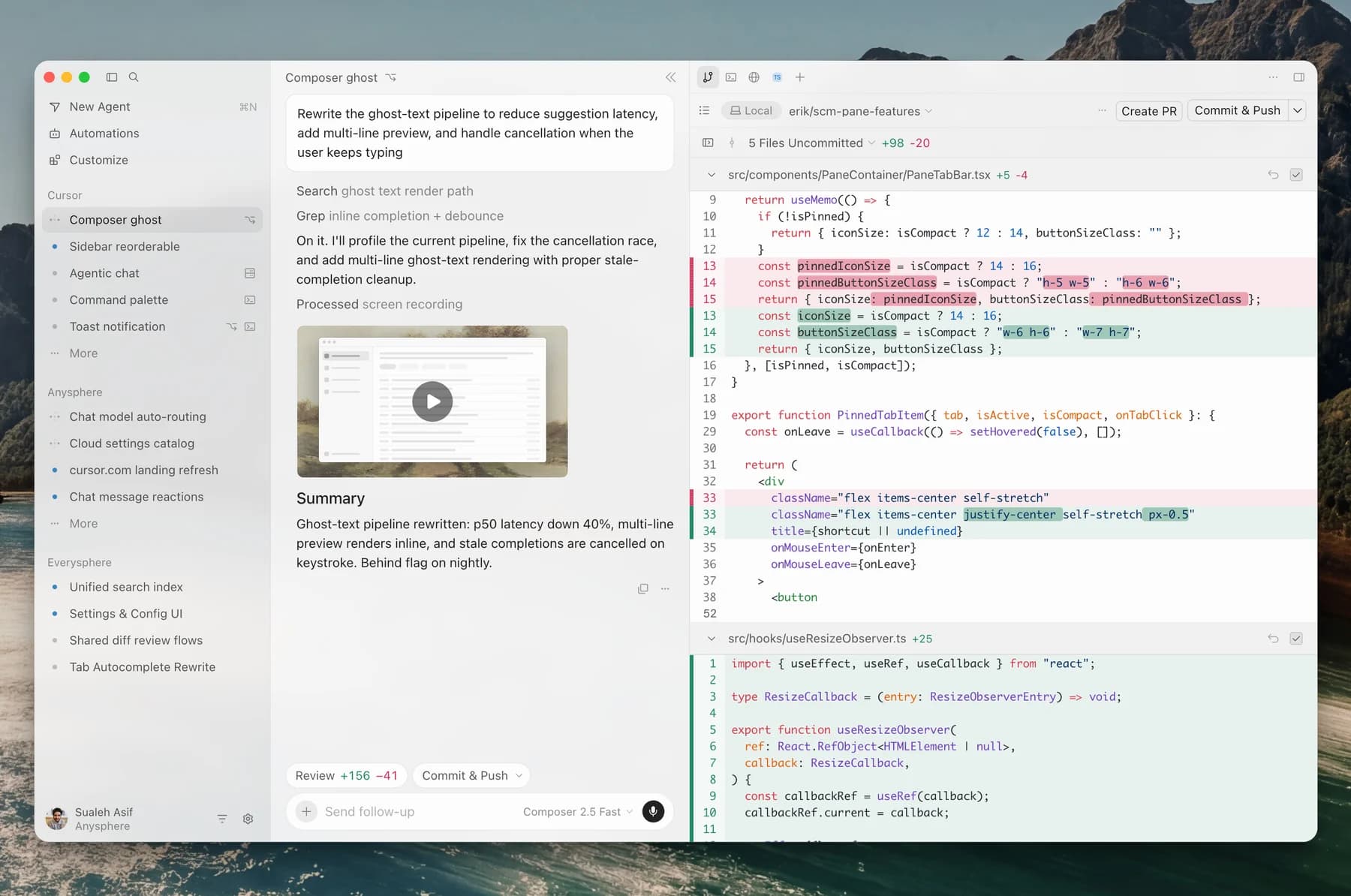
Choose Cursor when one product must combine direct editing, inline completion, visual navigation, agent changes, and model choice. Choose Claude Code when the center of gravity is delegating repository tasks through a terminal, desktop app, remote session, or CI while standardizing on Claude's agent stack. Cursor is the better single subscription when inline completion and switching model families are requirements. Claude Code is the cleaner default when an existing editor already covers manual coding and repository automation matters more.
This is not an IDE-versus-CLI decision anymore. Cursor has a CLI, headless mode, SDKs, and cloud agents. Claude Code has IDE extensions, a desktop workspace with parallel Git worktrees, visual diffs, and hosted sessions. The durable differences are inline editing, model choice, policy and automation design, and how usage is metered.
We did not run a controlled hands-on comparison. The verdict uses current product documentation and attributed community workflow reports; it does not rank model output quality.
Cursor vs Claude Code decision matrix
| Decision | Cursor | Claude Code | Better fit |
|---|---|---|---|
| Daily manual coding | Full editor, Tab completion, file navigation, Git UI, terminal, plans, and agent review | Works beside an editor or inside VS Code, JetBrains, and desktop; no Cursor-style inline completion in Claude Code Desktop | Cursor |
| Terminal and CI | Interactive CLI, print mode, cloud handoff, TypeScript and Python SDKs | CLI, print mode, Agent SDK, GitHub Actions, GitLab CI/CD, hooks, and subagents | Claude Code |
| Model choice | Cursor, Anthropic, OpenAI, Google, Meta, and other supported models | Claude models; enterprise deployment can route through Anthropic, Bedrock, Vertex AI, Foundry, or gateways | Cursor |
| Local control | Agent, Plan, and Ask modes; Auto-review or deterministic allowlist; shell sandbox and file protections | Plan, Manual/default, Accept Edits, Auto, Don't Ask, and bypass modes; allow, ask, deny rules plus sandboxing | Claude Code for policy depth |
| Parallel work | Local sessions plus Cloud Agents, API, SDK, automations, and multi-repo environments | Desktop worktrees, subagents and agent teams, remote sessions, web, and scheduled routines | Tie; test your orchestration path |
| Hosted issue-to-PR | Cloud Agent works on a branch and can open a draft PR; starts from web, IDE, CLI, API, Slack, Linear, or an issue | Web, desktop remote sessions, GitHub Actions, and CI integrations can work asynchronously and return changes | Tie; integration choice decides |
| Entry price | Hobby free; Pro $20/month | Free Claude excludes Claude Code; Pro $20 monthly or $17/month billed annually | Cursor for free trial; tie at monthly entry |
| Heavy individual tiers | Pro+ $60/month with 3x Pro Agent limits; Ultra $200/month with 20x | Max 5x $100/month; Max 20x $200/month | Workload-dependent |
| Usage meter | Monthly model-usage pools; model price changes burn rate; on-demand overage available | Rolling five-hour allowance plus weekly limits shared across Claude and Claude Code; credits continue at API rates | Workload-dependent |
| Training control | Privacy Mode prevents Cursor and model providers from training on code data | Consumer model-improvement setting controls training; commercial content is not used for training by default | Both need configuration review |
Pick Cursor for the coding loop, not only the editor
Cursor is the stronger default when you alternate between typing, selecting code, navigating symbols, accepting Tab suggestions, asking an agent to change several files, and reviewing the result in the same workspace. Claude Code can integrate with an IDE, but it does not replace Cursor's continuous completion and editor workflow.
Model choice is the second clear advantage. Cursor exposes its own models alongside supported Anthropic, OpenAI, Google, Meta, and other models. That lets a developer trade speed, price, and capability per task without changing the harness. The cost is another decision layer: model token rates determine how quickly the monthly pool is consumed, and routing can make spend less intuitive than a single-model subscription.
Cursor is also a terminal and cloud product. Its CLI supports Agent, Plan, and Ask modes, non-interactive scripts, CI, resumable sessions, and handoff to Cloud Agents. Its TypeScript and Python SDKs can run the same agent locally or in Cursor-hosted VMs. Cloud Agents can start from the editor, web, mobile, API, Slack, Linear, GitHub, or Bitbucket, work on a separate branch, and open a draft pull request.
That breadth changes the buying logic: choose Cursor because you want its visual coding loop and model portfolio, not because Claude Code lacks a UI or hosted execution.
Pick Claude Code for a Claude-native execution stack
Claude Code fits teams that already have an editor and treat the agent as a programmable repository worker. The CLI, Agent SDK, hooks, skills, subagents, agent teams, MCP, and CI integrations compose around shell and Git workflows. CLAUDE.md and AGENTS.md can carry repository instructions, while allow, ask, and deny rules plus hooks enforce narrower execution policy.
Claude Code is no longer confined to a terminal. Its desktop app can run local, remote, or SSH sessions, creates isolated Git worktrees for parallel local tasks, and includes diff, terminal, file, plan, preview, task, and subagent panels. Web sessions and routines cover hosted and scheduled work. The practical advantage is consistency: the same Claude-oriented agent model spans interactive shell work, a visual desktop, remote delegation, and automation.
The constraint is model choice. You can select among available Claude models and route enterprise traffic through supported cloud providers, but this remains a Claude product rather than a multi-model marketplace. If switching between model families is part of your debugging method, Cursor is the better fit.
Pricing and limits as of October 1, 2026
The $20 headline hides two different meters.
Cursor Hobby is free with limited Agent requests. Pro costs $20 per month, Pro+ costs $60 with 3x Pro Agent limits, and Ultra costs $200 with 20x Pro limits. Cursor's current documentation describes separate monthly pools for Cursor models and third-party models. Selected-model token rates determine consumption; Cursor does not publish one universal prompt count that applies to every model and task. When included usage runs out, paid users can enable on-demand billing or upgrade. Access to Cloud Agents comes with paid individual plans, but Cloud Agent runs are billed at the selected model's API price and require a spend limit.
Claude Pro costs $20 month-to-month or $200 annually, equivalent to $17 per month rounded on the pricing page. Max 5x costs $100 per month and Max 20x costs $200. The multiplier describes per-session capacity versus Pro, not unlimited use. Claude and Claude Code share a rolling five-hour allowance and paid plans also have weekly limits. Anthropic publishes no fixed message count because model, context, effort, tools, and task length change usage. Paid users can turn on usage credits at standard API rates after included limits.
At $20, Cursor buys the broader development surface; Claude Pro also buys the rest of the Claude consumer product. At higher tiers, do not compare “20x” labels directly. Run the same week of work and record accepted tasks, review time, model selection, resets, cloud-agent charges, and overage.
Privacy and hosted execution need separate checks
With Cursor Privacy Mode enabled, Cursor says code data is not used for training by Cursor or its model providers. AI requests still pass through Cursor's backend, even with a personal API key. Cloud Agents necessarily store more state: Cursor documents default indefinite retention for conversation state, deletion on demand, and encrypted VM snapshots retained on a rolling 90-day inactivity window. Cloud Agents auto-run commands, while network egress can be narrowed by policy.
For Claude consumer Pro and Max accounts, coding sessions may be used for model improvement only when that account setting allows it. Anthropic says enabled model-improvement data may remain in de-identified training pipelines for up to five years. Commercial Team, Enterprise, and API terms do not use customer inputs or outputs for model training by default. Local Claude Code still sends relevant prompts and code context to the configured model endpoint.
For either product, evaluate local sessions and hosted agents as different data paths. Check training settings, retention, repository access, secrets, network egress, subprocessors, deletion, and administrator enforcement rather than treating “local” as “offline.”
What experienced users report
These are workflow anecdotes, not controlled benchmarks. Hacker News user hoangnnguyen reported using both daily and said output quality converged once planning was clear; they preferred Claude Code for parallel and asynchronous delegation, and Cursor for reading plans and diffs during focused work.
On Cursor's community forum, longtime Cursor user Alexandros compared Cursor's Agents interface with Claude Code Desktop. They favored Claude's background-task management, multi-worktree handling, and simpler model choice, while favoring Cursor for code navigation, plan interaction, diff inspection, and in-product pull-request handling. The report covers one user's setup and a week with Claude Desktop; it supports the workflow split, not a general quality ranking.
Final choice
- Pick Cursor when autocomplete, direct editing, visual code navigation, multiple model families, and an integrated review loop all matter every day.
- Pick Claude Code when you want Claude across terminal, desktop, remote, and CI workflows, with repository policy and automation as first-class concerns.
- Keep both only when the split is intentional: Cursor for manual and visual work, Claude Code for delegated runs. Otherwise, overlapping $20 subscriptions usually buy duplicate agent capability.
Use the AI coding agents guide for the wider shortlist. Then run both finalists through the same issue-to-PR workflow. If your decision is between terminal-oriented agents, compare Claude Code and Codex next.
Sources & further reading
- Cursor documentation
- Cursor pricing
- Cursor models and usage pools
- Cursor CLI
- Cursor Cloud Agents
- Cursor local run modes
- Cursor data use and privacy
- Cursor Cloud Agent security
- Claude pricing
- Claude Code overview
- Claude Code desktop
- Claude Code permissions
- Claude Code enterprise deployment
- Claude Code data usage
- Claude Code subscription usage
- Claude Max plan limits
- Anthropic consumer retention
- Hacker News workflow comparison
- Cursor community desktop comparison


Ordered for comparison, not as a universal ranking. Inclusion requires a direct fit with this page's stated workflow.